
Question paper builder — make, print and save as PDF
Build an exam's question paper from your question bank with sections, marks and OR choices, then print it or save it as PDF, with or without the answer key.
The question paper builder turns one paper of an exam's datesheet into a printable question paper. You draw questions from the question bank, arrange them in sections, and print or save the paper as a PDF — with or without answers.
#Steps to build a question paper
- Create the exam and add the paper to its datesheet. See Exams and marks.
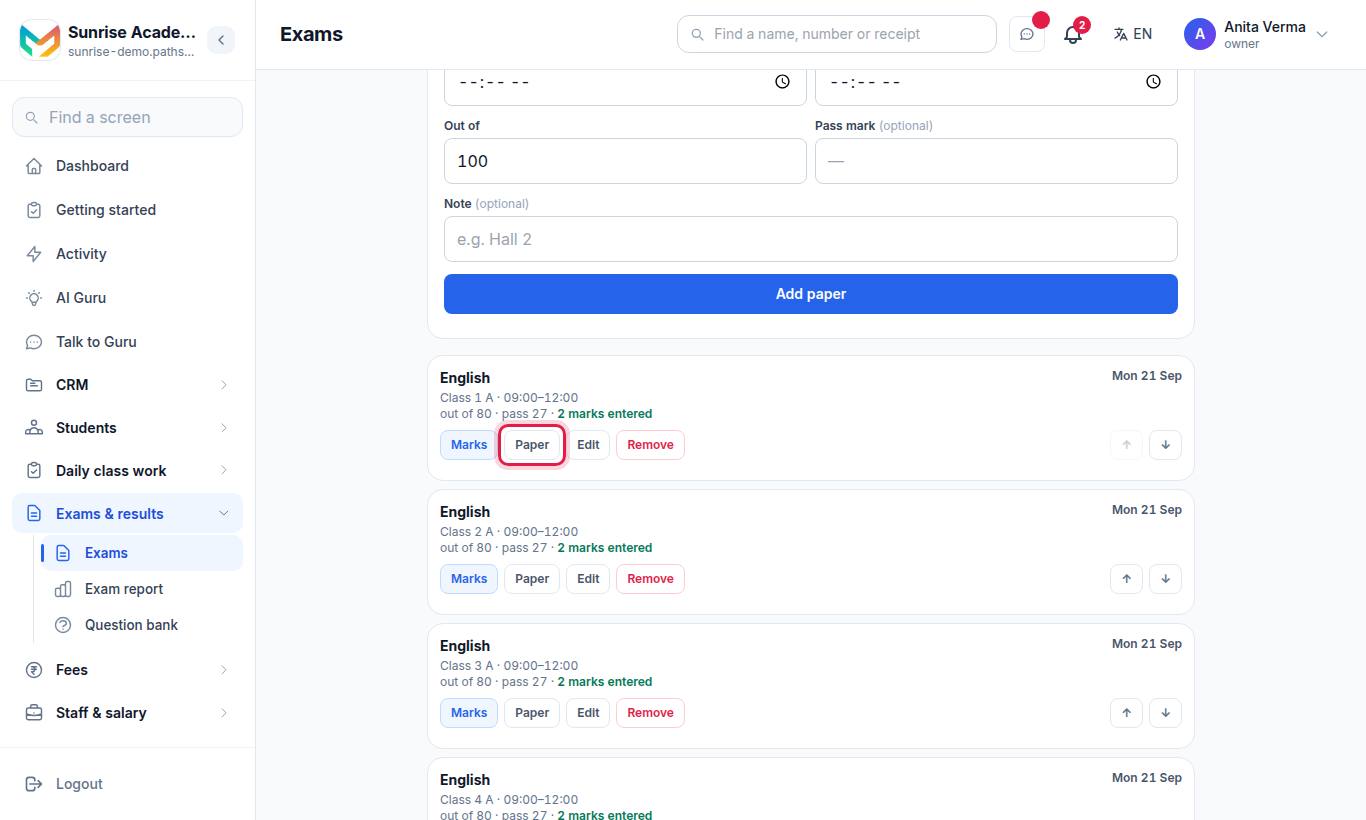
- On the paper, press Paper. The Question paper screen opens.
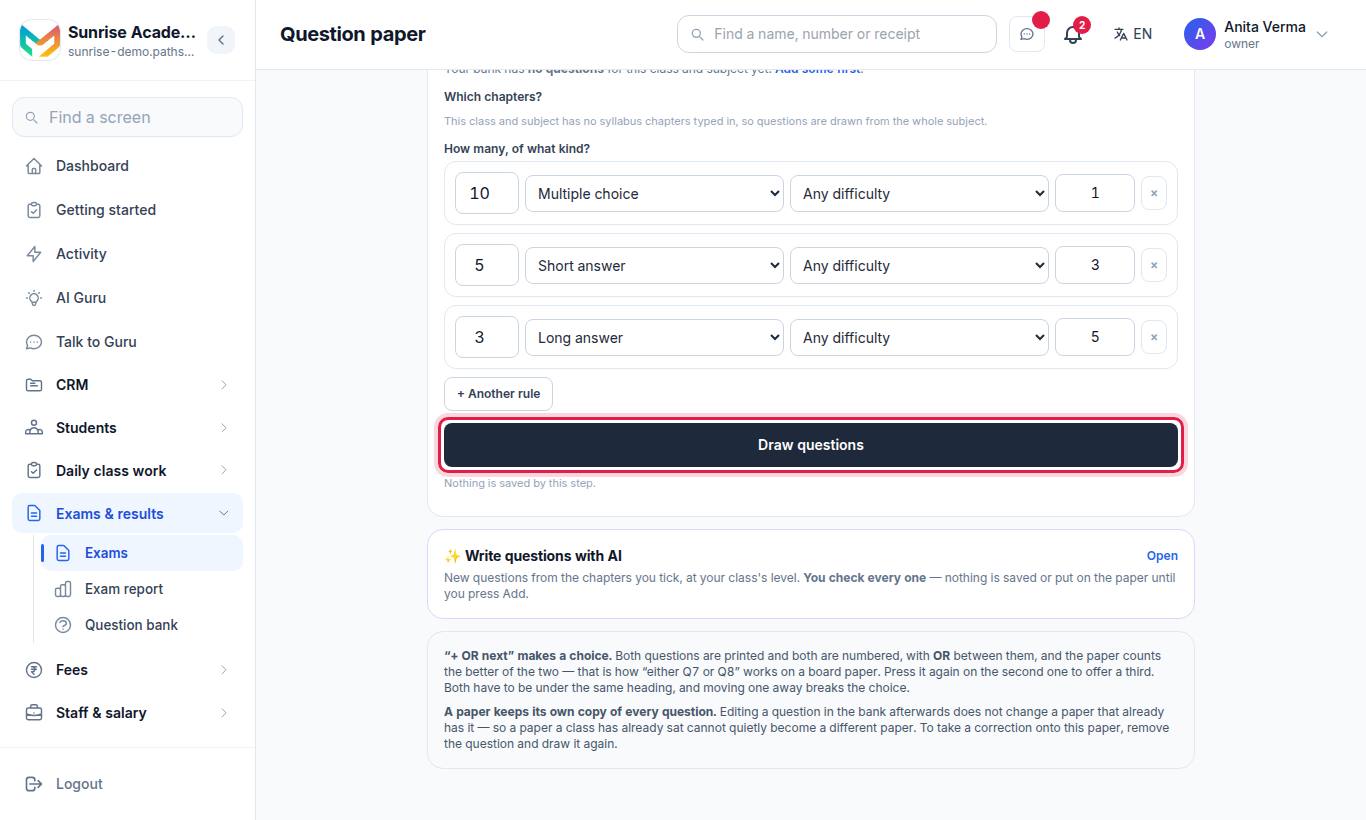
- Under Draw from the question bank, tick Which chapters? and set How many, of what kind? (add more with + Another rule). Choose Put them in (a section).
- Press Draw questions. Nothing is saved by this step — look at This is what it found.
- Press Add to the paper.
- Add headings with + Add a section. A section can have instructions, an "attempt any" rule and Marks each.
- Press Save as PDF or Print.
#Options on the paper
| Option | What it does |
|---|---|
| Or start from another paper › Copy that whole paper | Copies every question with its sections, marks and "attempt any" rules |
| Copy the shape of another paper › Copy these headings | Copies only the section headings and rules, not the questions |
| Marks each (on a section) | Sets every question in that section to that value |
| + OR next | Makes an "either / or" choice between two questions |
| Print with answers | Prints the answer key |
| Start again | Clears the paper |
Removing a section keeps its questions; they go back to the top of the paper under no heading. An empty section is not printed.
#Write questions with AI (Pro)
On the paper, open ✨ Write questions with AI:
- Choose From the syllabus chapters (tick Which chapters?) or From the book (PDF pages) (choose Which PDF (from Study material), From page and To page — about 15 pages at a time; a scanned book cannot be read).
- Choose Kind (MCQ, Short answer, Long answer, Match the column), How many, Marks each, Difficulty (A mix, Easy, Medium, Hard) and Language (English or Hindi).
- Press Write questions.
- Check every question. Choose Put them in and press Add to the bank and to this paper.
The questions you keep are saved in your question bank with your name as the author. Nothing is saved until you press Add. See AI in academics.
#The whole exam in one PDF
On the exam's datesheet, Save all papers as one PDF puts every paper of the exam in one file, and "…or the answer keys, in one file" does the same for the keys.
#Who can use the paper builder?
| Task | Who |
|---|---|
| See and print a paper | Owner, Admin, Staff |
| Build a paper, draw questions, use AI | Owner, Admin, Staff (setting the paper is the subject teacher's job) |
Plan: MJX Academic Pro (the paper builder is part of the question bank). AI writing is also Pro.
#Troubleshooting
| You see | What to do |
|---|---|
| "There are no questions on this paper yet." | Draw questions from your bank first. |
| "No PDF: … uses a character which the PDF fonts do not carry. Print works." | Use Print instead; your browser has the font. |
| A question in the bank was corrected but the paper still shows the old one | Remove it from the paper and draw it again. |
#Questions people ask
Can I copy last year's paper?
Yes. Use Or start from another paper and press Copy that whole paper. The paper you copy from is not touched.
If I correct a question in the bank, does the paper change?
No. A paper keeps its own copy of every question. Remove the question and draw it again to take the correction.
How do I give "either Q7 or Q8"?
Press + OR next on the first question. Both are printed with OR between them and the paper counts the better of the two.
Can I print the answer key?
Yes. Press Print with answers. It is marked "ANSWER KEY — NOT FOR STUDENTS".
Which plan do I need?
MJX Academic Pro.