
Refund or cancel a fee payment
Give back all or part of a fee payment, or cancel a receipt taken by mistake, and see how Pathshala updates the bill and the day-book.
In Pathshala you can reverse a fee payment in two ways: refund it, when money that really came in is being given back, or cancel it, when the receipt should never have been made. Both need a reason, both update the bill straight away, and both are kept in the history for audit.
#Refund or cancel — which one?
| Refund | Cancel | |
|---|---|---|
| Use when | Money came in and you are giving some or all of it back | The receipt was a mistake: wrong student, wrong bill, entered twice |
| Amount | Full or part of the payment | Always the whole payment |
| Payment afterwards | Stays Completed after a part refund; becomes Refunded after a full refund | Becomes Cancelled |
| Gets its own number | Yes, a refund number such as REF-26-00004 | No |
| In the day-book | The original payment still counts on its day; the refund counts as money out on the day it was given back | The payment no longer counts as collected |
| Who | Owner, or a role with Manage Refunds | Owner, Admin, or a role with Cancel a Payment |
| Plan | MJX Fees Management Basic and above | Every plan |
#How to refund a fee payment
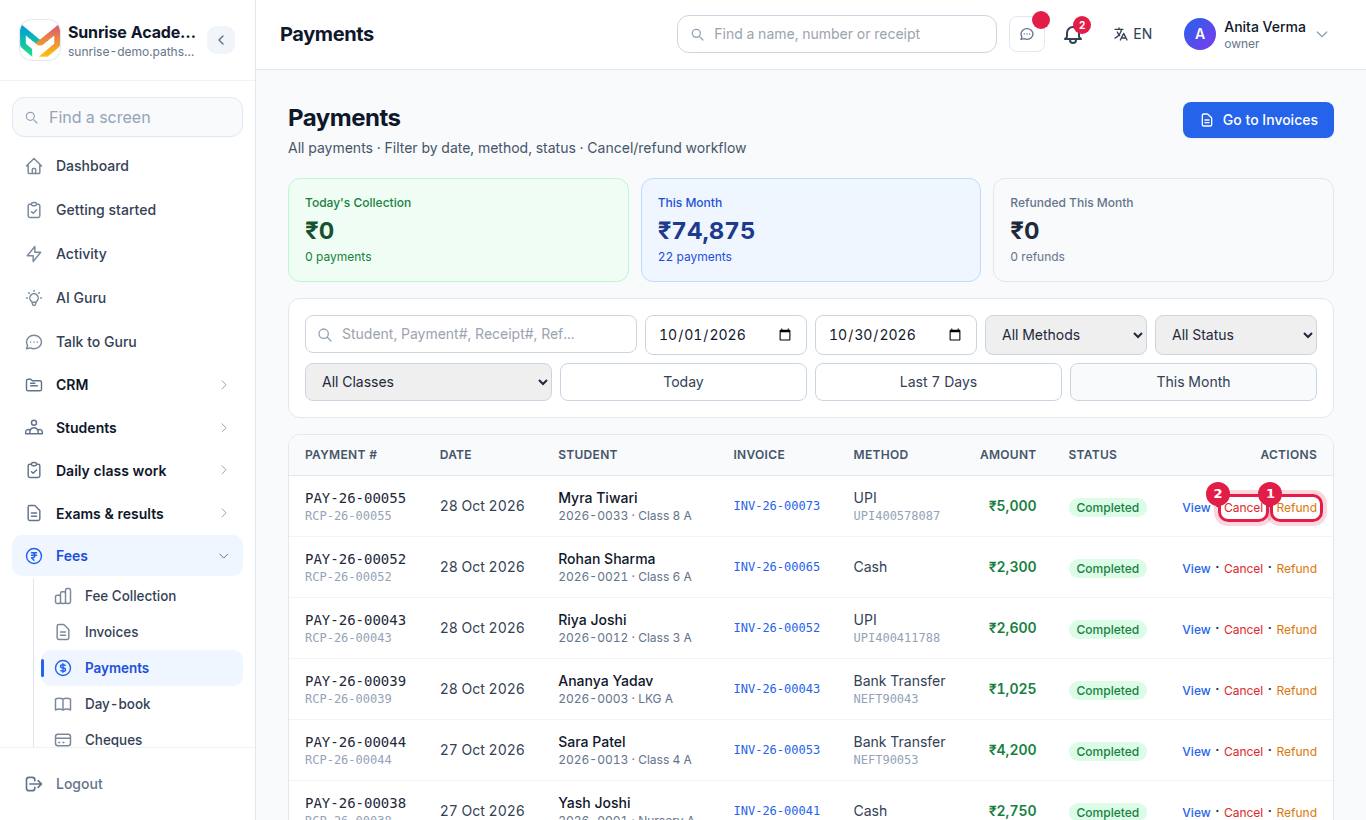
- Open Apps › Fees › Payments. Find the payment using search (student, payment number, receipt number or reference) and the date filters.
- On the row, press Refund. It only appears on Completed payments.
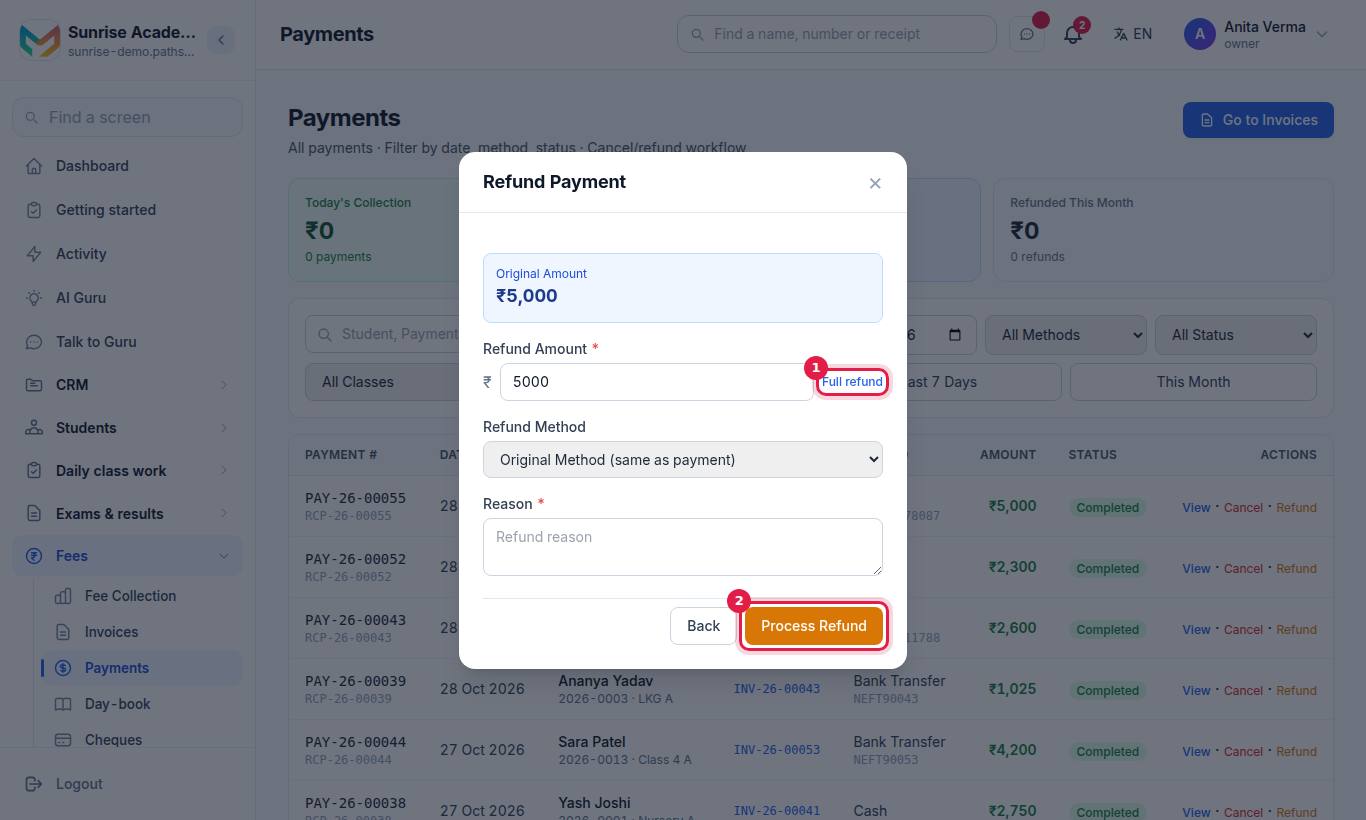
- Check Original Amount.
- Type the Refund Amount, or press Full refund to fill in the whole amount.
- Choose Refund Method: Original Method (same as payment), Cash or Bank Transfer.
- Type the Reason. It is required and stays in the audit trail.
- Press Process Refund.
#Partial refunds
- You can refund less than the payment, and refund the same payment again later.
- The total refunded can never be more than the payment. If you try, Pathshala tells you how much is still available to refund and how much was already refunded.
- When the refunds add up to the whole payment, the payment's status changes to Refunded.
#How to cancel a payment
- Open Apps › Fees › Payments and find the payment.
- Press Cancel on the row.
- Read the warning: the payment becomes cancelled, the bill's balance and status are worked out again, and this cannot be undone.
- Type the Reason (required).
- Press Cancel Payment. Press Back to leave without cancelling.
You cannot cancel a payment that was already refunded, or a cheque that bounced — a bounced cheque has already reopened the bill.
#What happens to the bill?
Pathshala works the bill out again from what is left: payments received minus refunds. So after a refund or cancel the bill becomes:
- Paid — if what is left still covers the total;
- Partial — if some money is still counted;
- Pending — if nothing is left and the due date is ahead;
- Overdue — if nothing (or only part) is left and the due date has passed.
The family will then show in your dues lists and fee reminders again for what they owe.
#Where to see refunds afterwards
| Place | What it shows |
|---|---|
| Payments | Status chips Refunded and Cancelled; the Refunded This Month tile; Status filter with Cancelled and Refunded |
| Invoices › open a bill | Transaction History with each PAYMENT and REFUND line, the refund number, "Via" the refund method, the original payment number and the reason; a fully refunded payment is marked Fully Refunded |
| Fee Collection dashboard | "Collected today" and "This month" are shown after refunds ("kept"), with "received − refunded" underneath |
| Day-book | Money in, Refunded, and the difference. A refund counts on the day it was paid back, and is credited to the person who processed it |
#Who can refund or cancel?
| Action | Default | Permission to give it to another role |
|---|---|---|
| Refund | Owner only | Manage Refunds (included in the Accountant role) |
| Cancel a payment | Owner and Admin | Cancel a Payment |
The Cashier role can do neither — a cashier takes money but cannot give it back or change what a family owes. Set roles under Sidebar › Settings › People & roles › Roles & permissions.
Refunds need MJX Fees Management Basic or higher. Cancelling a payment works on every plan, including Forever Free.
#Course refunds are separate
If you sell online courses with MJX LMS, a course buyer's refund is handled under Apps › MJX Learn › Refunds, not here. This page is about fee bills.
#Tips
- Always write a reason someone else can understand in six months: "Duplicate entry — same cash counted twice on 3 Oct", not "mistake".
- Use Cancel the same day you spot a wrong receipt. Use Refund when the family actually gets money back.
- After a refund made through your gateway, keep the gateway's refund ID in the reason. It makes the bank match easy.
#Questions people ask
What is the difference between cancelling and refunding a payment?
Cancel is for a receipt that should never have been made, such as a wrong student or a double entry. Refund is for money that really came in and is now being given back.
Does a refund in Pathshala send money back through Razorpay or PhonePe?
No. Pathshala records the refund. You return the money yourself, from your gateway dashboard, in cash or by bank transfer.
Can I refund only part of a payment?
Yes. Type a smaller amount. You can refund the same payment more than once until the full amount has been returned.
Who can refund a payment?
The owner, and anyone whose role has Manage Refunds (the Accountant role does). Admins can cancel but cannot refund unless given that permission.
Can I undo a cancel or a refund?
No. Both are final. If you made a mistake, record the payment again.