
Choosing modules and products in Pathshala
How Pathshala products are switched on — the 14-day trial, the Forever Free plan, Basic and Pro, MJX ONE, bundles, and the Add a module page.
In Pathshala a module (or product) is one part of the platform you switch on and pay for on its own — for example MJX Fees Management, MJX CRM or MJX Payroll. Each one has a Forever Free edition and paid Basic and Pro plans, and every new account starts with a 14-day free trial of the products it signed up for.
#Which products can I switch on?
These products have real screens behind them today and are listed as Live on Pricing:
| Product | What it does |
|---|---|
| MJX CRM | Capture and manage leads with AI-powered WhatsApp |
| MJX Academic | Classes, subjects, timetable, homework and exams |
| MJX Fees Management | Fee structure, invoices, payments, reminders |
| MJX Library | Seats, fees and books — in one app |
| MJX WhatsApp Automation | WhatsApp that answers for you |
| MJX LMS | Sell a course on WhatsApp. Payment unlocks it. |
| MJX HR | Your staff, on the record |
| MJX Payroll | Salaries computed, payslips sent |
| MJX Hire | Post a job. Hire the right person. |
| MJX Attendance | The register, on a phone, in thirty seconds |
Coming soon: MJX Hostel and MJX Transport. They show No price yet and a Join the waitlist form on the pricing page.
Extras such as Your own WhatsApp number (messages go out in your name, not on the shared MJX number) and MJX Full Branding (your own web address and your own app on the Play Store) are added on top. See Branding and custom domain.
#How the plan levels work
Sign up ─► 14-day free trial (every feature) ─► Forever Free (small limits)
                                                    │
                                    upgrade any time ▼
                                     Basic ─► Pro   (per product)
or MJX ONE Basic / Standard / Pro (everything)- Free trial — 14 days of every feature of the products you chose. No card.
- Forever Free — never locked, nothing deleted, with small limits and the MJX look. See the limits.
- Basic and Pro — paid plans for each product. Each product's page on Products lists what its Basic and Pro include.
- MJX ONE Basic, Standard or Pro — one plan that takes every MJX product at that level.
- Bundles — products institutes ask for together, at one price. Example: MJX People Plus Basic = MJX HR, MJX Payroll, MJX Hire and MJX Attendance.
#Choosing products at sign-up
- From a product's own page, press Start free trial. The sign-up page then shows You are signing up for with only those modules switched on. You can tick Add another module (optional) and choose Monthly or Yearly.
- From the plain sign-up page, the Free trial card is selected by default. Press Only want one module? Pick it from the catalogue → to choose just one.
#How to add a product later
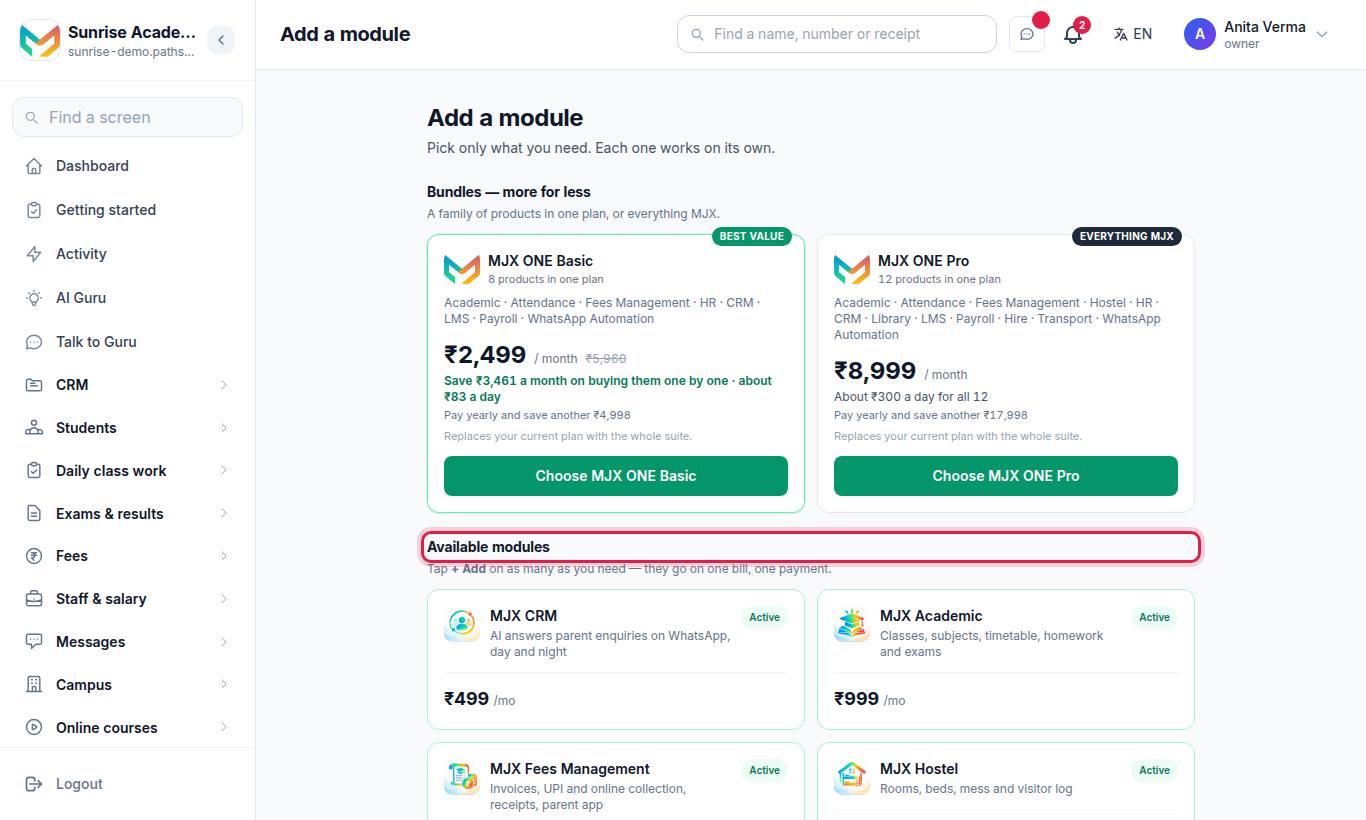
- Press Apps (top left) and look under Add products. Every product you do not have, and could use, is listed with a padlock (Not in your plan) and its monthly price.
- Press a product. The page says {Product} is not part of {your plan}, with the price, the cost per day and the yearly saving.
- Press Upgrade — pay online. Or press Questions? WhatsApp us.
- On Your products, choose Monthly or Yearly and press Pay.
You can also open Add a module directly at /upgrade: "Pick only what you need. Each one works on its own." Press + Add on each product you want, check the basket (N selected · ₹… / month), and press Pay online →. Products you already have show Active.
#When a feature is on a higher plan
Sometimes you have the product but not a feature inside it. Pressing it opens a page that says {Feature} is not part of {your plan} and "Part of {Module}, which you already have." It tells you which plan has it (for example "… is in MJX CRM Pro.") with Upgrade — pay online, Ask MJX for … and See plans.
#Can I drop a product?
Yes. Modules switch on and off one by one. Dropping one takes effect at the end of the month you have already paid for. To drop a product, contact MJX support.
#Who can choose products?
The Owner and Admin pay for products. When paying online is not offered — for other staff, and for the whole-suite MJX ONE plans — the page shows Talk to us on WhatsApp and See plans instead of a pay button.
#Related
#Questions people ask
Can I start with just one module?
Yes. Every product is sold on its own. Start with the one you need now and add the next later from the Add a module page.
How fast does a new module switch on?
As soon as the payment goes through. Adding a module takes effect immediately.
What happens if I drop a module?
Dropping a module takes effect at the end of the month you have already paid for.
Why does a product show a padlock in my menu?
It is a product you do not have yet. The padlock means "Not in your plan". Open it to see the price and switch it on.
Why can I not buy Hostel or Transport?
They are marked Coming soon. They have no price and cannot be bought yet — the pricing page takes a waitlist instead.