
Lead webhooks — send leads in and get events out
Post leads to a /hooks/lead address with no key, turn missed calls into leads, and receive signed lead.created and lead.status_changed webhooks.
MJX CRM has two kinds of webhooks. Lead sources are addresses you post leads to. Outgoing webhooks are calls we make to your server when something happens to a lead. This page covers both.
#Part 1 — Lead sources: post leads in
A lead source is a private address made on the Integrations page. The token in the address is the credential, so there is no key and no login. Each source counts its hits and the leads it made.
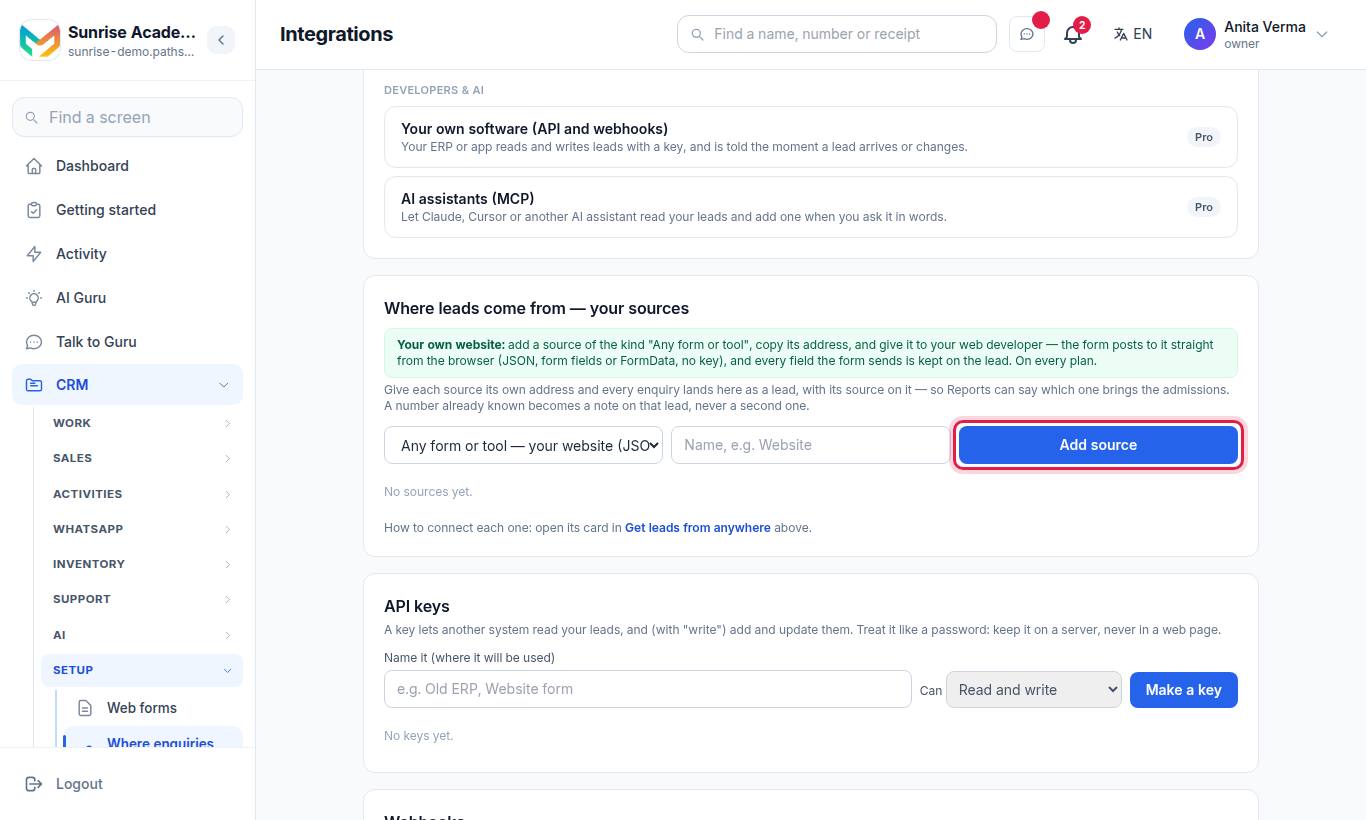
(For a business the menu says Where leads come from.)
#How to make a lead source
- Sign in as the Owner or an Admin.
- In Where leads come from — your sources, pick the kind in the list.
- Type a name, for example "Website".
- Press Add source.
- Press Copy next to the address that appears.
| Kind (as listed) | Address | Plan |
|---|---|---|
| Any form or tool — your website (JSON / form fields) | /hooks/lead/<token> | Every plan |
| IndiaMART (Push API) | /hooks/lead/<token> | Pro |
| JustDial (lead URL) | /hooks/lead/<token> | Pro |
| Meta lead ads (Facebook / Instagram) | /hooks/lead/<token> | Pro |
| LinkedIn lead gen forms (Make / Zapier) | /hooks/lead/<token> | Pro |
| Google Ads lead forms | /hooks/lead/<token> | Pro |
| Missed call → lead (a Plivo number) | /hooks/call/<token> | Pro |
An institute can have up to 20 lead sources. The full address is shown on the source row; it looks like https://pathshala.mjxtechnologies.com/hooks/lead/9f8e… (the token is 40 letters and digits).
#Posting to a generic source ("Any form or tool")
Send POST (or GET with query fields) to the address as:
- JSON (
Content-Type: application/json), - form fields (
application/x-www-form-urlencoded), or multipart/form-data(FormData). Any file in it is dropped.
A browser on any website may call it — CORS is open for /hooks/lead/ and /hooks/call/, with no cookies. Limits: 256 KB body; for FormData, 80 fields of up to 20 KB each.
fetch("https://pathshala.mjxtechnologies.com/hooks/lead/<token>", {
  method: "POST",
  headers: { "Content-Type": "application/json" },
  body: JSON.stringify({ name: "Meena Iyer", phone: "98XXXXXX32", email: "meena@example.com",
                         message: "Admission for Class 6", source: "website" })
});curl -X POST "https://pathshala.mjxtechnologies.com/hooks/lead/<token>" \
-d "full_name=Meena Iyer" -d "mobile=98XXXXXX32" -d "requirement=Admission for Class 6"Field names do not need to match ours. We read name / full_name / your_name, phone / mobile / whatsapp, email, message / requirement / comments, company, service, budget, city, class / course / grade, booking reference, type, from, to, tags, source, page_url and many other spellings. Nested data, fields, lead or answers objects are opened up. Anything we do not recognise is kept on the lead as Additional details (up to 30 fields). A field named cf_<name> fills that custom field.
A phone number or an email is required.
#Answers from a lead source
| Status | Body | When |
|---|---|---|
| 201 | {"success":true,"data":{"id":"…","duplicate":false}} | A new lead was made |
| 200 | {"success":true,"data":{"id":"…","duplicate":true}} | The number (or email) is known — a note "Enquired again via …" was added to that lead |
| 400 | A phone number or an email is required. | Neither was sent |
| 402 | IndiaMART, JustDial, Facebook & Instagram, LinkedIn, Google Ads and missed-call sources come with MJX CRM Pro. … | A Pro kind on a plan without Pro |
| 403 | The key does not match this lead source. … | Google Ads only: wrong google_key |
| 404 | No such lead source. | Wrong token, or the source was removed |
| 410 | This lead source is switched off. | The owner pressed Switch off |
| 422 | A sentence | Anything else that went wrong |
Errors use the {"success":false,"error":{"message":"…"}} envelope. The last problem is also shown on the source row as "Last problem: …".
#What the special kinds read
| Kind | What it expects |
|---|---|
| IndiaMART | IndiaMART's Push API body (a RESPONSE object with SENDER_NAME, SENDER_MOBILE, SENDER_EMAIL, SUBJECT, QUERY_MESSAGE, QUERY_PRODUCT_NAME, SENDER_CITY, UNIQUE_QUERY_ID, SENDER_COMPANY). Source indiamart. |
| JustDial | JustDial's lead URL fields: name, mobile, email, city, category, area, leadid. Source justdial. |
| Meta lead ads (set up by hand) | GET with hub.mode=subscribe, hub.verify_token, hub.challenge (we answer the challenge when the verify token matches the one on the source row), then Meta's leadgen POST. We fetch each lead from Meta with the page access token you saved on the source. Answers EVENT_RECEIVED. Source meta_ads. |
Flat keys from Make / Zapier (firstName, lastName, emailAddress, phoneNumber, companyName, jobTitle), an answers list of question/answer pairs, or a Lead Sync leadGenFormResponse. Source linkedin. | |
| Google Ads | Google's lead form webhook body (lead_id, form_id, campaign_id, google_key, is_test, gcl_id, user_column_data). google_key must equal the Key for Google Ads shown on the source. Source google_ads. |
Set-up steps for each are in Lead connectors setup.
#Missed call → lead (/hooks/call/<token>)
Use this as the Answer URL of a Plivo application on your Plivo number. When someone calls:
- We answer with Plivo XML: the caller hears your greeting (in Indian English) and the call ends.
- The caller's number becomes a lead (source
missed_call), or a note on their existing lead. - A high-priority task "Call back … — they called and the line was not answered" is made for the owner (or an admin), due in 30 minutes.
- The call is logged as an inbound, unanswered call.
The default greeting is "Thank you for calling <your name>. We will call you back shortly." You can change it when adding the source (up to 300 characters).
#Part 2 — Outgoing webhooks: we call your server
When a lead is created or its status changes, we POST to your https:// address. Needs MJX CRM Pro.
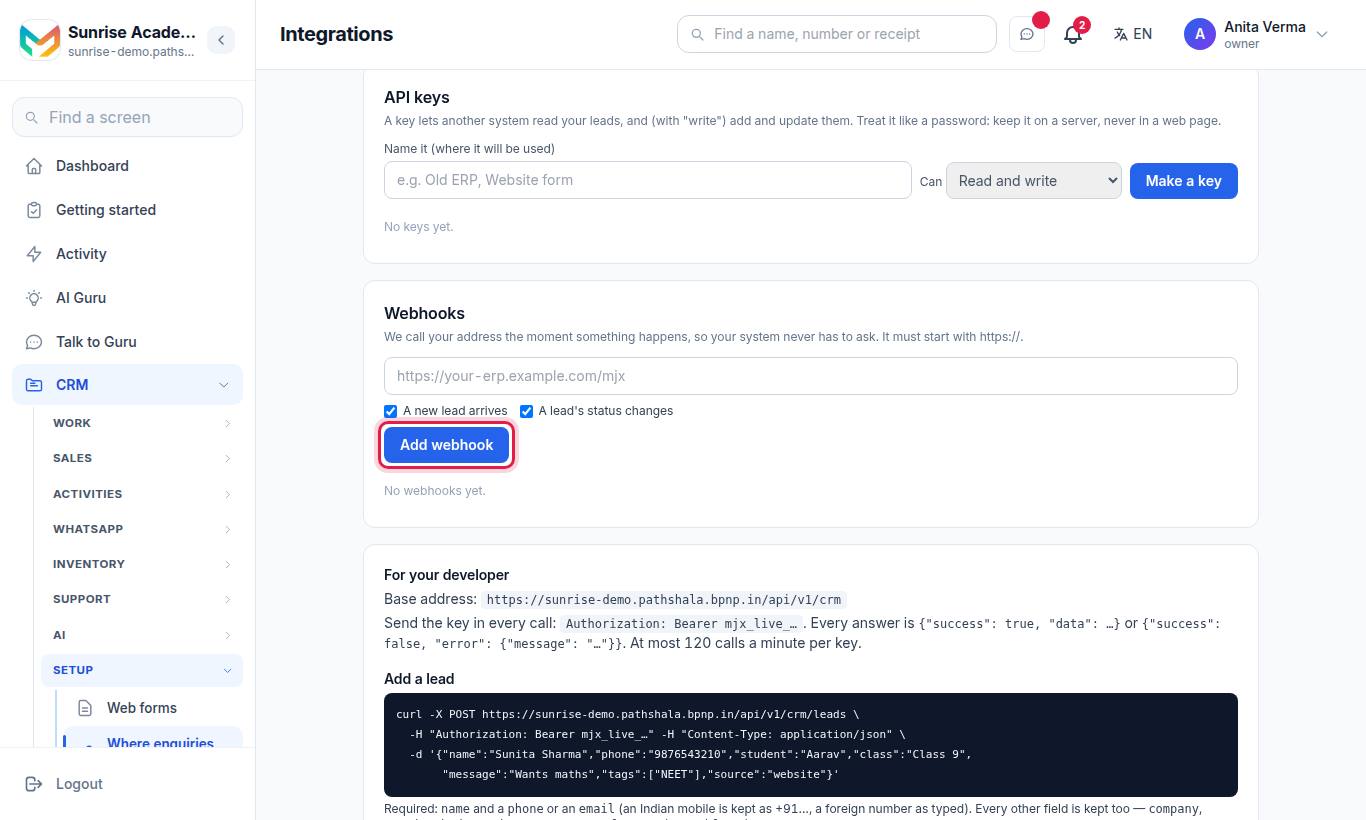
#How to add a webhook
- Type your address in the box (it must start with
https://). - Tick the events: A new lead arrives (
lead.created) and/or A lead's status changes (lead.status_changed). - Press Add webhook.
- Copy the signing secret (
whsec_…) — "copy it now; it will not be shown again." Press I have copied it. - Press Send a test to send a
ping.
Each webhook row has Send a test, Recent calls (the last 20 deliveries), Turn on again (when it is off) and Delete. An institute can have up to 10 webhooks.
#Address rules
- Must be
https://on port 443, with no user name or password in it. - Must be on the public internet:
localhost,.local,.internal, and private, loopback, link-local or cloud-metadata addresses are refused, both when you add it and every time we send. - Up to 500 characters.
#What we send
POST https://your-erp.example.com/mjx
Content-Type: application/json
User-Agent: MJX-CRM-Webhooks/1
X-MJX-Event: lead.created
X-MJX-Delivery: 7f1c2a9e-3b4d-4c5e-8f6a-1b2c3d4e5f60
X-MJX-Timestamp: 1793162400
X-MJX-Signature: sha256=5d2c…{
"event": "lead.created",
"delivery": "7f1c2a9e-3b4d-4c5e-8f6a-1b2c3d4e5f60",
"created_at": "2026-10-28T05:30:00.000Z",
"data": {
"lead": {
"id": "3f2b9c1e-6a4d-4f8e-9b7a-2c1d0e5f6a7b",
"name": "Sunita Sharma",
"phone": "+9198XXXXXX10",
"status": "new",
"tags": [],
"…": "the full lead object"
}
}
}| Event | When | Extra in data |
|---|---|---|
lead.created | Any new lead — the public form, a lead source, a connector, the API, the MCP server, or one typed in by staff | — |
lead.status_changed | The status really changes (not when it is saved unchanged) | previous_status |
ping | You pressed Send a test | message instead of lead |
The lead is the same object as in the API reference.
#Check the signature
The signature is sha256= + the hex HMAC-SHA256 of <X-MJX-Timestamp>.<raw body> using your signing secret. Use the raw body exactly as received.
// Node.js (Express): keep the raw body, e.g. express.json({ verify: (req, res, buf) => { req.rawBody = buf; } })
const crypto = require('crypto');
const expected = 'sha256=' + crypto.createHmac('sha256', process.env.MJX_WEBHOOK_SECRET)
  .update(req.headers['x-mjx-timestamp'] + '.' + req.rawBody).digest('hex');
const got = req.headers['x-mjx-signature'] || '';
const genuine = got.length === expected.length &&
crypto.timingSafeEqual(Buffer.from(expected), Buffer.from(got));import hmac, hashlib
expected = "sha256=" + hmac.new(secret.encode(), (timestamp + "." + raw_body).encode(), hashlib.sha256).hexdigest()
genuine = hmac.compare_digest(expected, signature_header)#Retries and switching off
| Rule | Value |
|---|---|
| Success | Any 2xx answer within 5 seconds |
| Retry | One retry, a minute later, with the same X-MJX-Delivery |
| Switch-off | After 20 failures in a row the webhook turns itself off ("Off after 20 failures in a row") |
| Turn back on | Turn on again — this also resets the failure count |
| History kept | The last 50 deliveries per webhook; Recent calls shows 20 |
Calls are sent in the background, so a slow server never slows down the CRM.
#Zapier and Make
- Leads in: use their "Webhooks / HTTP request" step and
POSTto/api/v1/crm/leadswith your API key — or, with no key, to a generic lead source address. - Leads out: make a "Catch hook" there and paste its
https://address as a webhook here.
#Questions people ask
Do I need an API key to post a website form to the CRM?
No. A lead source address carries its own secret token. Post the form to it from the browser or your server, with no key.
What happens if the same person fills the form twice?
No second lead is made. The existing lead gets a note "Enquired again via …", and the answer says duplicate true.
How do I check that a webhook call really came from MJX?
Compute HMAC-SHA256 of the timestamp, a dot and the raw body with your signing secret, and compare it with the X-MJX-Signature header.
Why did my webhook turn itself off?
After 20 failed calls in a row it switches off. Fix your endpoint, then press "Turn on again" on the Integrations page.