
MJX CRM MCP server — connect Claude, Cursor and other AI assistants
Connect an AI assistant to MJX CRM over MCP: the address, the API key, setup for Claude Desktop, Claude Code, Cursor and the Claude API, and every tool.
The MJX CRM MCP server lets an AI assistant read your leads and, with a write key, add and update them when you ask in plain words. It speaks the Model Context Protocol (MCP) over Streamable HTTP and uses the same API key and rules as the REST API.
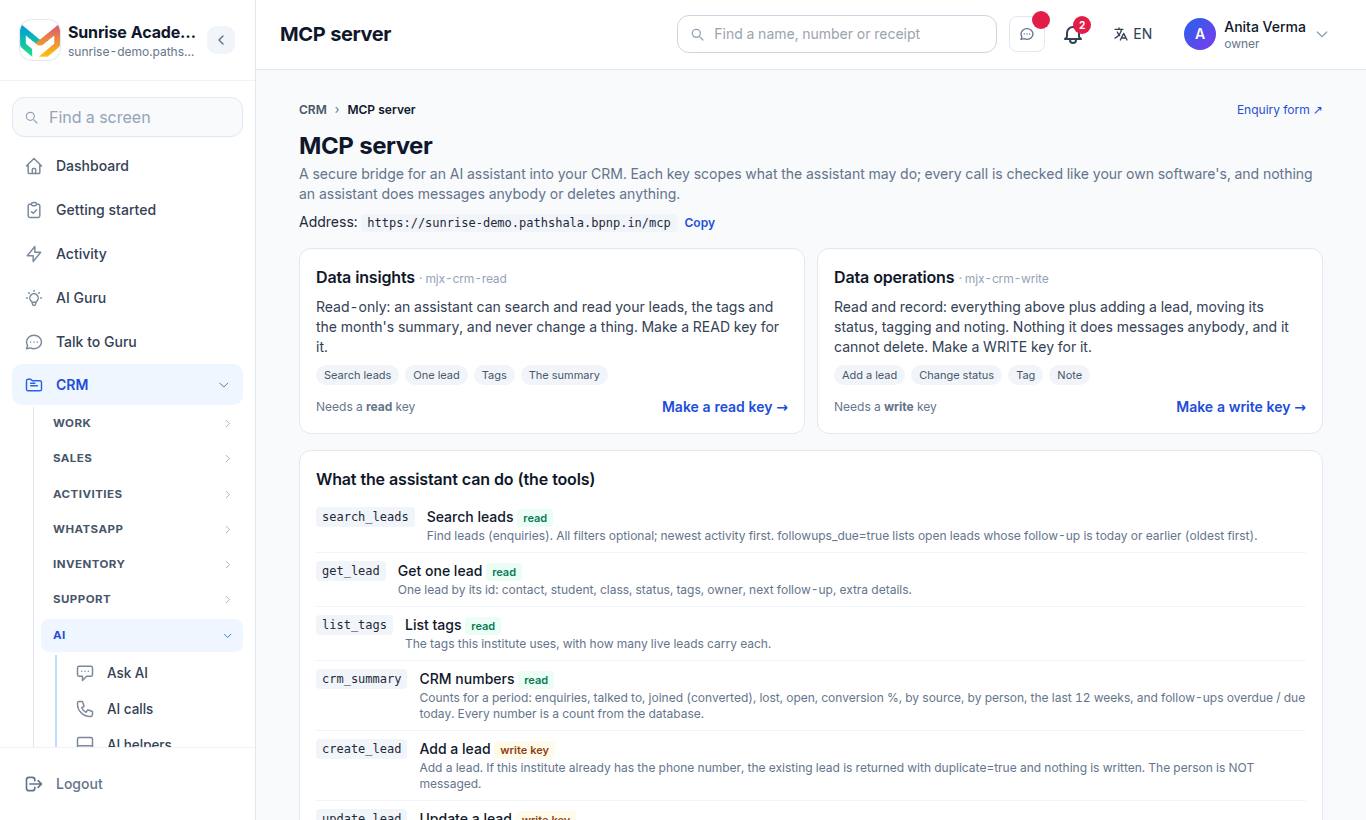
The MCP server page shows your address, the two server kinds, the tools, and copy-ready settings. Keys are made on the Integrations page.
#The address
POST https://<your-code>.pathshala.mjxtechnologies.com/mcp
Authorization: Bearer mjx_live_…
Content-Type: application/json
Copy the exact address from the MCP server page (Copy next to Address).
| Detail | Value |
|---|---|
| Transport | Streamable HTTP, stateless — one JSON-RPC 2.0 message per POST, one JSON answer |
| Methods | initialize, ping, tools/list, tools/call, and notifications (answered 202 with no body) |
| Not supported | GET and DELETE answer 405 (no event stream, no session); batches answer 400 |
| Protocol versions | 2025-11-25, 2025-06-18, 2025-03-26, 2024-11-05 (an unknown one gets 2025-06-18) |
| Server info | name mjx-crm, title MJX CRM — <your institute>, version 1.0.0 |
| Plan | MJX CRM Pro |
| Rate limit | 120 calls a minute per key, shared with the REST API |
#Which key? "Data insights" or "Data operations"
| Server card | Key to make | Tools you get |
|---|---|---|
Data insights (mjx-crm-read) | Only read | search_leads, get_lead, list_tags, crm_summary |
Data operations (mjx-crm-write) | Read and write | The four above, plus create_lead, update_lead, add_note |
A read-only key does not see the write tools in tools/list. If a write tool is called anyway, the answer is: "This key is read-only. The institute must make a key with "write" for …".
#Steps to connect
- Make a key: Apps › MJX CRM › CRM settings › Advanced: API & webhooks › API keys → name it (e.g. "Claude") → pick Only read or Read and write → Make a key → copy it.
- Copy the MCP address from Apps › MJX CRM › CRM settings › Connect AI tools (MCP).
- Paste both into your assistant, using one of the settings below.
- Restart the assistant and ask: "How many leads came this week?"
#Claude Desktop and Claude Code
In claude_desktop_config.json (Claude Desktop) or .mcp.json (Claude Code):
{
  "mcpServers": {
    "mjx-crm": {
      "command": "npx",
      "args": ["-y", "mcp-remote", "https://<your-code>.pathshala.mjxtechnologies.com/mcp",
               "--header", "Authorization: Bearer mjx_live_…"]
    }
  }
}
This uses the open-source mcp-remote bridge, so Node.js must be installed.
#Cursor
In .cursor/mcp.json:
{
  "mcpServers": {
    "mjx-crm": {
      "url": "https://<your-code>.pathshala.mjxtechnologies.com/mcp",
      "headers": { "Authorization": "Bearer mjx_live_…" }
    }
  }
}#From your own code (Claude API MCP connector)
"mcp_servers": [{ "type": "url", "url": "https://<your-code>.pathshala.mjxtechnologies.com/mcp",
                  "name": "mjx-crm", "authorization_token": "mjx_live_…" }],
"tools": [{ "type": "mcp_toolset", "mcp_server_name": "mjx-crm" }]
Send it with the header anthropic-beta: mcp-client-2025-11-20.
#Any other MCP client
Any client that speaks Streamable HTTP and can send an Authorization header works. A raw call:
curl -X POST "https://<your-code>.pathshala.mjxtechnologies.com/mcp" \
  -H "Authorization: Bearer mjx_live_…" -H "Content-Type: application/json" \
-d '{"jsonrpc":"2.0","id":1,"method":"tools/list"}'#The tools
All tools answer with JSON text built from rows in your CRM — nothing is estimated.
#search_leads (read)
Find leads. All filters are optional; newest activity first. followups_due: true lists open leads whose follow-up is today or earlier (oldest first).
| Argument | Type | Notes |
|---|---|---|
query | string | Part of a name, phone number, email or student name |
status | string | new, in_conversation, follow_up_due, converted, lost |
tag | string | One tag, any case |
followups_due | boolean | |
limit | integer | 1–50, default 20 |
offset | integer | default 0 |
Returns { leads, total, limit, offset }.
#get_lead (read)
One lead by id (required, a uuid): contact, student, class, status, tags, owner, next follow-up, extra details. Returns { lead }.
#list_tags (read)
The tags in use, with how many live leads carry each. No arguments. Returns { tags: [{ tag, count }] }.
#crm_summary (read)
Counts for a period: enquiries, talked to, joined (converted), lost, open, conversion %, by source, by person, the last 12 weeks, and follow-ups overdue / due today.
| Argument | Type | Notes |
|---|---|---|
days | integer | 7, 30, 90, 365 or 0 (all time). Default 30. |
Returns totals, funnel, sources, owners, weekly, followups, response (reply times) and targets.
#create_lead (write)
Add a lead. If the phone number is already known, the existing lead is returned with duplicate: true and nothing is written. The person is not messaged.
| Argument | Type | Notes |
|---|---|---|
name | string | Required |
phone | string | Required. An Indian mobile, with or without +91, or any other country's number with its country code (+447400123456) |
email, student, class, message, source | string | Optional |
tags | array of strings | Up to 10 |
#update_lead (write)
Change a lead's status, replace its tags, or set / clear (null) its next follow-up date (ISO 8601, e.g. 2026-11-01T10:00:00+05:30).
| Argument | Type | Notes |
|---|---|---|
id | string | Required |
status | string | One of the five statuses |
tags | array of strings | Up to 10; replaces the tags |
next_followup_at | string or null |
#add_note (write)
Add a note staff will see on the lead, signed with the key's name. Arguments: id (required), note (required, up to 1,900 characters).
#Example questions to ask
- "Which leads have not been called this week?"
- "Add a lead: Ravi Mehta, 98XXXXXX21, wants the NEET batch."
- "Tag every lead from IndiaMART as trade."
- "What did we get this month, by source?"
#Errors
Errors come back as JSON-RPC errors:
| HTTP | JSON-RPC code | Message |
|---|---|---|
| 401 | -32001 | "Send your API key: …" or "That API key is not valid, or it was revoked." (with a WWW-Authenticate: Bearer realm="mjx-crm" header) |
| 403 | -32001 | "The MCP connection comes with MJX CRM Pro." / "MJX CRM is not switched on for this institute." |
| 400 | -32600 | "Invalid request: send one JSON-RPC 2.0 object." / "Send one JSON-RPC message per request (no batches)." |
| 200 | -32601 | "Method not found: …" |
| 405 | -32000 | "This MCP server answers POST only (no event stream)." |
| 500 | -32603 | "Internal error." |
A tool that fails (for example "No lead with that id.") answers normally with isError: true and the sentence as text.
#Questions people ask
Can the assistant send WhatsApp messages or delete leads?
No. The tools only read and record — add a lead, change status, tags or follow-up, add a note. Nothing messages anybody and nothing can be deleted.
Which key should I give the assistant?
A read key if it only needs to answer questions ("Data insights"). A read-and-write key if it should add or update leads ("Data operations").
Does the MCP server cost extra?
It comes with MJX CRM Pro, like the API. Your AI assistant's own charges are separate.
Can I connect ChatGPT?
Any MCP client that can call a remote server over Streamable HTTP and send an Authorization header can connect. A client that only offers a sign-in (OAuth) button cannot use an API key directly.