
Classes, sections and subjects
Set up the classes (or batches), sections and subjects your institution runs — the list every register, fee structure and timetable picks from.
Your class list is how your institution is organised. In Pathshala, every attendance register, fee structure, timetable and homework audience is picked from it — so it is the first thing to set up. Subjects come next: they are the list the timetable, syllabus, exam papers and question bank pick from.
#The words for your type of institution
| Institution | Top level | Level under it | A college also has |
|---|---|---|---|
| School | Class | Section | — |
| Coaching centre | Target Exam | Batch | — |
| Tuition classes | Grade | Batch | — |
| College | Branch | Section | Course (above the branch) |
| Skill institute | Course | Batch | — |
The sidebar row and the page title use your word, for example Target Exams for a coaching centre.
#How to add classes
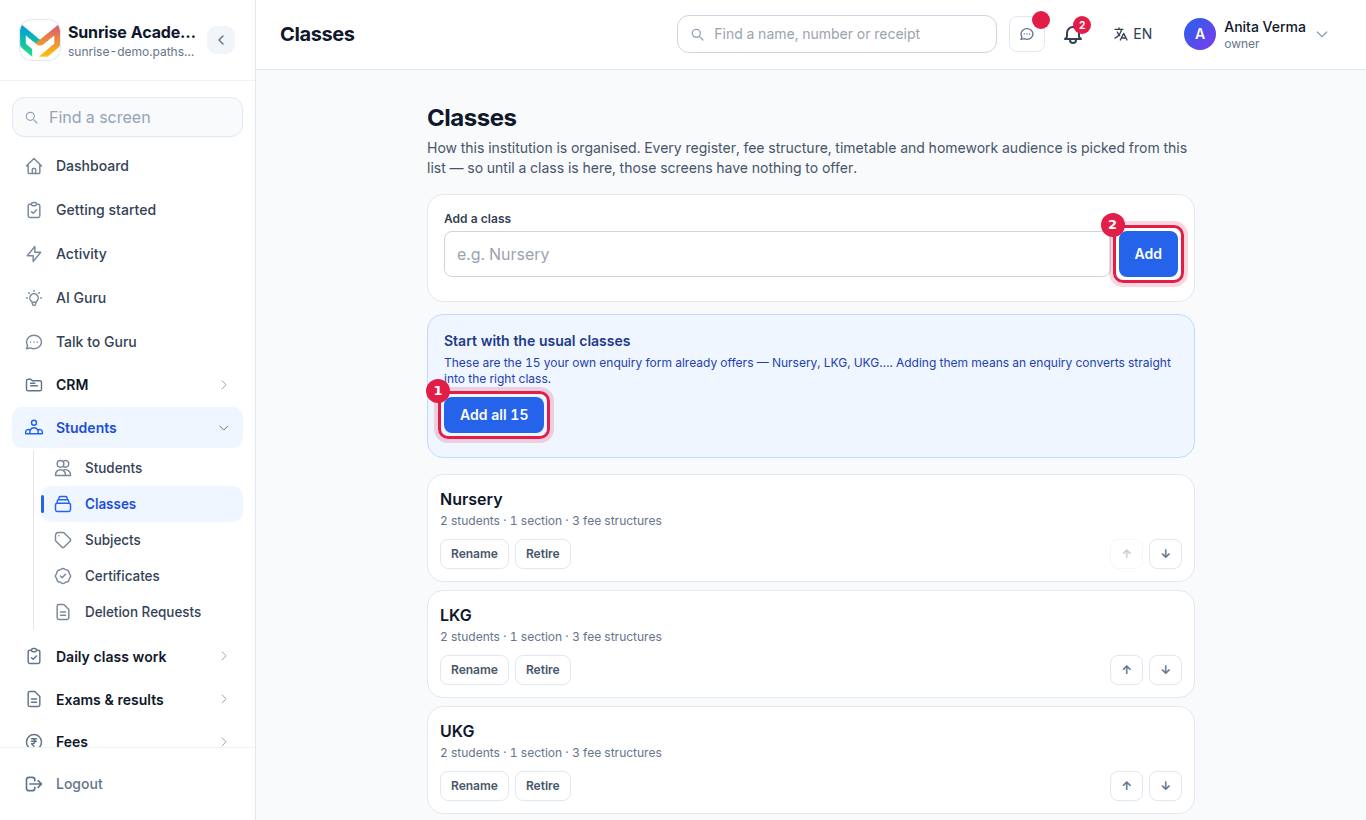
- The fastest start: under Start with the usual classes, press Add all. These are the classes your own enquiry form already offers (for a school, Nursery to Class 12), so an enquiry converts straight into the right class.
- Or type a name under Add a class and press Add.
- Under Asked about in your enquiries, Pathshala lists classes families have asked about that are not on your list. Tap one to add it.
#Change a class
Each row has:
| Button | What it does |
|---|---|
| Rename | Renames it everywhere |
| Retire | Takes it out of every picker. Last year's registers, bills and marks keep their names, and its students stay on the roll. |
| Put back | Brings a retired class back |
| Move up / Move down | Changes the order classes appear in |
There is no delete, on purpose: fee structures, sections and the timetable hang off a class.
#For a college: courses and branches
A college first sets the Courses it runs (for example B.Tech, MBA, BE) and presses Add. Each branch is then put in a course with the picker on its row. Retiring a course only takes it out of the picker; the branches under it keep working.
#Sections and batches
Sections are made inside a class:
- On the student form, the Section box offers the class's sections — and you can type a new one (A, B, C…).
- In an Excel import, a new section name in the file is created for you.
Registers, notices, homework and the calendar can then be aimed at one section.
#The academic year (session)
Fee structures, invoices and the register are filed under a session. Most Indian institutions run 1 April to 31 March and write it "2026-27".
Add a session with its Name, Starts and Ends dates, and tick Make this the current session for the one in use. Exactly one session is current. At year end, use Promote to the new session.
#How to add subjects
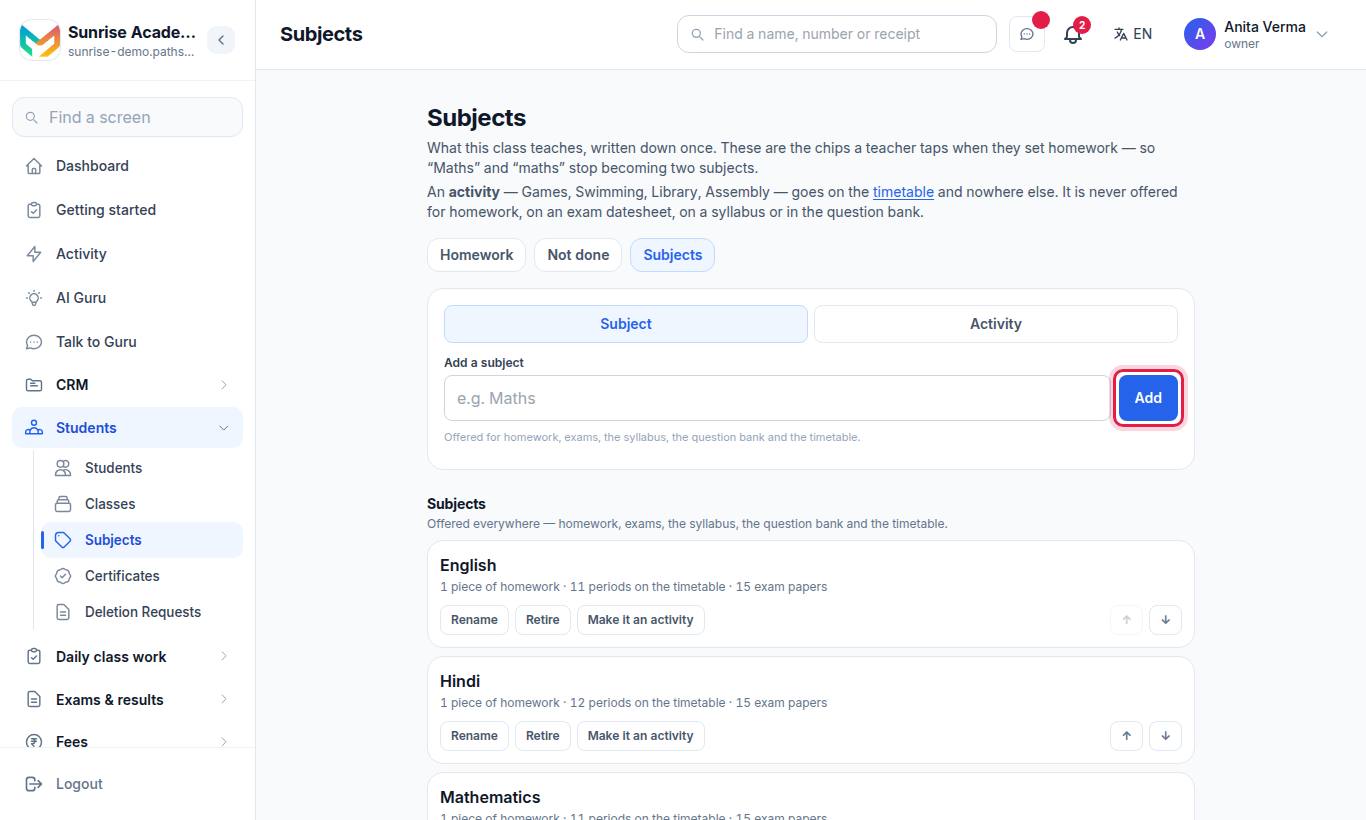
- Under Add a subject, type the name (for example "Maths").
- Choose whether it is a Subject or an Activity.
- Press Add.
| Kind | Where it is offered |
|---|---|
| Subject | Homework, exams, the syllabus, the question bank and the timetable |
| Activity (Games, Swimming, Library, Assembly) | The timetable only |
Under Already typed into homework, Pathshala lists subject names teachers have typed when setting homework that are not on your list. Tap one to add it, so "Maths" and "maths" stop being two subjects.
#Change a subject
Rename, Retire / Put back, Make it an activity / Make it a subject, move up or down, and delete. A subject can be deleted only while no homework uses it; otherwise retire it. Homework set in March keeps its name.
A skill institute calls subjects Modules.
#Who can do what?
| Action | Default roles |
|---|---|
| See classes and subjects | Owner, Admin, Staff |
| Add, rename, retire, reorder classes and courses | Owner, Admin |
| Add a subject | Owner, Admin, Staff |
| Reorder, retire or delete subjects | Owner, Admin |
Classes come with every institution account. Subjects need MJX Academic.
#Troubleshooting
| What you see | What it means |
|---|---|
| "You can see the list. Only an owner or admin can change it." | Your role can view but not change classes. |
| "Already on your list" | A class or subject with that name already exists (perhaps retired — look for it and press Put back). |
| The register says "No classes set up yet" | Add classes here, then add students to them. |
#Related
#Questions people ask
Why can I not delete a class?
Because fee structures, sections and the timetable hang off it. Retire it instead — it leaves every picker and keeps last year's records intact.
Where do I add sections or batches?
Type the section name on the student form or in the import file. A section that does not exist yet is created inside that class.
What is the difference between a subject and an activity?
A subject is offered everywhere — homework, exams, syllabus, question bank and timetable. An activity, such as Games or Assembly, appears on the timetable only.
Who can change the class list?
Owners and Admins. Everyone else can see the list.
We are a college with courses and branches. Does that work?
Yes. A college gets a third level — Courses such as B.Tech or MBA — and each branch sits in a course.