
Protect your course videos from sharing
Stop paid course links being shared — one-device sign-in, a name-and-number watermark, a copy guard and locked offline downloads in MJX Learn.
MJX Learn protects a paid course in layers: a link that opens only for its owner, one device at a time, a watermark with the learner's own name and number, and switches that make casual copying awkward. None of it is sold as "piracy proof" — it is a speed bump and a trace.
#What protects every course
These work on every plan, without any setting:
- The link opens for its owner only. Opening a course sends a 6-digit code on WhatsApp to the number on the learner's record. The page says: "This link opens your access only. Passing it on will not let anyone else in."
- One device at a time. A learner signed in on a second device is asked: "This account is signed in on another device. Sign that device out and continue here?"
- Location at sign-in. Learners are told: "One device at a time. Your location is asked when you sign in, to stop a course being shared."
- The YouTube link is never sent to learners. They watch inside your own page.
- Every PDF is marked. Each page of a PDF topic carries your institute's name in a faint diagonal line — a pasted link or an uploaded file alike. With Show the learner's name and number on recorded topics ticked, the line also has the learner's name and number. A free sample reads Free sample · your institute's name, and a staff preview carries the name and number of the person who opened it.
- Access you can take back. Remove a learner's access in one tap — see Learners.
#How to set the video protections
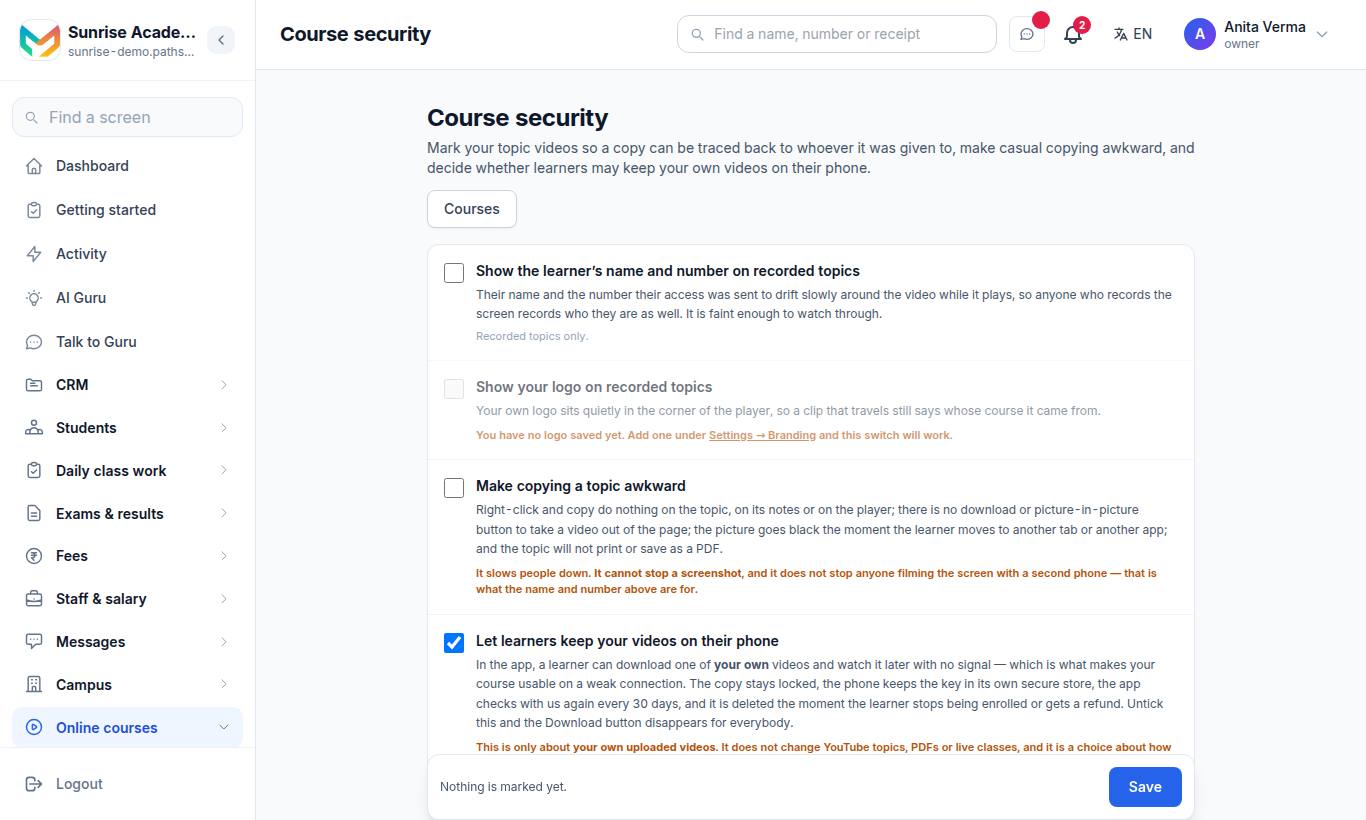
The page is called Course security (the link on the Courses page reads Protect the videos). In the app: Terms & Privacy › Protect the videos.
- Tick the switches you want (table below).
- Press Save.
| Switch | What it does |
|---|---|
| Show the learner's name and number on recorded topics | Their name and the number their access was sent to drift slowly around the video while it plays, so a screen recording records who they are. Faint enough to watch through. Recorded topics only. |
| Show your logo on recorded topics | Your logo sits in the corner of the player. You need a logo saved under Settings → Branding first. |
| Make copying a topic awkward | Right-click and copy do nothing on the topic, its notes or the player; no download or picture-in-picture button; the picture goes black when the learner moves to another tab or app; the topic will not print or save as a PDF. |
| Let learners keep your videos on their phone | In the app, a learner can download one of your own videos and watch it later with no signal. Untick it and the Download button disappears for everybody. |
#Your own uploaded videos (MJX Protected Video add-on)
When you upload a video file to a topic (instead of a YouTube link), it is stored and played by MJX Learn, encrypted, and only for learners who have access.
It is a paid add-on, MJX Protected Video. Keeping video files costs MJX for every video stored, so uploading is sold on its own and is not part of any plan. A YouTube link set to Unlisted stays the free default on every plan, with no limit — see Put your lesson video on YouTube as Unlisted.
- Without the add-on, Video (upload a file) and ⋯ › Upload a video show a padlock and say: "Uploading your own video is a paid add-on: MJX Protected Video…", with a button to get it and Use a free YouTube link instead. Videos you uploaded before keep playing for your learners.
- Every upload is compressed to 720p (H.264), so a lecture takes far less space; a file that is already small is kept as it is. The upload box and Billing show how much storage your protected videos use.
- Get it from Billing (the MJX Protected Video card) or the button beside the padlock. Until MJX opens it for sale, the button reads Ask MJX on WhatsApp.
The security page shows one of two sentences under Your own videos, not YouTube's:
- "Secure video is ready. Upload a video to a lesson and learners will play it here instead of on YouTube."
- "Secure video is not switched on yet. MJX has to finish setting up the video storage before you can upload your own videos here." — your YouTube topics keep playing in the meantime. Press Check again to ask once more.
To upload, open a topic's ⋯ menu and press Upload a video (or choose Video (upload a file) when adding a topic). Accepted files: MP4, MOV, MKV or WebM.
#Offline downloads in the app
With Let learners keep your videos on their phone ticked, learners see Videos on the course in the app, with Download to watch offline.
- The copy stays locked; the phone keeps the key in its own secure store.
- The app checks with MJX again every 30 days. Learners see "Connect to the internet once to keep watching your saved copy." when it is due.
- The copy is deleted the moment the learner stops being enrolled or gets a refund.
- It only applies to your own uploaded videos — not YouTube topics, PDFs or live classes.
#What none of this does
- It does not stop anybody filming the screen with a second phone.
- No website can block a screenshot.
- Somebody who knows their way around a browser can take the mark off their own screen.
That is why the name-and-number mark matters: a copy that travels still says who it came from.
#Spotting shared accounts
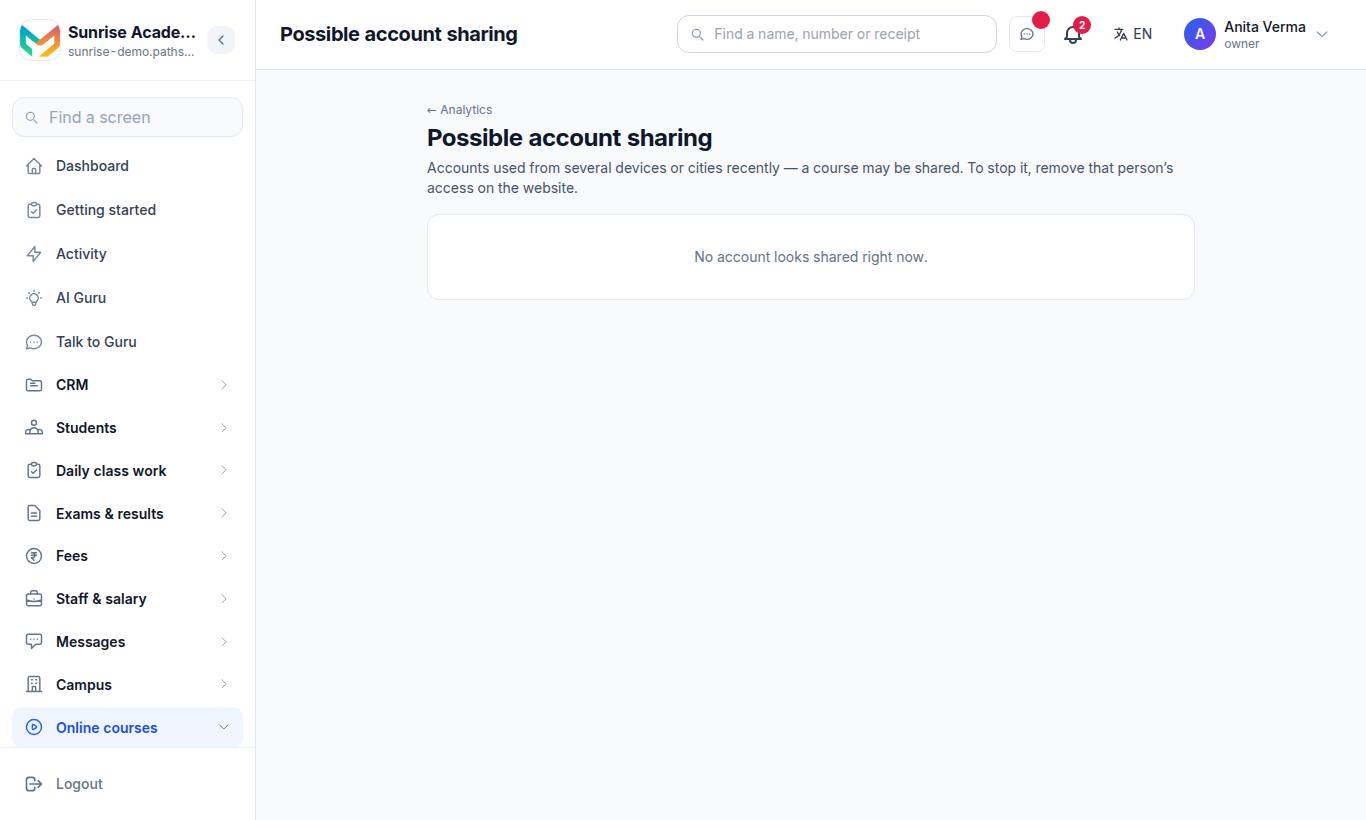
This list shows accounts used from several devices or cities recently. A flag is a hint, not proof — one family sharing a phone can look like this too. To stop sharing, open the learner and remove that course's access. Owner and admin only.
#Who can use this?
| Who | Can |
|---|---|
| Owner, Admin | Change the switches on Course security; see Possible account sharing. |
| Learners | Benefit automatically; download only when you allow it. |
| Plan | Every plan. Uploading your own videos needs the MJX Protected Video add-on. |
#Questions people ask
Is MJX Learn piracy proof?
No, and no honest product can claim that — a person can always film a screen with a second phone. MJX Learn stops the ordinary case (a paid link passed around a WhatsApp group) and marks every copy with the name and number of the person it was given to.
What happens if a learner forwards their course link?
The link only opens after a 6-digit code is sent to the learner's own WhatsApp number, so it does not open for anybody else.
Can learners download videos?
Only your own uploaded videos, only in the app, and only if you tick "Let learners keep your videos on their phone". The copy stays locked and is deleted when the learner stops being enrolled or is refunded.
Is uploading my own videos free?
No. Uploading your own video files is the paid MJX Protected Video add-on, and every upload is compressed to 720p to save space. Unlisted YouTube links stay free on every plan.
Does the app block screenshots?
On Android, the MJX Learn app blocks screenshots and screen recording while one of your own videos is playing. On an iPhone it hides the video while a recording runs. A browser cannot do either.