
Leave management with balances and manager approval
Set leave days, carry-over and part-year rules, apply for leave, approve it as a manager, and keep the holiday list.
Leave in MJX HR is where people ask for time off and their manager answers. In Pathshala, approved leave shows on the staff register, and each person sees their balance on My HR and in the MJX People app.
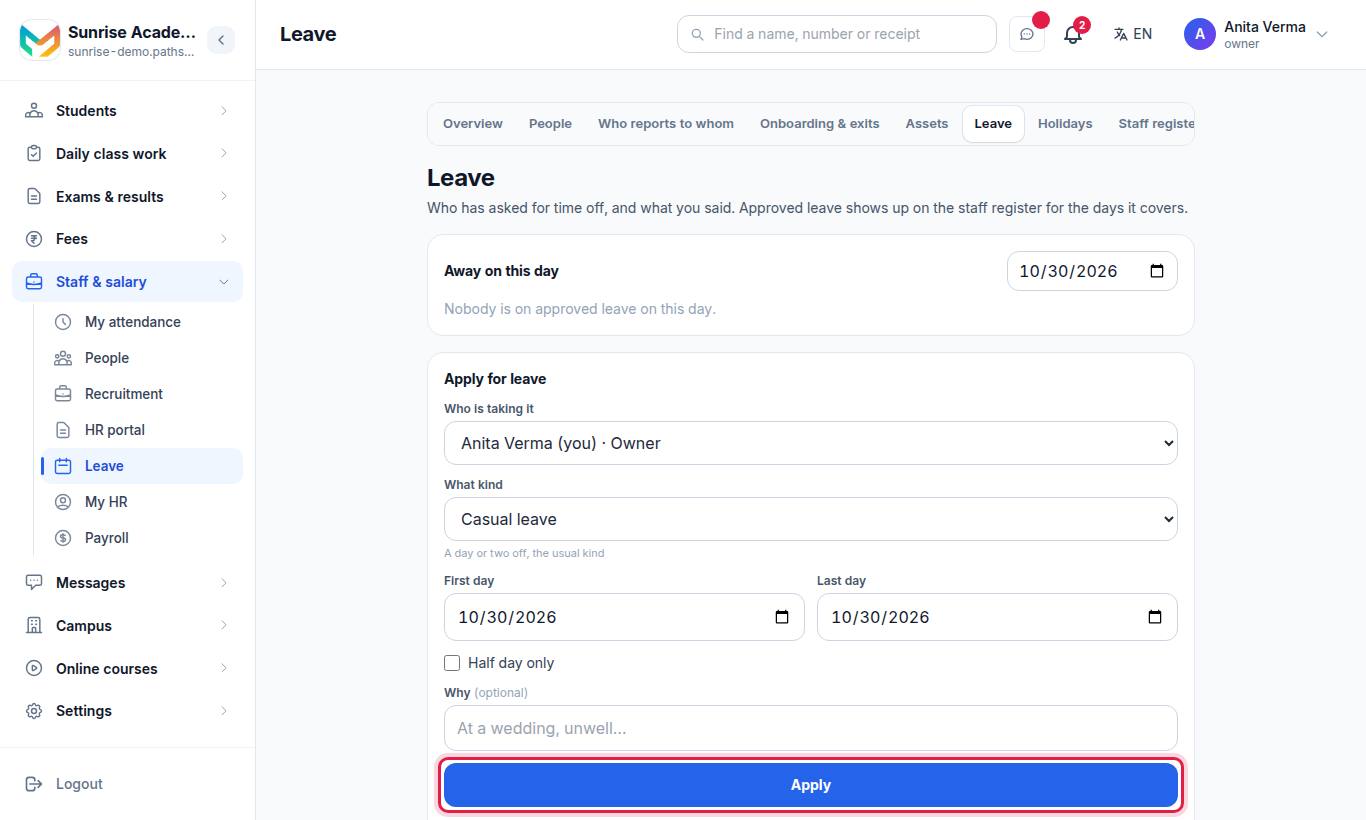
The same screen is under Apps › MJX People › HR portal › Time › Leave.
#Kinds of leave
Casual leave · Sick leave · Earned leave · Leave without pay · Maternity / paternity · Other.
#How to set the leave policy
Owner or admin only (or anyone with the leave-policy permission).
- Open Leave and find Leave policy.
- For each kind of leave, type the days a year you give. Half days are allowed (for example 12.5).
- Optional: type how many days may carry over into the next year.
- Optional: tick Somebody who joins part-way through the year gets part of it.
- Press Save policy.
| Setting | How it works |
|---|---|
| Days a year — empty | No balance is shown for that kind of leave |
| Days a year — 0 | You give none; every day taken counts as over |
| May carry over — empty | Unused days do not carry |
| May carry over — a number | At most that many unused days come into the next year. Only for people whose joining date shows they were here last year. |
| Part-year tick | A joiner gets one twelfth for each whole month from the month they joined to March, rounded to the nearest half day. Anybody with no joining date still gets the whole year. |
#How to apply for leave
- Under Apply for leave, choose What kind.
- Choose the First day and Last day. Tick Half day only for half a day (both dates the same).
- Optional: Why (optional), for example At a wedding, unwell…
- Press Apply.
To cancel it, press Withdraw. It stays on the record, marked as withdrawn.
#How to approve or turn down leave
Managers and the office see Your team's leave at the top.
- Read the application.
- Press Approve, or Turn down and write a reason (optional).
The person is told. Use Away on this day to see who is on approved leave on any date. Filter the list with All, Waiting and Approved.
| Status | Meaning |
|---|---|
| Waiting for an answer | Not answered yet |
| Approved / Away now | Approved; "Away now" while it is running |
| Turned down | Not approved, with the reason if one was given |
| Withdrawn | Cancelled by the person; kept on record |
#Balances
With a policy set, each person sees left of … · taken on My HR, and the app shows "*x* left of y". The balance is your policy, plus anything carried over, less approved leave taken this year. Without a policy, the screen shows days taken only.
#Holidays
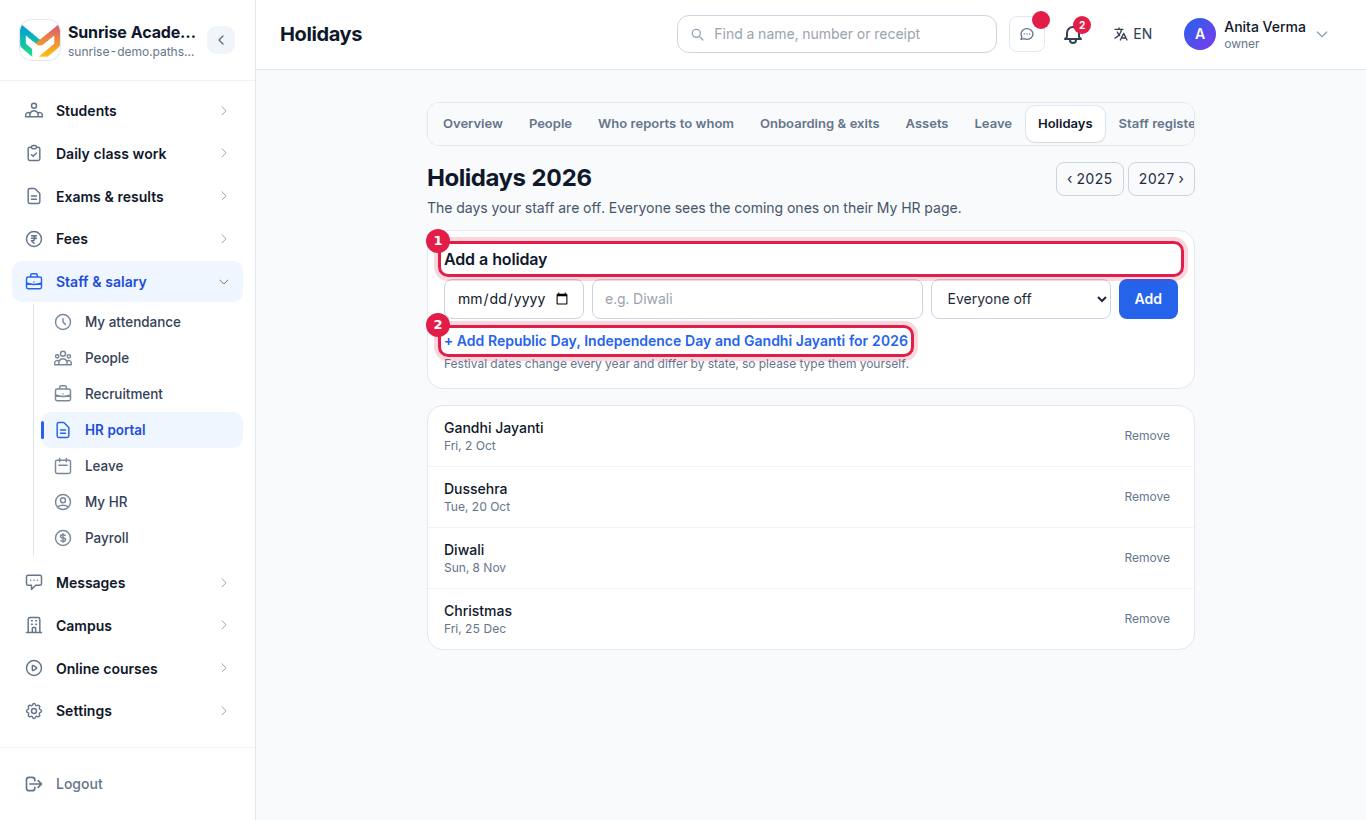
- Under Add a holiday, choose the date, type a name (for example Diwali) and choose Everyone off or Optional (restricted).
- Press Add.
- Press + Add Republic Day, Independence Day and Gandhi Jayanti to add the three national holidays for the year.
Festival dates change every year and differ by state, so type them yourself. Use ‹ and › to move between years. Everyone sees the coming holidays on My HR and in the app's Office tab.
#Who can use leave?
| Who | What |
|---|---|
| Every signed-in person | Apply for and withdraw their own leave |
| Reporting manager | Answer their team's leave |
| Owner, Admin | Answer anyone's leave, apply on someone's behalf, set the policy |
Leave and holidays are in every MJX HR plan, including Forever Free.
#Common messages
| Message | What to do |
|---|---|
| The last day cannot be before the first day | Swap the dates |
| A half day is half of one day… | Make both dates the same, or untick half day |
| A leave longer than 365 days is not a leave — check the year on those dates. | Check the year |
| Name is switched off and cannot be given leave. | Switch them on in People first |
| Only an owner, an admin or a reporting manager can answer a leave application. | Ask the office or their manager |
#Questions people ask
Are weekends counted in a leave?
Yes. Days are counted on the calendar, weekends included. A half day counts as half of one day.
What is the leave year?
April to March, the same financial year your books and fees use.
What happens if I leave the days box empty?
Nothing is claimed about that kind of leave and no balance is shown. Typing 0 is different — it means you give none, and every day taken counts as over.
Does approved leave show on attendance?
Yes. Approved leave shows on the staff register for the days it covers, so nobody is marked absent for a day they were allowed off.
Can an employee cancel a leave they applied for?
Yes, while it is waiting or approved. Press Withdraw — it stays on the record, marked as withdrawn.
Can the office apply on someone's behalf?
Yes, the owner or an admin can choose Who is taking it. Everybody else applies for their own leave only.