
Fee day-book, daily collection report and Tally export
See every fee payment and refund of a day in Pathshala, count the cash drawer, download the day as a sheet, and export receipts to Tally.
The Day-book in Pathshala shows every fee payment and refund of one day, line by line, so you can count the cash drawer against it at closing time. From the same screen you can download the day as a spreadsheet or hand it to your accountant as a Tally file.
#Who can use this?
| Action | Who |
|---|---|
| Open the Day-book and download the day | Owner, Admin, or staff with View Day Book (Accountant, Cashier) |
| Tally export page (ledger names, whole month) | Owner, Admin, or a role with Manage Fee Setup (Accountant) |
The Day-book and its files are in MJX Fees Management Basic and above. On Forever Free the row is not shown, and the dashboard shows Day book & Excel 🔒 Basic.
#How to read a day
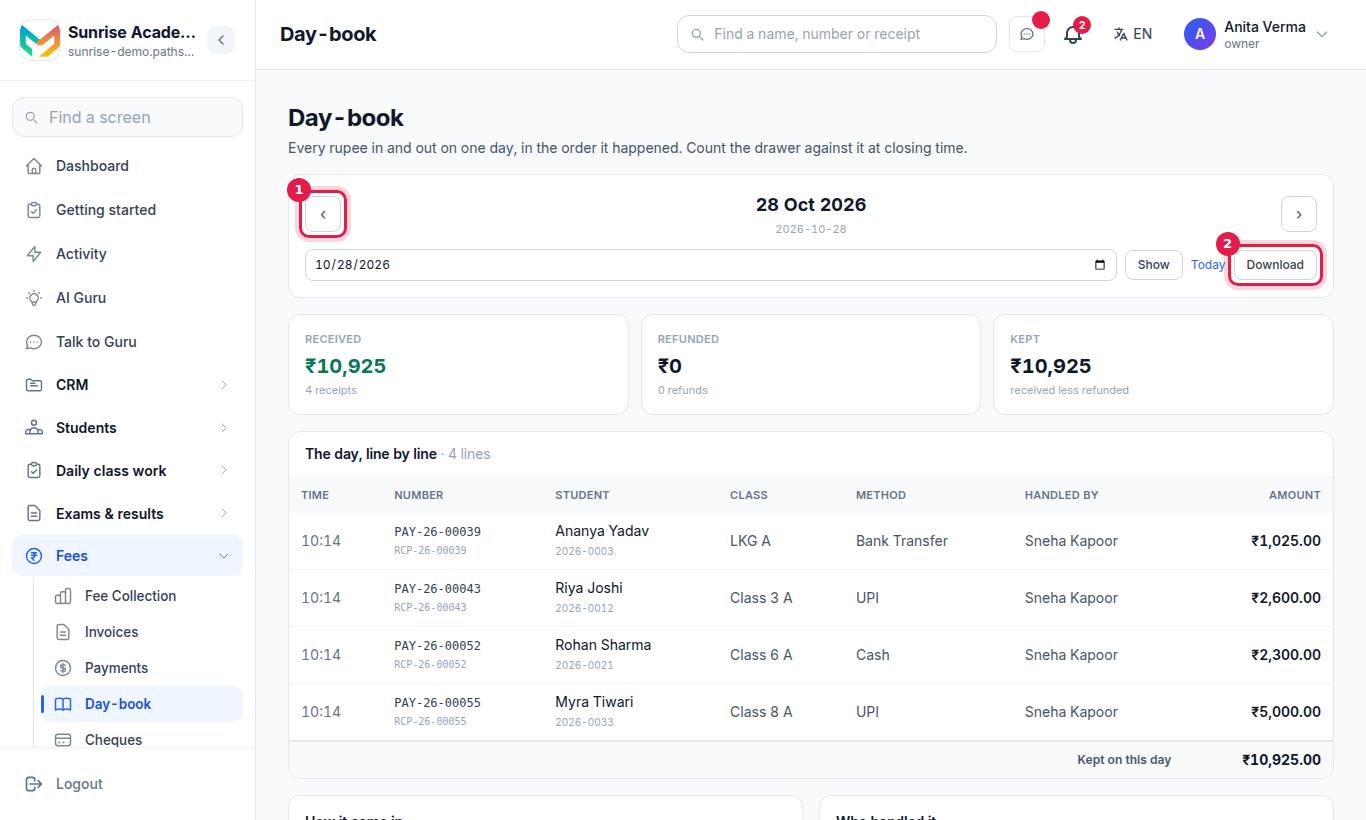
- The Day-book opens on today. Use the ‹ and › arrows to go a day back or forward, or pick a date under Show the book for and press Show. Today brings you back.
- The three totals at the top:
- Received — money in, and the number of receipts;
- Refunded — money given back, and the number of refunds;
- Kept — received less refunded.
- The day, line by line lists each movement with an In or Out tag, the payment or refund number, the student, class, method, time and who handled it. A refund line says which payment it was against. A payment refunded later shows later refunded in full. A line entered on a later day says recorded with that date.
- How it came in and How it went back give the totals per payment method. A refund carries its own method, so the two lists are counted separately.
- Who handled it gives each person's net, with taken and given back when they did both.
#How to close the day
#Steps
- Open Day-book at closing time.
- Look at How it came in › Cash. Count the drawer; the two should match.
- Check Who handled it if more than one person took cash.
- Press Download to keep the day's sheet, or give it to the accountant as a Tally file.
#Download the day as a sheet
Press Download. You get a CSV file (opens in Excel or Google Sheets) with one line per movement — refunds as minus amounts — and the day's totals. A narrowed viewer's file says These lines are the ones you handled, not the whole day.
#Export to Tally
#Step 1: set your ledger names (once)
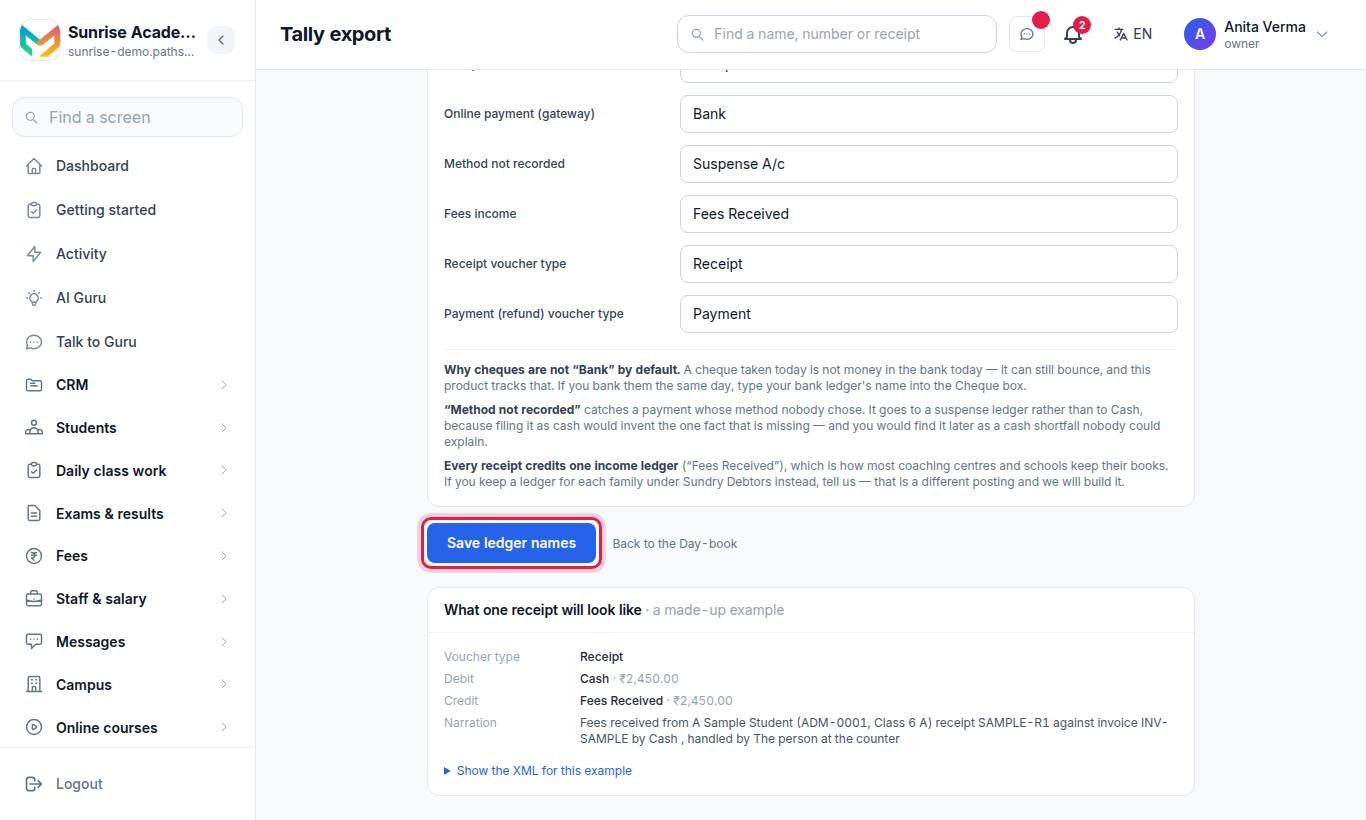
Tally will not create a ledger it has never heard of, so type the names your Tally company uses.
| Field | Default |
|---|---|
| Your Tally company | Your institute's name, if left blank |
| Cash | Cash |
| UPI | Bank |
| Bank transfer / NEFT | Bank |
| Card | Bank |
| Cheque | Cheques Received |
| Online payment (gateway) | Bank |
| Method not recorded | Suspense A/c |
| Fees income | Fees Received |
| Receipt voucher type | Receipt |
| Payment (refund) voucher type | Payment |
Press Save ledger names. Clearing a box puts it back to the suggestion. The page shows What one receipt will look like — a made-up example voucher, with its XML under Show the XML for this example.
#Step 2: export a day
On the Day-book, under Give it to the accountant, press Tally (XML) or Tally (sheet). Whatever day is on screen is the day in the file. Every rupee in becomes a Receipt voucher and every refund a Payment voucher, each with a narration such as Fees received from … receipt RCP-… against invoice INV-… by Cash. The box lists the ledgers that must already exist in Tally.
#Step 3 (optional): export a whole month
On the Tally export page, under A whole month in one file, pick the Month, press Show, then press the month's Tally (XML) or Tally (sheet) button. Each day in the file is exactly that day's own file. An empty month gives an empty file, not an error.
#Tips
- Record payments on the day they are received, so the Day-book matches the drawer.
- Always choose a payment method. A payment with no method lands in Suspense A/c in Tally.
- Use the dashboard's Today's cashier card for a quick look, and the Day-book for the full list.
#Questions people ask
What is the day-book?
It is every rupee that came in or went back out on one day, in the order it happened, with totals by payment method and by the person who handled it.
Can I export fee receipts to Tally?
Yes. The Day-book gives a day as Tally (XML) or Tally (sheet), and the Tally export page gives a whole month. Set your ledger names first.
Why do my staff see a smaller total?
Staff who are not owner or admin see only the lines they handled. The screen says so and shows the whole day's figures in words.
Has the Tally file been tested in Tally?
Its shape and arithmetic are tested on every release, but MJX has not pressed Import inside a real Tally. Try it on a copy of your company first.