
MJX CRM REST API reference (v1)
Every MJX CRM API endpoint — me, leads, one lead, add, update, notes and tags — with parameters, example requests, responses and errors.
The MJX CRM REST API v1 has seven endpoints under /api/v1/crm. All of them need an API key; the write endpoints need a key with write.
#Base address
https://<your-code>.pathshala.mjxtechnologies.com/api/v1/crmCopy the exact address from For your developer on the Integrations page.
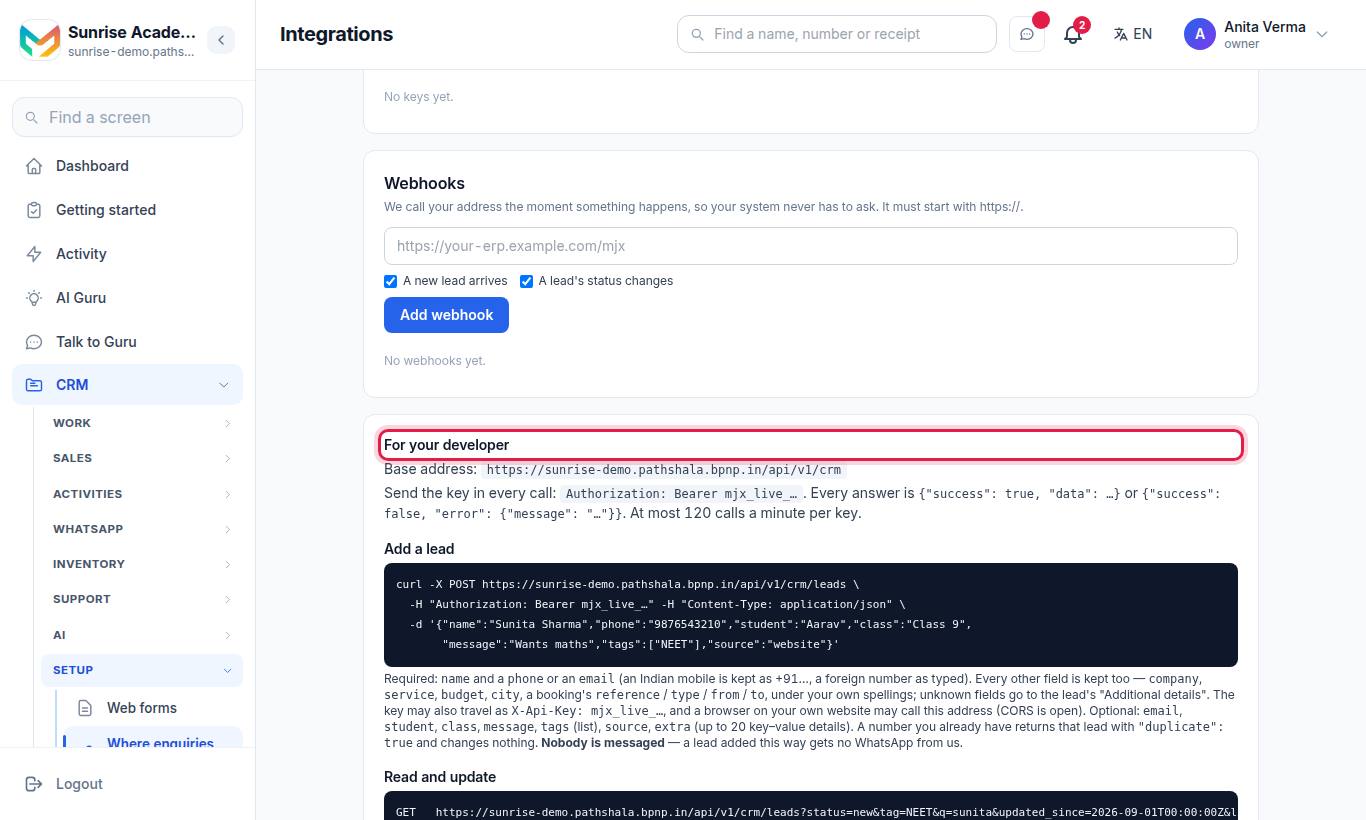
Requests with a body use Content-Type: application/json. Every answer is JSON in the same envelope:
{ "success": true, "data": { … } }
{ "success": false, "error": { "message": "A sentence you can show or log." } }#Endpoints
| Method | Path | Scope | What it does |
|---|---|---|---|
| GET | /me | read | Which institute and key, the statuses and webhook events |
| GET | /leads | read | Search and list leads |
| GET | /leads/{id} | read | One lead |
| POST | /leads | write | Add a lead (or get the existing one) |
| PATCH | /leads/{id} | write | Change status, tags or next follow-up |
| POST | /leads/{id}/notes | write | Add a note |
| GET | /tags | read | The tags in use, with counts |
Any other path under /api/v1/crm answers 404 with "No such endpoint. See the Integrations page for the list."
#The lead object
Every endpoint that returns a lead uses this shape. It is also the lead inside a webhook body.
| Field | Type | Meaning |
|---|---|---|
id | string (uuid) | The lead's id |
name | string | The person who enquired |
phone | string or null | +91XXXXXXXXXX for an Indian mobile; +<digits> for a foreign number |
email | string or null | Email address |
student | string or null | Who the enquiry is for (a child, for example) |
class | string or null | The class column, when set in the CRM |
status | string | One of the five statuses below |
source | string or null | Where it came from, e.g. website, api, web_hook, indiamart, meta_ads |
message | string or null | What they wrote |
tags | array of strings | Tags, oldest first |
assigned_to | string or null | Name of the staff member who looks after it |
next_followup_at | string (ISO date) or null | Next follow-up |
extra | object | Extra details (shown as "Additional details" on the lead) |
details | object | Your vertical's own fields, e.g. target_exam, course, service, company, city, reference, from, to |
interest | string or null | One line summing up what they want |
created_at, updated_at | string (ISO date) | Times |
#Statuses
| API value | Default on-screen name |
|---|---|
new | New |
in_conversation | Talking |
follow_up_due | Call back |
converted | Admitted (school, college) · Joined (coaching, tuition, institute) · Won (business) |
lost | Not interested |
#GET /me
Checks your key and tells you who it belongs to.
curl "$MJX_BASE/me" -H "Authorization: Bearer $MJX_KEY"{
"success": true,
"data": {
"institute": { "code": "sunrise", "name": "Sunrise Coaching" },
"key": { "name": "Old ERP", "scopes": ["read", "write"] },
"statuses": ["new", "in_conversation", "follow_up_due", "converted", "lost"],
"webhook_events": ["lead.created", "lead.status_changed"]
}
}#GET /leads
Lists leads, newest activity first (by updated_at, or created_at when never updated). Deleted leads are never returned.
#Query parameters
| Name | Type | Default | Meaning |
|---|---|---|---|
status | string | — | Only this status. Must be one of the five values. |
tag | string | — | Only leads with this tag (any case). Up to 30 characters. |
q | string | — | Part of a name, phone number, email or student name. Up to 80 characters. |
updated_since | ISO date | — | Only leads created or updated at or after this time. |
followups_due | any value | — | Present = only open leads whose follow-up is today or earlier (India time), oldest first. Leave it out otherwise. |
limit | integer | 50 | 1 to 100 |
offset | integer | 0 | Skip this many |
curl "$MJX_BASE/leads?status=new&tag=NEET&updated_since=2026-10-01T00:00:00Z&limit=50&offset=0" \
-H "Authorization: Bearer $MJX_KEY"{
"success": true,
"data": {
"leads": [
{
"id": "3f2b9c1e-6a4d-4f8e-9b7a-2c1d0e5f6a7b",
"name": "Sunita Sharma",
"phone": "+9198XXXXXX10",
"email": null,
"student": "Aarav",
"class": null,
"status": "new",
"source": "website",
"message": "Wants a weekend batch",
"tags": ["NEET"],
"assigned_to": "Priya",
"next_followup_at": null,
"extra": {},
"created_at": "2026-10-28T05:30:00.000Z",
"updated_at": "2026-10-28T05:30:00.000Z",
"details": { "target_exam": "NEET 2027" },
"interest": "NEET 2027"
}
],
"total": 1,
"limit": 50,
"offset": 0
}
}#Errors
| Status | Message |
|---|---|
| 400 | status must be one of: new, in_conversation, follow_up_due, converted, lost. |
| 400 | updated_since must be a date, e.g. 2026-09-01T00:00:00Z. |
#GET /leads/{id}
curl "$MJX_BASE/leads/3f2b9c1e-6a4d-4f8e-9b7a-2c1d0e5f6a7b" -H "Authorization: Bearer $MJX_KEY"{ "success": true, "data": { "lead": { "id": "3f2b9c1e-…", "name": "Sunita Sharma", "…": "…" } } }| Status | Message |
|---|---|
| 404 | No lead with that id. (also for an id that is not a uuid, or a lead of another institute) |
#POST /leads
Adds a lead. Needs a write key.
#Body
A phone number or an email is required. Everything else is optional. Field names do not have to match ours: full_name, mobile, whatsapp, email_address, requirement and many more are recognised.
| Field | Type | Meaning |
|---|---|---|
name | string | The person. If left out, it is taken from company, then the email, then "Caller <phone>". |
phone | string | An Indian mobile, with or without +91, or a foreign number with its country code |
email | string | Email address |
student | string | Who the enquiry is for |
class | string | Class, course, exam, grade or batch — stored in your vertical's own field |
message | string | What they wrote (up to 5,000 characters) |
company, service, budget, timeline, city | string | Stored under details |
reference, type, from, to | string | A booking's reference, type and dates — stored under details |
tags | array or comma-separated string | Tags |
source | string | Your own word for where it came from, e.g. website. Default api. |
extra | object | Extra details; also any field we do not recognise. Up to 30 kept. |
Fields named cf_<something> go into the CRM's custom fields.
curl -X POST "$MJX_BASE/leads" \
  -H "Authorization: Bearer $MJX_KEY" \
  -H "Content-Type: application/json" \
-d '{"name":"Ravi Mehta","phone":"98XXXXXX21","email":"ravi@example.com","class":"NEET 2027","city":"Bhopal","tags":["Walk-in"],"source":"erp"}'#Responses
| Status | When | data |
|---|---|---|
| 201 | A new lead was added | { "lead": {…}, "duplicate": false } |
| 200 | The phone (or, with no phone, the email) already belongs to a lead | { "lead": {…existing…}, "duplicate": true } — nothing is written |
| 400 | No usable phone or email | A phone number or an email is required. or phone "…" is not a phone number, and there is no email. |
| 403 | Read-only key | This key is read-only. Make a key with "write" to add or change leads. |
#PATCH /leads/{id}
Changes a lead. Needs a write key. Send only the fields you want to change.
| Field | Type | Meaning |
|---|---|---|
status | string | One of the five statuses |
tags | array of strings | Replaces all the lead's tags |
next_followup_at | ISO date or null | Sets the next follow-up; null clears it |
curl -X PATCH "$MJX_BASE/leads/3f2b9c1e-6a4d-4f8e-9b7a-2c1d0e5f6a7b" \
  -H "Authorization: Bearer $MJX_KEY" \
  -H "Content-Type: application/json" \
-d '{"status":"converted","tags":["NEET"],"next_followup_at":"2026-11-01T10:00:00+05:30"}'{ "success": true, "data": { "lead": { "id": "3f2b9c1e-…", "status": "converted", "…": "…" } } }| Status | Message |
|---|---|
| 400 | status must be one of: new, in_conversation, follow_up_due, converted, lost. |
| 400 | next_followup_at must be a date, or null to clear it. |
| 404 | No lead with that id. |
#POST /leads/{id}/notes
Adds a note that staff see on the lead. Needs a write key. The note is saved with your key's name in front, e.g. [Old ERP] Called from our ERP.
curl -X POST "$MJX_BASE/leads/3f2b9c1e-6a4d-4f8e-9b7a-2c1d0e5f6a7b/notes" \
  -H "Authorization: Bearer $MJX_KEY" \
  -H "Content-Type: application/json" \
  -d '{"note":"Called from our ERP"}'
201 Created:
{ "success": true, "data": { "note": { "id": "b7c1…", "note": "Called from our ERP", "created_at": "2026-10-28T06:10:00.000Z" } } }| Status | Message |
|---|---|
| 400 | note is required. |
| 404 | No lead with that id. |
The saved note (with the key's name) is cut at 2,000 characters.
#GET /tags
The tags in use on live leads, most used first (up to 200).
curl "$MJX_BASE/tags" -H "Authorization: Bearer $MJX_KEY"{ "success": true, "data": { "tags": [ { "tag": "NEET", "count": 42 }, { "tag": "Walk-in", "count": 7 } ] } }#Errors on every endpoint
| Status | Message |
|---|---|
| 401 | Send your API key: "Authorization: Bearer mjx_live_…". |
| 401 | That API key is not valid, or it was revoked. |
| 403 | MJX CRM is not switched on for this institute. |
| 403 | The API comes with MJX CRM Pro. |
| 429 | Too many requests for this key — at most 120 a minute. Slow down and try again. |
| 500 | Something went wrong on our side. Try again. |
| 503 | Could not check that key just now. Try again. |
See Rate limits and errors for how to handle them.
#Questions people ask
Can I delete a lead through the API?
No. The API can read, add and update leads and add notes. Deleting is done by people in the CRM.
Can I assign a lead to a staff member through the API?
No. The lead's owner is returned as assigned_to (a name) but cannot be set through the API.
How do I page through all leads?
Use limit (up to 100) and offset. The answer includes total, so stop when offset reaches total.
How do I fetch only leads that changed since my last sync?
Pass updated_since with an ISO date, e.g. 2026-10-01T00:00:00Z.