
Plans, billing and GST invoices
Pathshala plans explained — 14-day trial, Forever Free limits, Basic and Pro, paying your bill, auto-pay, WhatsApp usage and GST tax invoices.
In Pathshala you pay only for the products you switch on. Every account starts with a 14-day free trial with no card, then moves to the Forever Free plan by itself; you upgrade a product to Basic or Pro when you need more. This page explains the plans, the Forever Free limits, how to pay, and where your GST invoices are.
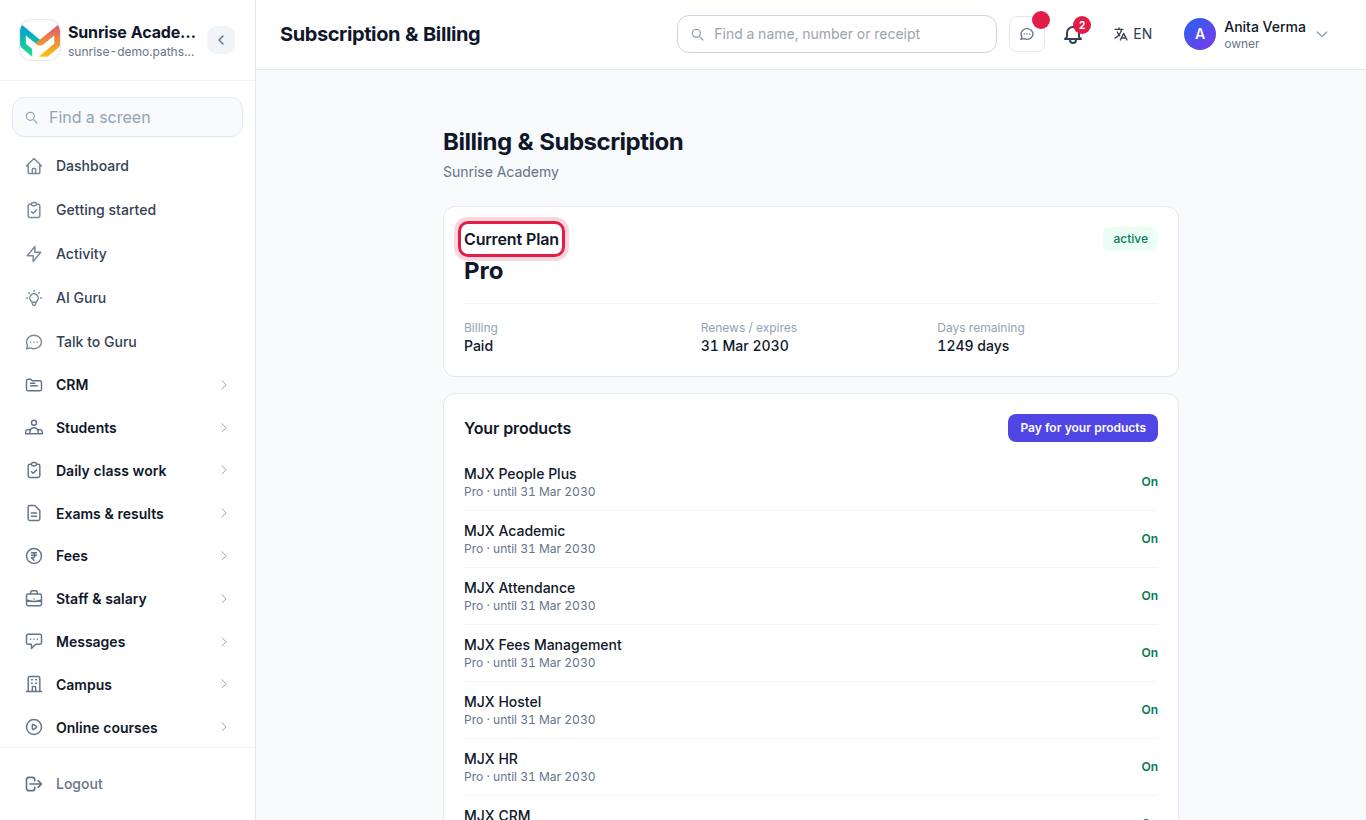
#What plans are there?
| Plan | What it is |
|---|---|
| Free trial | 14 days of every feature of the products you signed up for. No card. Full Branding is not part of the trial. |
| Forever Free | Free for ever with small limits and the MJX look. Never locked. |
| Basic | A paid plan for one product, with that product's Basic features and higher limits. |
| Pro | A paid plan for one product, with every feature. |
| MJX ONE Basic / Standard / Pro | One plan that covers every MJX product, at the matching level. |
| Bundles | Products sold together at one price, for example MJX People Plus Basic (MJX HR, MJX Payroll, MJX Hire and MJX Attendance). |
Prices change from time to time and are always shown on the Pricing page and on each product's page under Products. Each product page lists what its Basic and Pro include.
#What are the Forever Free limits?
| Limit | Forever Free |
|---|---|
| Students | Up to 50 |
| Learners (MJX LMS) | Up to 50 |
| Staff logins | 1 (you included) |
| Courses or batches (MJX LMS) | Up to 2 |
| Employees (MJX HR, Payroll, Attendance) | Up to 5 |
| Open jobs (MJX Hire) | 1 |
| Library members (MJX Library) | Up to 30 |
The billing page describes it as: "MJX's look, and up to 50 students, 50 learners, 1 staff login and 2 courses. Everything you added stays. Upgrade for every feature."
- Limits only apply when you add something. Nothing you already have is hidden or deleted.
- When you reach a limit you see: "You are on the Forever Free plan, which allows up to …. Everything you already have stays — upgrade to add more."
- On Forever Free, MJX LMS sends no WhatsApp messages except sign-in codes — learners are told by email instead.
- Paid plans can have their own caps too. If you reach one, the message names your plan.
#How does the free trial work?
The free trial is 14 days today. MJX sets the length, and the sign-up page, the pricing page and your welcome message always show the number that applies when you sign up. A trial that has already started keeps its own end date, shown in Subscription & Billing. The Forever Free limits above are the defaults; the numbers shown on the billing page and in a refusal message are the ones that apply.
- When you sign up, the trial starts. A banner for the owner and admin says Free trial · N days left with the end date, and a See prices & pay button.
- In the last 7 days the banner warns you: "Your free trial ends in N days … Then you move to the Forever Free plan — pay to keep every feature. Nothing is deleted."
- When the trial ends, the owner or admin sees Your 14-day free trial has ended (the number is the length of your own trial) with two buttons: Upgrade to … and Continue on Forever Free.
#How to upgrade or add a product
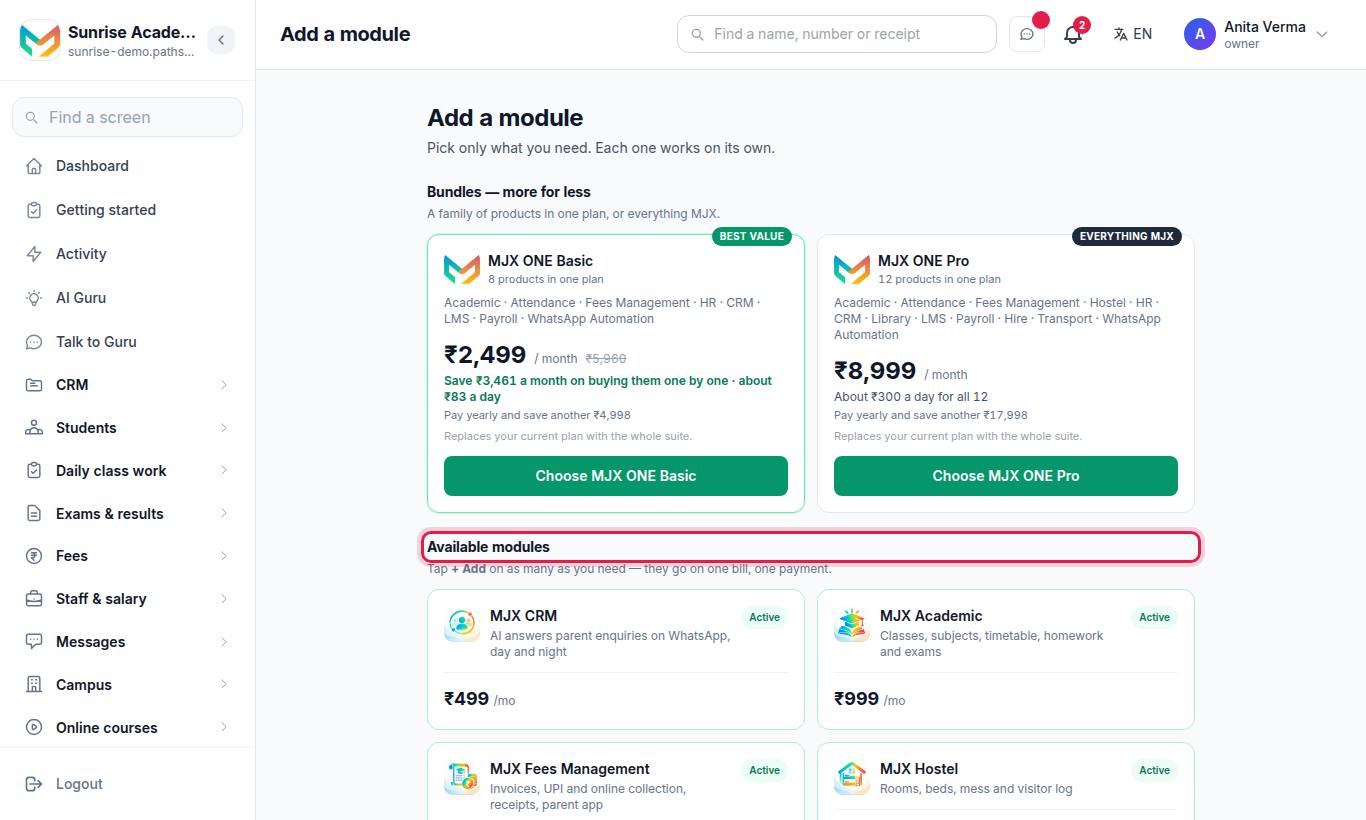
- Open the product you want from Apps › Add products, or go to
/upgrade. The page is called Add a module. - On a product's card, press + Add. Products you already have show Active.
- Check the basket line (N selected · ₹… / month) and press Pay online →.
- On the Your products page choose Monthly or Yearly, check the Products, GST 18% and Total lines, and press Pay.
See Choosing modules and products for more on how products are switched on.
#How per-employee pricing works
MJX HR, MJX Payroll, MJX Attendance and MJX People Plus are priced per employee per month. The bill is counted on your active logins, with at least 5. The owner and admin can see and change their employee seats at Sidebar › Settings › Billing › Subscription & billing › Employee seats (/billing/seats).
#How to pay your bill
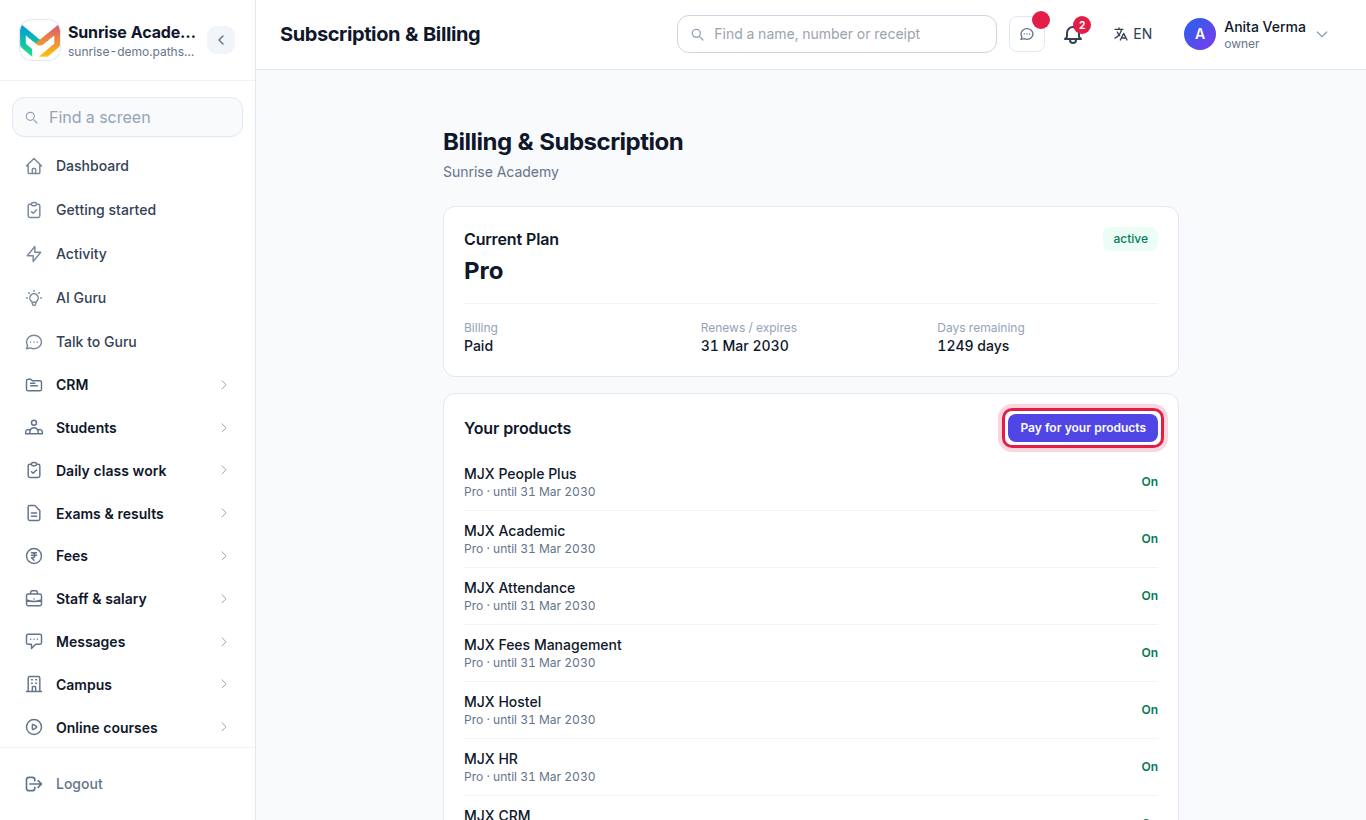
- Open Subscription & Billing. The Current Plan card shows your plan; Your products shows each product as On, Forever Free or Needs paying.
- Press Pay for your products.
- Choose Monthly or Yearly. To renew without paying by hand each time, tick Renew automatically (UPI AutoPay, card or bank mandate).
- Press Pay and finish the payment in the Razorpay window. UPI is shown first.
You can pay by UPI (GPay, PhonePe, Paytm), credit or debit card, net banking or bank transfer, and by cheque on annual plans.
#Auto-pay
The Auto-pay card on Subscription & Billing has Set up auto-pay, Pay with auto-pay, Turn auto-pay off and Cancel auto-pay.
#Need more time to pay?
On the payment page, press Request a short extension, tell MJX why you need more time, and press Send Request. MJX's team reviews the request.
#What other bills can I get?
| Bill | Where | What it is |
|---|---|---|
| WhatsApp usage | Subscription & Billing › WhatsApp usage (/billing/whatsapp) | WhatsApp template messages sent for your institution, on the MJX number or your own |
| What you owe MJX | Subscription & Billing › What you owe MJX (/billing/dues) | MJX LMS only: MJX's fee on learners you added by hand, and refunds MJX paid for you |
#How WhatsApp messages are charged
- Every WhatsApp template message is charged at the rate in force when it was sent, once WhatsApp confirms it was delivered.
- A message that failed is never charged. Chat replies are not charged.
- 18% GST is added to each month. The page shows Includes 18% GST.
- Amounts under ₹1 are carried to your next payment.
- Press Pay ₹… now to pay the bill.
#What you owe MJX (MJX LMS)
This page shows You owe, What it is made of, and a Pay ₹… now button. No tax or charge is added — you pay exactly the figure shown. If it stays unpaid for more than 15 days, the account is paused until it is cleared.
#Where are my GST tax invoices?
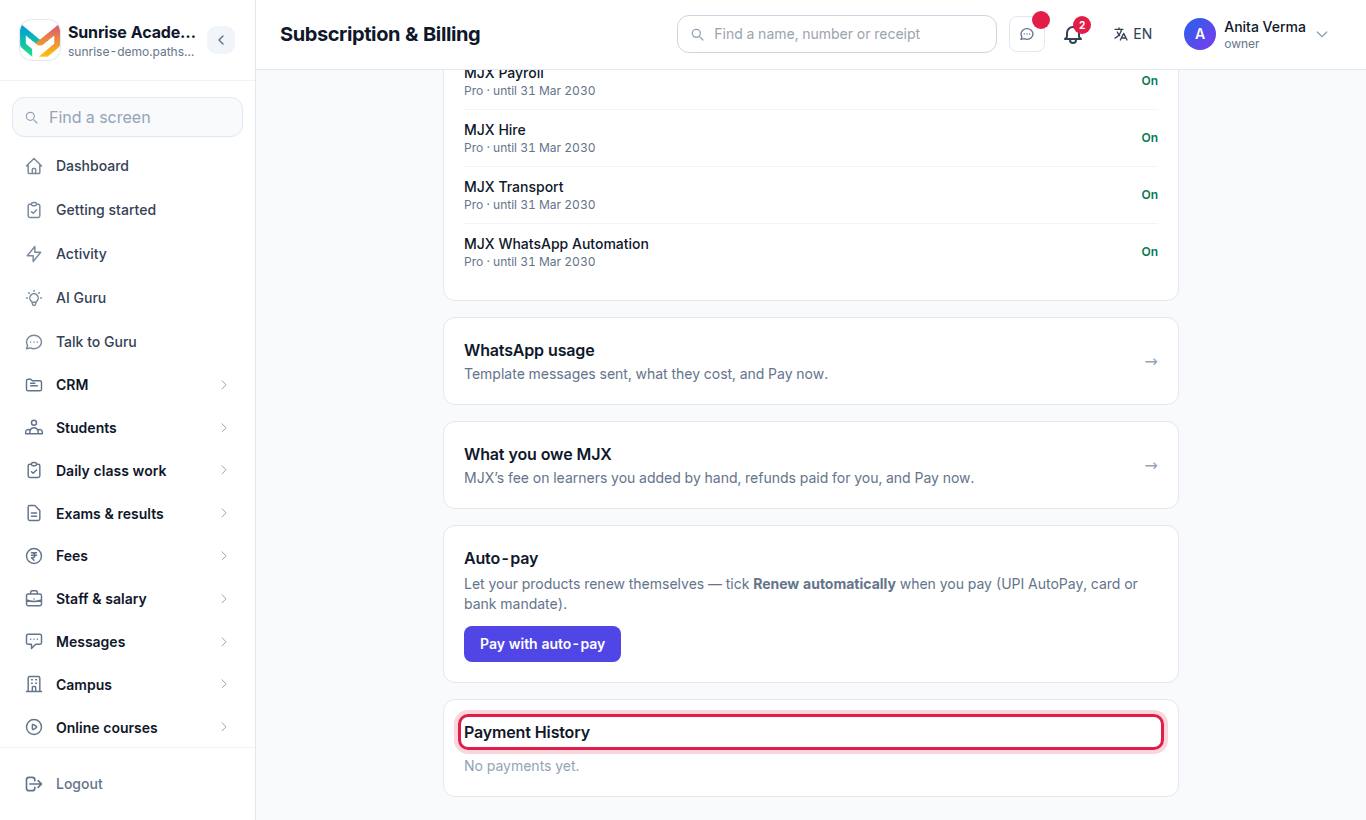
- Open Subscription & Billing and scroll to Payment History (Date, Amount, Plan, Status).
- Press Tax invoice … next to the payment.
- Press Print or save as PDF.
WhatsApp usage invoices are on the WhatsApp usage page.
| On the invoice | What it shows |
|---|---|
| Invoice no. | Plans: MJX/PL/2026-27/0001. WhatsApp: MJX/WA/2026-27/0001. The year is India's financial year (April to March). |
| From | MJX Technologies' name, address and GSTIN |
| Billed to | Your organisation's name, address, city and state |
| Place of supply | Your state |
| Tax | CGST 9% + SGST 9% inside the same state, or IGST 18% for another state |
| Total | With the amount in words |
#What if my account is paused?
An account is paused when a bill stays unpaid:
- the plan's subscription has expired, been suspended or been cancelled,
- the WhatsApp usage bill is unpaid for more than 15 days, or
- (MJX LMS) what you owe MJX is unpaid for more than 15 days.
A trial that ends is not a pause — you simply move to Forever Free.
When an account is paused, the website shows "Your account is suspended due to a payment issue. Please clear your dues to restore access." with Renew / Pay and Contact us. The owner and admin are taken to the bill that caused it. The apps show Your account is paused or Your billing is pending with a Pay WhatsApp bill or Pay now button; staff are told to ask the owner.
After a paid plan expires, you get a short grace period with a warning — "Your subscription expired N days ago. Please renew to avoid interruption." — before the account drops to Forever Free.
Paying the bill opens everything again at once. See Troubleshooting for every message.
#Who can see billing?
| Role | Billing |
|---|---|
| Owner | Everything: plans, paying, invoices, WhatsApp usage, what you owe MJX, employee seats |
| Admin | The same as the owner |
| Other staff | Billing is for the owner and admin. The WhatsApp usage, What you owe MJX and Employee seats pages are owner/admin only. When the account is paused, staff are told to ask the owner to pay. |
#Related
#Questions people ask
What happens when my 14-day trial ends?
You move to the Forever Free plan by yourself. Nothing is locked or deleted, and no card was taken, so nothing is charged. You can upgrade at any time.
Are prices with or without GST?
Plan prices are shown before 18% GST unless the page says "Prices include GST". Your bill adds the GST line before you pay.
Where do I download my GST invoice?
Go to Subscription & Billing, find the payment in Payment History, and open its "Tax invoice" link. Press "Print or save as PDF".
Can I pay by UPI?
Yes. You can pay by UPI (GPay, PhonePe, Paytm), credit or debit card, net banking or bank transfer, and by cheque on annual plans.
What is the WhatsApp usage bill?
A separate monthly bill for WhatsApp template messages sent for your institution. Only delivered template messages are charged; chat replies are not charged. 18% GST is added.
How are HR and payroll priced?
MJX HR, MJX Payroll and MJX Attendance are priced per employee per month, counted on your active logins, with a minimum of 5.