
AI calls — an AI assistant that phones your enquiries
Let an AI assistant call new enquiries on your own phone account, answer questions, book a visit or demo, and note every word in MJX CRM.
In MJX CRM, AI calls let an AI assistant telephone an enquiry (a lead, for a business) on your own telephone account. It holds a short conversation, answers questions from your knowledge base, books the visit, demo class or call-back, and keeps every call word for word on the lead.
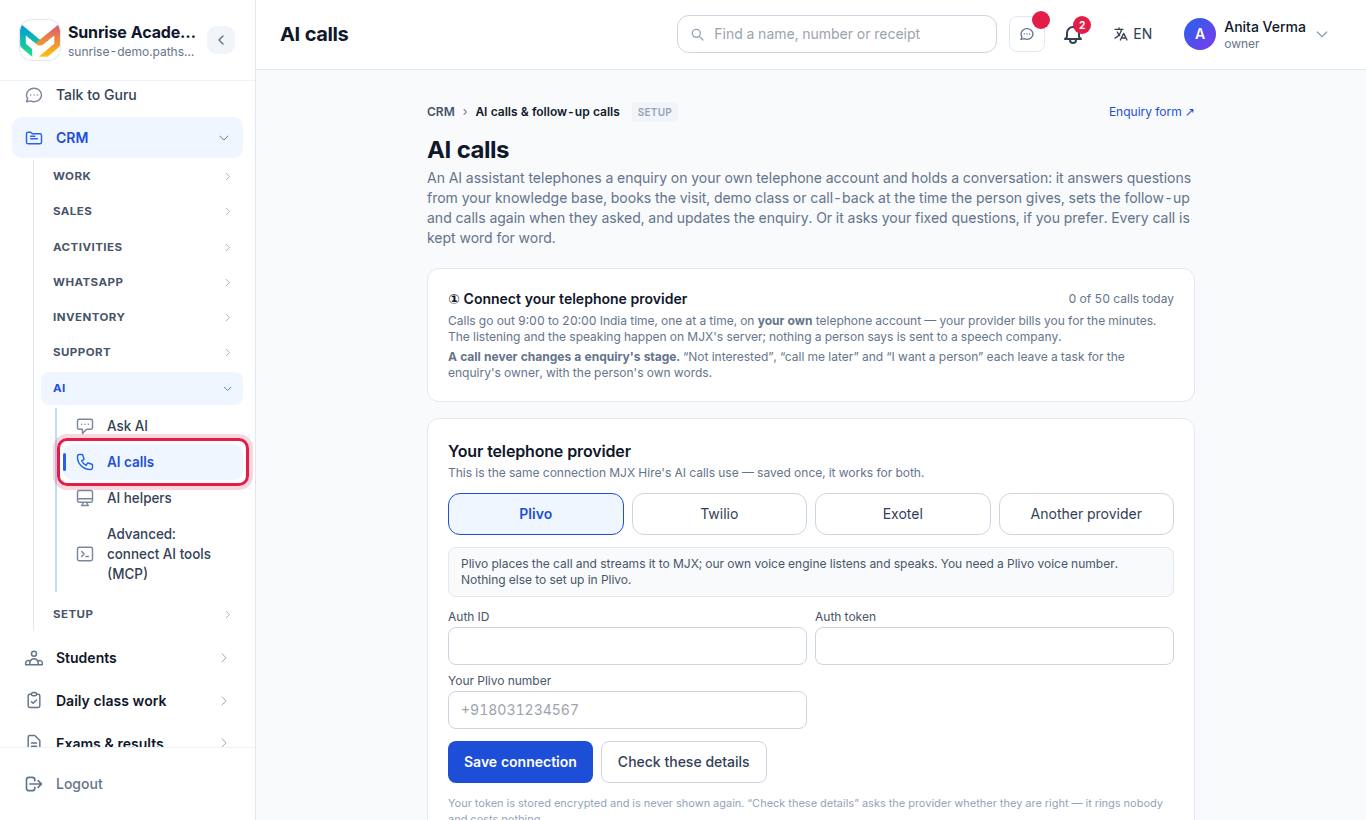
Only the Owner or an Admin can open and change this page. Other staff see the Call with AI button on a lead.
#What does the AI caller do on a call?
- It opens: "Hello, (first name). I am an AI assistant calling from (your name). You enquired about (course or class). Is this a good time to talk for two minutes? Please say yes, or press 1."
- It talks with the person — in A conversation mode, or by asking Your fixed questions (see below).
- It offers the next step: a visit, a demo class, or a call from a counsellor.
- If the person gives a clear day and time, and booking is allowed, it books the meeting and says "Booked for …". Otherwise it leaves a task for the lead's owner.
- It thanks the person and ends the call.
On a follow-up call it carries on: "…calling back as you asked. Last time we spoke about (course)." If a visit is already booked, it confirms the visit instead.
#Before you start: what you need
- MJX CRM Pro.
- A telephone account — Plivo, Twilio, Exotel or Another provider (a voice bot) — connected once in Apps › MJX CRM › CRM settings › Telephony. See Calls and telephony.
- MJX's voice engine on the server. If it is missing, the page says "The AI caller is not available on this server." — you can fill in everything, but it cannot be switched on until MJX installs it.
- Knowledge base pages (fees, timings, how to join) so the assistant can answer questions.
#Steps to set up AI calls
- Connect calling once in Apps › MJX CRM › CRM settings › Telephony: pick your provider, fill in its fields, press Save connection and Test connection. Already use Plivo for click to call? It is the same connection — nothing more to do.
- Open Apps › MJX CRM › AI calls. The top card shows "Calling is connected on +91…" with Change in Telephony →. If it says Connect calling first, press Open Telephony.
- Under The call, tick Switch AI calls on. Choose English or Hindi and The assistant's voice — press ▶ Listen to hear how it sounds on a phone line.
- Under How the assistant talks, choose A conversation (recommended) or Your fixed questions.
- Under The last question: the next step, choose what it offers: a visit, a demo class, or a call from a counsellor. Tick The assistant may book it itself if it may book on its own.
- In Things the assistant may say, type one fact per line, for example "Classes run 4 pm to 8 pm, Monday to Saturday."
- Press Save.
The connection is saved once for your organisation, in Telephony. Click to call uses it too, and so do MJX Hire's AI calls if you have MJX Hire Pro. The AI calls page shows it but does not ask for it.
#Conversation or fixed questions?
| A conversation (recommended) | Your fixed questions | |
|---|---|---|
| How it talks | Greets by name, says what they enquired about, answers questions from your knowledge base, fee structure, courses and the facts you typed | Asks your questions one at a time, after "Is this a good time?" |
| Languages | Follows the person: English, Hindi or Marathi | English, or Hindi if you typed the Hindi sentence for every question |
| Updates the lead | Yes, from what the person said (see below) | Never changes the lead's status |
| Questions | Not needed | Two to six questions; press + Add a question or Reset to the suggested questions |
For fixed questions, each question has a Short name (what your team sees), The sentence the assistant says, an optional Hindi sentence, and the kind of answer: anything they say, yes or no, a number, a date, or one of a list (two to eight choices). A clear answer can also be written to a lead field ("Interested in" or one of your custom fields of the same kind).
The suggested questions depend on your kind of organisation — for a school: class, the child's name and age, and when to start; for a coaching centre: course or exam, class or year, and when to start.
#How a call changes the lead (conversation mode)
| What the person says | What happens |
|---|---|
| They talk | The lead moves to Talking |
| They book the next step | The meeting is booked in Meetings; the lead is marked hot |
| "Call me tomorrow at 11" | The lead moves to Call back with that date, and the AI calls again at that time |
| "Not interested" | The lead is marked cold and the owner gets a task "Said not interested on the AI call — confirm" — it is never marked lost |
| "I want a person" | A high-priority task "Call them — asked for a person" |
| They ask not to be called | No more AI calls to that lead |
A status a person set by hand is never moved by the AI.
#What is saved after each call?
- The call in Recent AI calls on the AI calls page, with its status: Queued, Calling, Done, No answer, Call later, Wants a person, Not interested, Could not call or Cancelled.
- A note on the lead's timeline with a summary and the whole transcript.
- An entry in the CRM Calls log.
- The booked meeting, or a task for the lead's owner with the person's own words.
#How to call one lead or many
- One lead: open the lead and press Call with AI.
- Many leads: tick them on the Enquiries list (Leads for a business) and press 📞 Call them with AI — up to 100 at a time.
Calls go out one at a time. Outside 9:00–20:00 India time they wait for the window. A waiting call can be cancelled with Cancel. A lead is skipped, with the reason, when:
| Reason shown | Why |
|---|---|
| No phone number on the lead. | Add a number first |
| A call is already waiting. | Only one waiting call per lead |
| This lead is already converted. | Admitted / Joined / Won leads are not called |
| This lead is tagged "do not call". | The tags do not call, do-not-call, dnc or no calls stop calls |
| They asked not to be called. | Said on an earlier call |
| That lead is given to someone else. | With "only my leads" on, you can call only your own |
#Follow-up calls
With Call the lead after each follow-up message that gets no reply ticked, the assistant also calls a lead a few hours after each WhatsApp follow-up message (from Follow-up messages) that got no reply.
| Setting | Detail |
|---|---|
| Default | Off. It can be on only while AI calls are on. |
| Delay | 0 to 48 hours after the message (default 2) |
| Cancelled when | They reply on WhatsApp before the call goes |
| Limits | One automatic follow-up call a day per lead; at most three AI calls to one lead in 30 days |
| Not called | Admitted / Joined / Won or Not interested leads, and "do not call" leads |
#Limits and costs
| Item | Value |
|---|---|
| Hours | 9:00 to 20:00 India time |
| Daily limit | 1 to 1,000 calls a day (default 50) |
| Calls at once | One per organisation (shared with MJX Hire AI calls) |
| Call minutes | Billed by your own telephone provider |
| Conversation replies | Counted against your organisation's AI allowance |
| A call that waits three days without going out | Cancelled |
Nothing a person says is sent to an outside speech company — the listening and speaking happen on MJX's server.
#Who can use it?
| Action | Who |
|---|---|
| Open the AI calls page, change settings | Owner, Admin ("Only an owner or admin can change the AI caller.") |
| Connect the provider (on Telephony) | Owner, Admin |
| Press Call with AI on a lead | Staff who can see the lead |
| Plan | MJX CRM Pro (inquiry.ai_caller) |
#Tips
- Keep Things the assistant may say short and factual. The assistant says "our team will tell you" for anything not there.
- Turn on booking only after your Meetings slots are set up, so it books real times.
- Read a few transcripts in the first week and add the facts people ask about.
- Tag leads "do not call" when a person asks you not to phone them.
#Questions people ask
Which plan has AI calls?
AI calls come with MJX CRM Pro. Without Pro the page opens and shows what it does, with a lock and a See Pro link.
Who pays for the call minutes?
Your own telephone provider (Plivo, Twilio, Exotel or another) bills you for the minutes. The listening and speaking run on MJX's own voice engine.
What time does the AI call people?
Only between 9:00 and 20:00 India time. A call due at night waits and goes in the morning.
Which languages does it speak?
You choose English or Hindi for the call. In conversation mode the call follows the language the person speaks — English, Hindi or Marathi.
Will the AI mark a lead as lost?
No. "Not interested", "call me later" and "I want a person" each leave a task for the lead's owner, with the person's own words.
How many times can it call one person?
Automatic calls stop after three AI calls to one lead in 30 days — then a person should call.