
Payroll reports, salary register and bank sheet
Download the salary register, the bank-transfer sheet, statutory files and every payroll report from one Payroll reports screen.
MJX Payroll puts every report it produces on one Payroll reports screen. "Nothing here changes anything." You can search, filter by group and star the ones you use most.
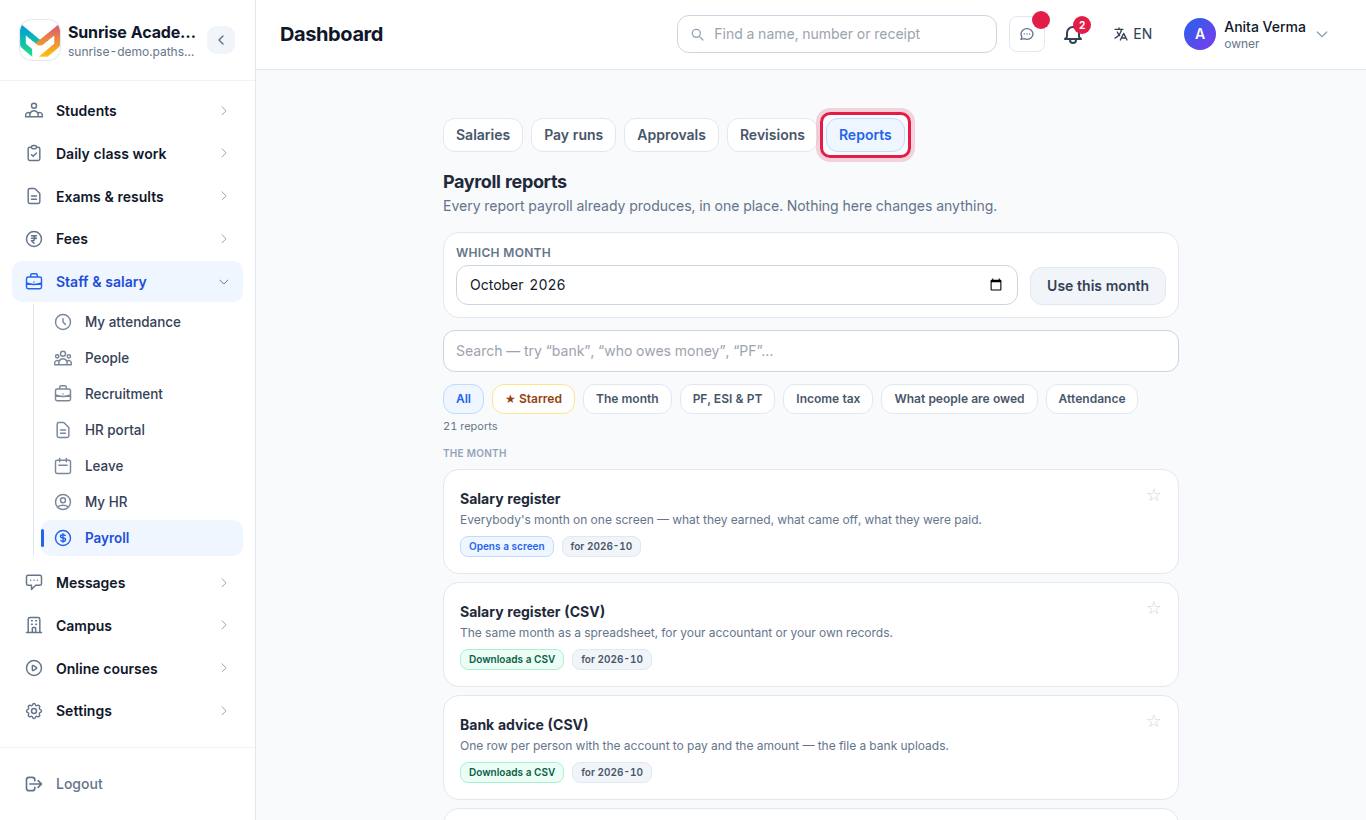
#How to find a report
- Choose Which month and press Use this month (monthly reports follow it).
- Type in Search — try "bank", "who owes money" or "PF".
- Or press a group: All, ★ Starred, The month, PF, ESI & PT, Income tax, What people are owed, Attendance.
- Press ☆ beside a report to star it.
#Which reports are there?
| Group | Report | What it is |
|---|---|---|
| The month | Salary register | Everybody's month on one screen — what they earned, what came off, what they were paid. |
| The month | Salary register (CSV) | The same month as a spreadsheet, for your accountant or your own records. |
| The month | Bank advice (CSV) | One row per person with the account to pay and the amount — the file a bank uploads. |
| The month | Payslips issued | Which payslips are out, which are still drafts, and who has been sent theirs. |
| The month | Pay runs and their approvals | Every month that was prepared, who approved it and when it was paid. |
| PF, ESI & PT | PF, ESI and PT — what was deducted | The month's statutory deductions per person, and the rates used. |
| PF, ESI & PT | EPF ECR file | The electronic challan file, in the format the EPFO portal takes. |
| PF, ESI & PT | ESI monthly contribution | The contribution return for the ESIC portal. |
| PF, ESI & PT | Professional tax | PT deducted per person for the month, by state slab. |
| PF, ESI & PT | Filing — everything in one place | All four returns with what has been filed and what has not. |
| Income tax | Income tax — everybody | Each person's regime, yearly tax, what has been deducted so far and what is suggested this month. |
| Income tax | Form 24Q (quarterly TDS) | The quarterly TDS return, ready for the filing utility. |
| Income tax | Form 16 / Form 16 — everybody, one PDF | The yearly certificate for each person. |
| What people are owed | Salary revisions | Every increment proposed, who approved it, from when, and the months it owed. |
| What people are owed | Arrears owed | What is still owed for past months and what has been paid off. |
| What people are owed | Advances and loans | Who has taken an advance, what has been repaid and what is left. |
| What people are owed | Reimbursement claims | Expense claims, what was approved and which payslip carried them. |
| Attendance | Punch log (CSV) | Every check-in and check-out with its time, device and place. |
| Attendance | Staff attendance — the month (CSV) | Present, absent, leave and late per person per day. |
| Attendance | Staff register | The month on screen, and where a correction is made. |
The attendance reports come from MJX Attendance. See office attendance.
#The month on one screen
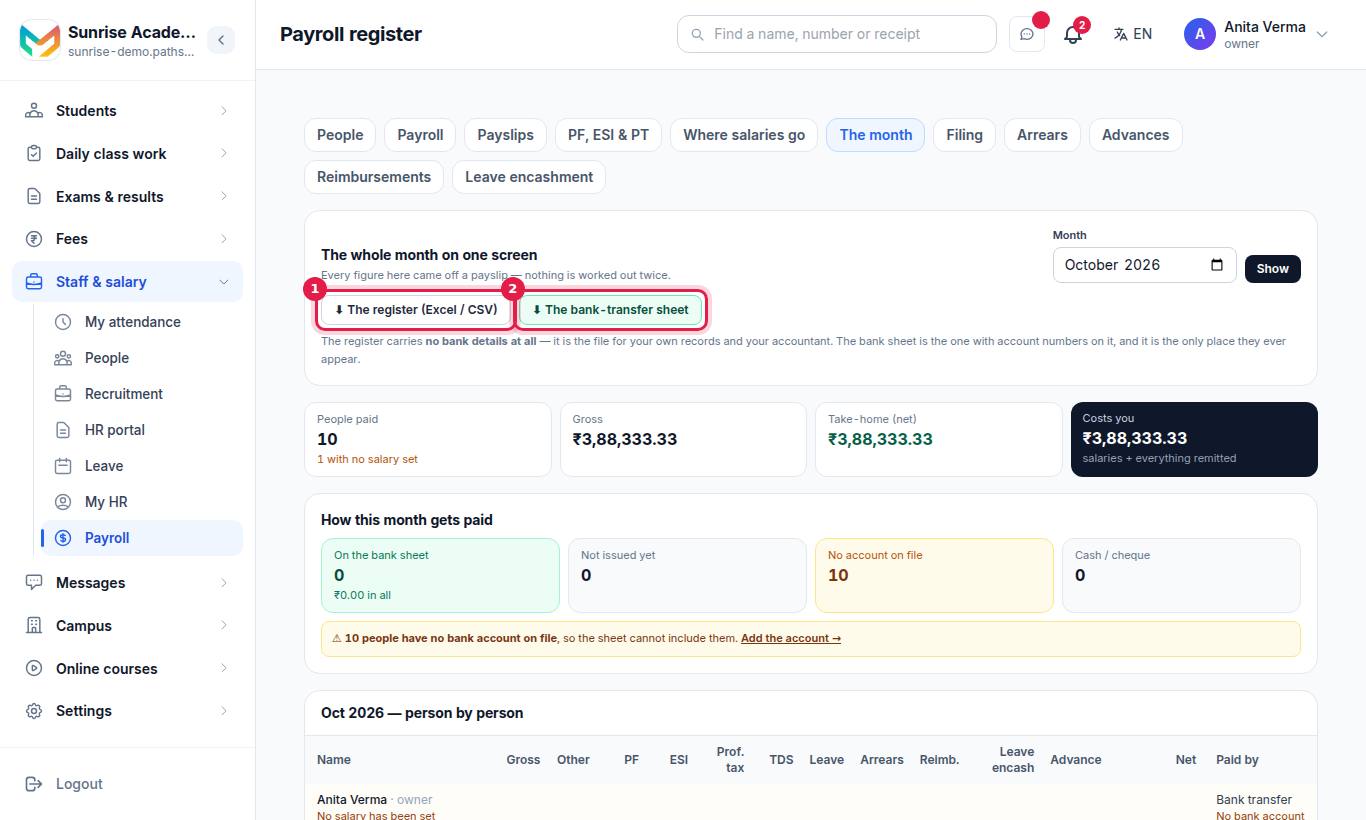
"The whole month on one screen. Every figure here came off a payslip — nothing is worked out twice."
- Pick the Month and press Show.
- Read the totals: People paid, Gross, Take-home (net) and Costs you (salaries plus everything remitted).
- What you owe beside the salaries — PF, ESI and PT, each as one payment covering the person's half and the organisation's half. "Paying only the person's half is the commonest mistake there is, so both are shown."
- How this month gets paid — On the bank sheet, Not issued yet, No account on file, Cash / cheque.
- Read the person-by-person list (Gross, Deductions, PF, ESI and more; Issued or Not issued).
- Download ⬇ The register (Excel / CSV) or ⬇ The bank-transfer sheet.
#Payslip PDFs
- Print all payslips on the Payslips screen gives one PDF for the whole month.
- Print payslip gives one person's.
- Employees download their own from My payslips › Open payslip.
See run payroll and issue payslips.
#Who can use it?
- Payroll reports screen: owner and admin.
- The month, the register and bank sheet downloads: owner and admin, or anyone given Payroll Reports in Roles & permissions.
- Plan: the register and bank sheet need MJX Payroll Basic or above. The PF, ESI and PT files need Pro. Income-tax reports need Basic; the Form 24Q download and Form 16 PDFs need Pro. Reports your plan does not include are hidden and counted at the bottom of the screen.
#Questions people ask
Does the salary register contain bank account numbers?
No. The register carries no bank details at all. Account numbers appear only in the bank-transfer sheet you download for your bank.
Why is somebody missing from the bank sheet?
Either their payslip has not been issued yet, they have no bank account on file, or they are paid by cash or cheque. The month screen counts each group.
Can my accountant download the reports without seeing everything?
Yes. Give them the Payroll Reports permission. They can read the register, download the files and read the filing screens, but not change anything.
Why are some reports not shown?
Reports that need a feature your plan does not have are hidden, and the screen says how many. Income tax, the statutory filings and advances each come with their own plan.