
Manage enquiries and leads in MJX CRM
Capture, sort and move every enquiry (lead) along — stages, owner, tags, score, duplicates, fee quote, admit in one step, import and export.
In MJX CRM, an enquiry is one person who got in touch — a parent, a student or, for a business, a customer. A business sees the word Lead instead of Enquiry everywhere. This page explains the list, one enquiry's page, stages, owners, tags, score, duplicates and import.
(For a business: Apps › MJX CRM › Leads.)
#Where do enquiries come from?
| Way in | Message sent? |
|---|---|
Your public enquiry form (/inquire), its embed and tracked links | Yes — a welcome on WhatsApp, then your follow-up messages |
| A new number messaging your WhatsApp | The WhatsApp AI answers |
| Add enquiry by hand | No — "Nothing is sent." |
| Import from Excel | No — "Nobody is messaged." |
| Lead sources, connectors (Facebook, IndiaMART…), the API | No |
See Lead sources and connectors.
#The Enquiries list
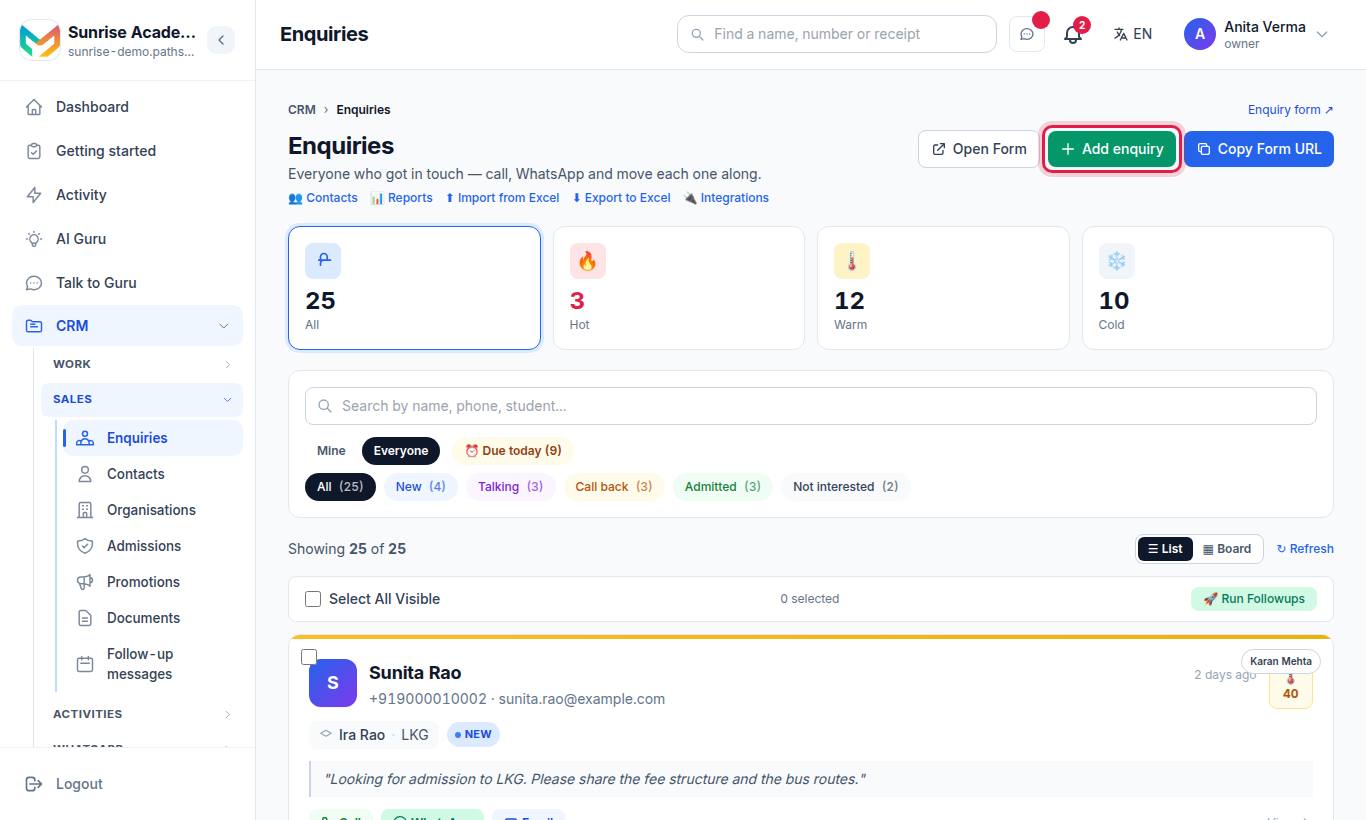
The page opens with "Everyone who got in touch — call, WhatsApp and move each one along."
| Part | What it does |
|---|---|
| Hot / Warm / Cold / All cards | Filter by temperature (from the score) |
| Mine · Everyone (owner, admin) or My team (staff) | Whose enquiries you see |
| ⏰ Due today (n) | Follow-ups due today or already late |
| Status tabs | New · Talking · Call back · Admitted · Not interested |
| Tag row | Filter by one tag |
| Search | By name, phone or student |
| ☰ List / ▦ Board | A list, or columns by stage that you drag cards between |
| Open Form · Copy Form URL | Your public enquiry form |
| Links | 👥 Contacts · 📊 Reports · ⬆ Import from Excel · ⬇ Export to Excel · 🔌 Integrations |
Staff members see their own enquiries plus "unassigned enquiries are shown to you either way".
#How to add an enquiry by hand
- Press Add enquiry (a business sees "Add lead").
- Fill Contact name and Phone (pick the country code if the number is not Indian). Student, Class, Email and Note are optional.
- Press Add it.
#Bulk actions
Tick enquiries (or Select All Visible). A bar shows "n selected" with:
| Button | Does |
|---|---|
| Status | Change the stage of all ticked |
| Followup | Set one follow-up date and time |
| Assign | Hand them to a staff member, Take these myself or Unassign |
| Message | Send a WhatsApp — an approved template (works any time) or free text (only to people who wrote in the last 24 hours) |
| Tag | Add or take off tags, several with commas (up to 10 tags on one enquiry) |
| Call them with AI | Queue an AI call to each |
| Delete | Delete the ticked enquiries |
A button your plan does not include shows 🔒 and, when pressed, a line that names the plan, such as "Changing many at once comes with MJX CRM Basic and above."
#One enquiry's page
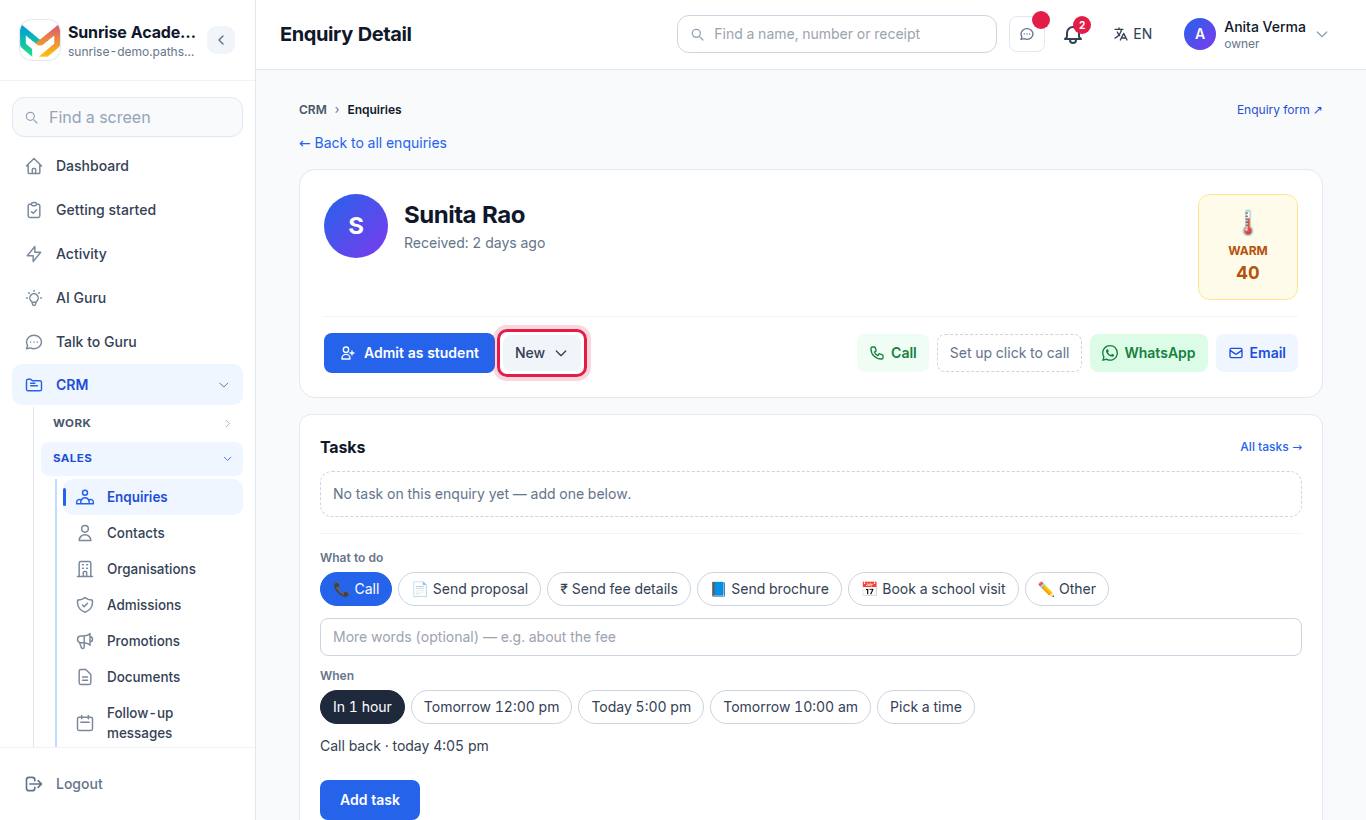
Open an enquiry to see everything about that person in one place.
| Section | What is there |
|---|---|
| Header | Name, when received, Hot / Warm / Cold with the score, the stage buttons |
| Contact Details / Details | Phone, email, student, class or course, and your vertical's own fields |
| Original Message | What they wrote |
| Additional Details | Every extra field a form or source sent |
| ✨ AI help | Brief me before I call and Draft a WhatsApp reply — "AI drafts, you decide — nothing is sent until you send it." |
| 🏷 Tags | Add a tag ("Words to find this person again — a course, where they came from, anything.") |
| 🎯 Enquiry score | The score and its reasons, Re-score |
| 📅 Auto messages | Start or stop a sequence for this person |
| 🤖 AI call | Call with AI |
| Meetings | + Book a meeting (School visit, Demo class or Meeting) |
| Calls | + Log a call; with Click to call set up, call from the browser |
| ⚡ Auto actions | Which rules touched this enquiry |
| Internal Notes | "Only visible to your team" — Add Note |
| Attachments | Proposals, agreements, brochures |
| WhatsApp conversation | The chat, with delivery ticks and a reply box |
#Stages (statuses)
Every enquiry is in one of five stages. The words change with your kind of organisation:
| Code | Shown as | Meaning |
|---|---|---|
new | New | Just arrived |
in_conversation | Talking | You are in touch |
follow_up_due | Call back | A call-back is due |
converted | Admitted (school, college) · Joined (coaching, tuition, institute) · Won (business) | They said yes |
lost | Not interested | Closed |
Press a stage button at the top of the enquiry, or drag the card on the Board. You can add your own stages under Stages & fields.
#Who looks after an enquiry?
Each enquiry can have one owner, shown as Looked after by (a Counsellor, Teacher or Salesperson, depending on your organisation). Only an owner or admin can hand enquiries to somebody else; a staff member can take enquiries for themselves. Assigning comes with a paid CRM plan. To keep staff to their own enquiries only, see Agents and access.
#The enquiry score
The score (0–100) is computed from what happened, not from the form. It updates when something happens and every night.
| Reason | Points |
|---|---|
| Enquired | +20 |
| Gave an email · Wrote a message | +5 each |
| Named what they want | +10 |
| Referred by someone | +10 |
| Replies on WhatsApp in 14 days | +10 each, up to +30 |
| Replied within an hour | +5 |
| Talked on the phone | +15 |
| Interested on the AI call | +15 |
| Visit / demo booked · Came for a visit / demo | +20 · +25 |
| Missed a visit / demo | −10 |
| 3 or more calls not answered | −10 |
| Said not interested on the AI call | −25 |
| Tagged not interested / do not call | −30 |
| No activity for 7 / 14 / 30 days | −10 / −20 / −30 |
Hot is 70 or more, Warm 40–69, Cold below 40. An admitted or closed enquiry keeps its last score.
#Same person twice (duplicates)
The CRM matches people by the last 10 digits of an Indian phone, and by the full number for any other country. On an enquiry's page you see "Same number, n other enquiries" with Merge into this one.
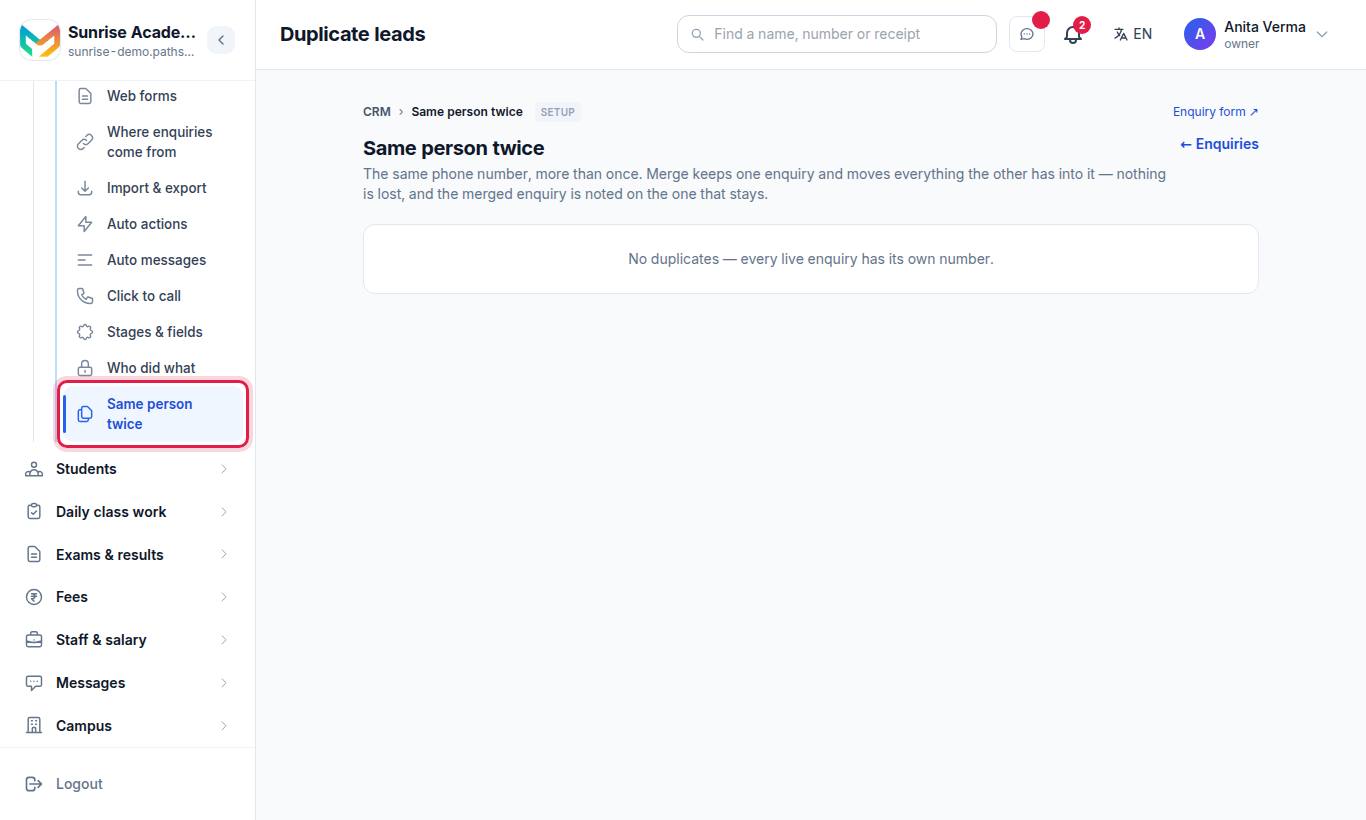
The page lists every number that has more than one live enquiry, with notes, messages, calls and meetings for each, and marks one "suggested to keep". Tick the one to keep and press Merge into the ticked enquiry.
Merging moves notes, tasks, calls, meetings, tags, messages, AI calls and attachments to the one you keep, fills its empty fields, and never moves it to an earlier stage. Nothing is deleted for good.
#Send a fee quote
On an enquiry, press 💰 Send fee quote. The CRM builds a WhatsApp message from your fee structure for the class they asked about (or every class). It is sent directly if the person wrote in the last 24 hours; otherwise you get a link to send it from your own WhatsApp. The text is logged on the enquiry. "A fee, date or offer is only written if you type it here."
#Admit in one step
For schools and institutes with student records, press 🎓 Admit in one step on the enquiry. "The student is created from what this enquiry already knows; pick the class." Choose the class (and section), then Admit.
If it was already done: "This enquiry was already admitted." If your plan is full: "Your plan has no room for another student."
#Contacts
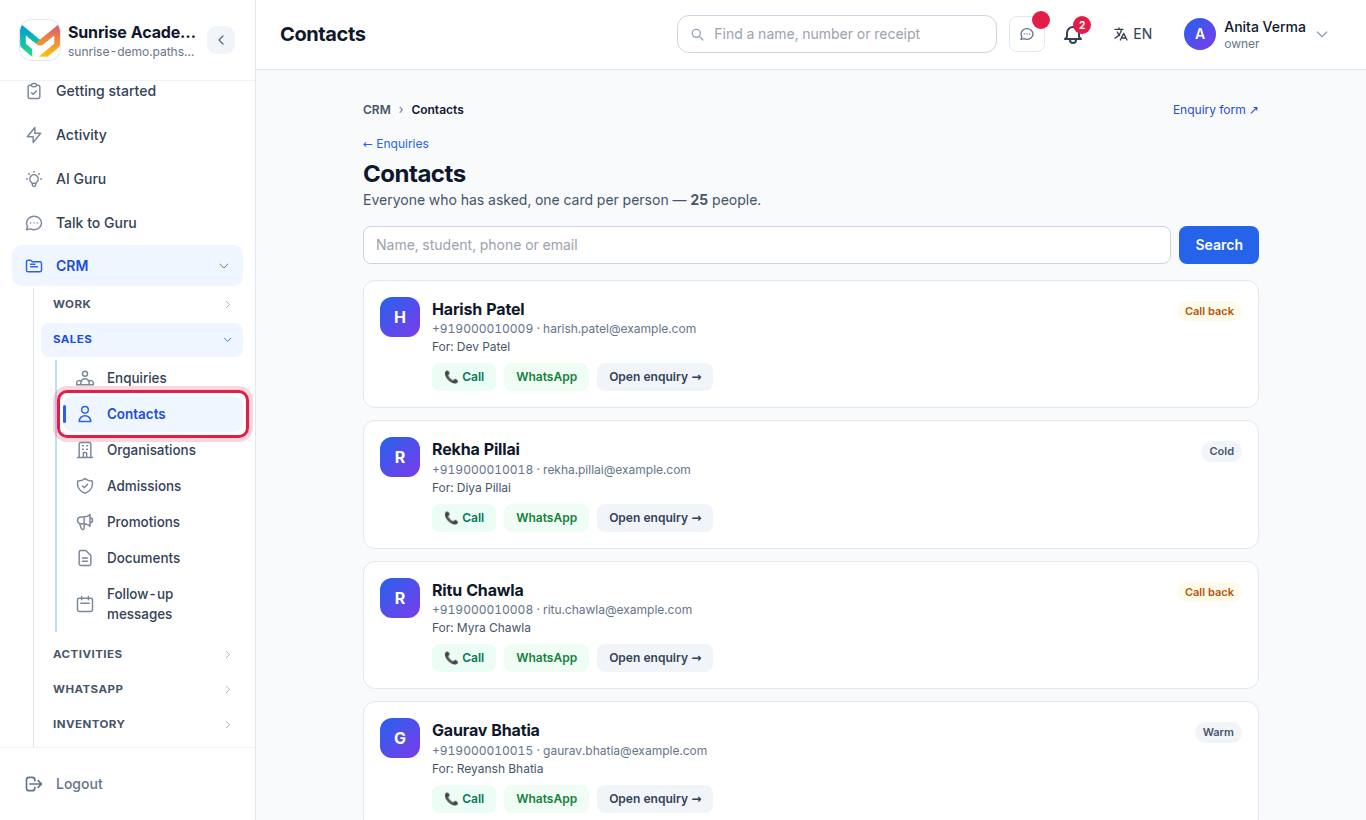
"Everyone who has asked, one card per person" — one card per phone number, even if they enquired several times, with 📞 Call, WhatsApp and links to each enquiry.
#Import and export
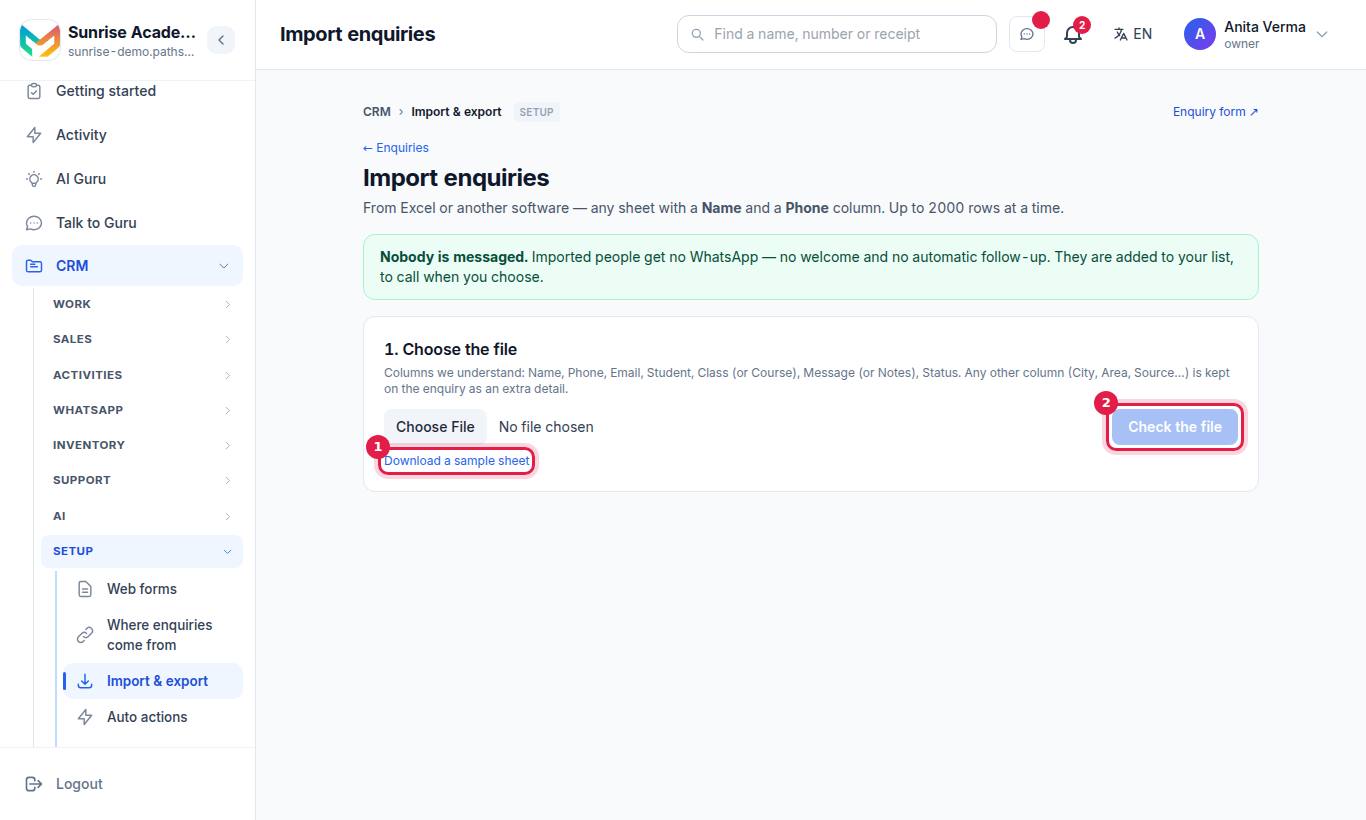
- 1. Choose the file — any Excel sheet with a Name and a Phone column, up to 2,000 rows. Download a sample sheet if you need one.
- Press Check the file.
- 2. What will happen shows each row as new, already have, or cannot import (with the reason). Tick Fill in what is missing to add email, student, class and extra details to people you already have — never the name or status.
- Press Import, then See your enquiries.
Columns understood: Name, Phone, Email, Student, Class (or Course), Message (or Notes), Status. Any other column (City, Area, Source…) is kept as an extra detail. Nobody is messaged.
⬇ Export to Excel on the Enquiries list downloads your enquiries as a sheet. Import and export are for the owner and admins — or a job given Import Enquiries / Export Enquiries — on CRM Basic and above. A staff member's export holds only the enquiries their own list shows.
#Who can use what?
| Feature | Who | Plan |
|---|---|---|
| See and work enquiries | Owner, Admin, Staff with CRM access | Every plan |
| Assign to others, bulk actions | Owner, Admin | Paid plan (lock shows which) |
| Import enquiries, Export to Excel, CRM reports | Owner, Admin, or a job with Import / Export Enquiries or View Inquiry Dashboard | CRM Basic and above |
| Same person twice (merge) | Owner, Admin | Every plan |
| AI calls, Auto actions, Auto messages | Owner, Admin | CRM Pro |
#Tips
- Work ⏰ Due today first every morning.
- Tag by course or campaign ("NEET", "Walk-in") so you can filter and message groups.
- Merge duplicates weekly, so one person has one story.
#Questions people ask
Does adding an enquiry by hand send a WhatsApp message?
No. "Add enquiry" only adds the person to your list — no WhatsApp and no email goes out. Only the public enquiry form sends a welcome.
How is the lead score worked out?
From what happened — replies, calls, visits, silence. 70 and above is Hot, 40 to 69 is Warm, below 40 is Cold. Press Re-score to update it at once.
Can a staff member see everyone's enquiries?
By default a staff member sees their own list (Mine) plus unassigned enquiries. The owner and admins see everyone. The owner can tighten this under "Who did what".
How many rows can I import at once?
Up to 2,000 rows per file. Nobody is messaged, and numbers you already have are not added twice.
What happens when I admit an enquiry?
"Admit in one step" makes the student from what the enquiry knows, marks the enquiry Admitted (or Joined), and links to the student's page and fee ledger.