
MJX Hire quickstart — post your first job
Sign up for MJX Hire, post your first job, share your careers page and see your first application — step by step.
This quickstart takes you from sign-up to your first application in MJX Hire. It takes about ten minutes. You need a mobile number, an email address and the details of one job you want to fill.
#Create your account
Open the MJX Hire sign-up page. MJX Hire is already ticked under "You are signing up for".
- Pick what best describes your organisation (School, Coaching, Tuition, College, Institute or Business).
- Type your organisation's name and choose Your Portal URL — for example
sunrisegives yousunrise.pathshala.mjxtechnologies.com. - Type your PIN code; the city and state fill in by themselves.
- Fill in your name, WhatsApp phone number, email and a password.
- Press Create and Get Portal.
You will sign in with this phone number. Your 14-day trial of every feature starts now.
#Open Recruitment
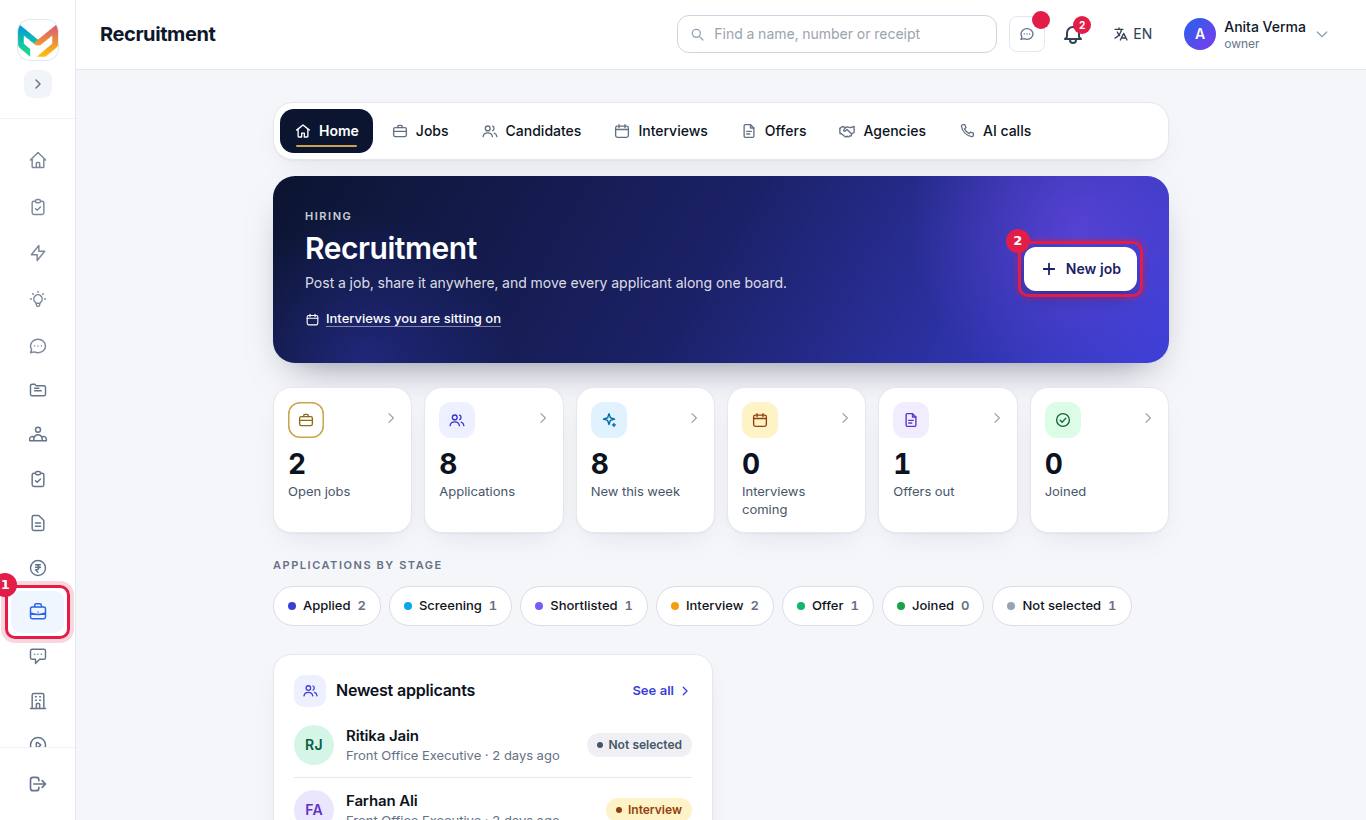
Sign in at your portal address. Press Apps, choose MJX Hire and press Recruitment. You see the Recruitment home with six count tiles: Open jobs, Applications, New this week, Interviews coming, Offers out and Joined.
#Write your first job
Press New job. Only Job title (required) is needed, but fill in what you know:
- Department, Place, Type, Work mode, Openings
- Experience from / Experience to (years) and Salary (tick Show the salary on the job page to show it)
- Last date to apply
- Requirements — one per line. These are what the ATS match checks resumes against.
- Job description — or press ✨ Draft with AI on MJX Hire Pro.
Press Publish job to put it live, or Save as draft to finish later.
#Share it
Open the job. Under Link, WhatsApp and website code for this job, press Copy to copy the link, or Share on WhatsApp ↗. Your job is also sent to the free job boards by itself.
#Watch the first application arrive
When someone applies, they appear on the job's Applicants tab and on Candidates, in the Applied stage. Open them to read the answers and resume, add notes and move them along.
#What next?
- Add more people to the hiring team: give them the HR role so they can open Recruitment. See roles and managers.
- Learn the board: Candidates and the pipeline.
- Set up interviews and offer letters.
- Get the MJX Hire app on your phone.
#Questions people ask
Do I need a card to start?
No. MJX Hire starts with a 14-day free trial of every feature, with no card. After the trial you stay on Forever Free until you choose a paid plan.
What is the least I need to post a job?
Only the job title. Everything else on the job form is optional, but a clear description and requirements bring better applicants.
Where is my careers page?
It is at your own Pathshala address followed by /careers, for example https://sunrise.pathshala.mjxtechnologies.com/careers.
Can I add candidates I already have?
Yes. Open the job and press Add a candidate. You can attach their resume. Nothing is sent to the person.