
Enquiry form and web forms in MJX CRM
Set up your public enquiry form, change its words and questions, and make extra web forms with their own link, source, campaign and WhatsApp auto-reply.
Every MJX CRM institute or business has a public enquiry form. Families, students or customers fill it in, and each submission becomes an enquiry (a lead for a business) in the CRM, with your welcome message on WhatsApp. You can also make extra web forms — one per purpose — each with its own link.
Only the Owner or an Admin can open these pages.
#The main form
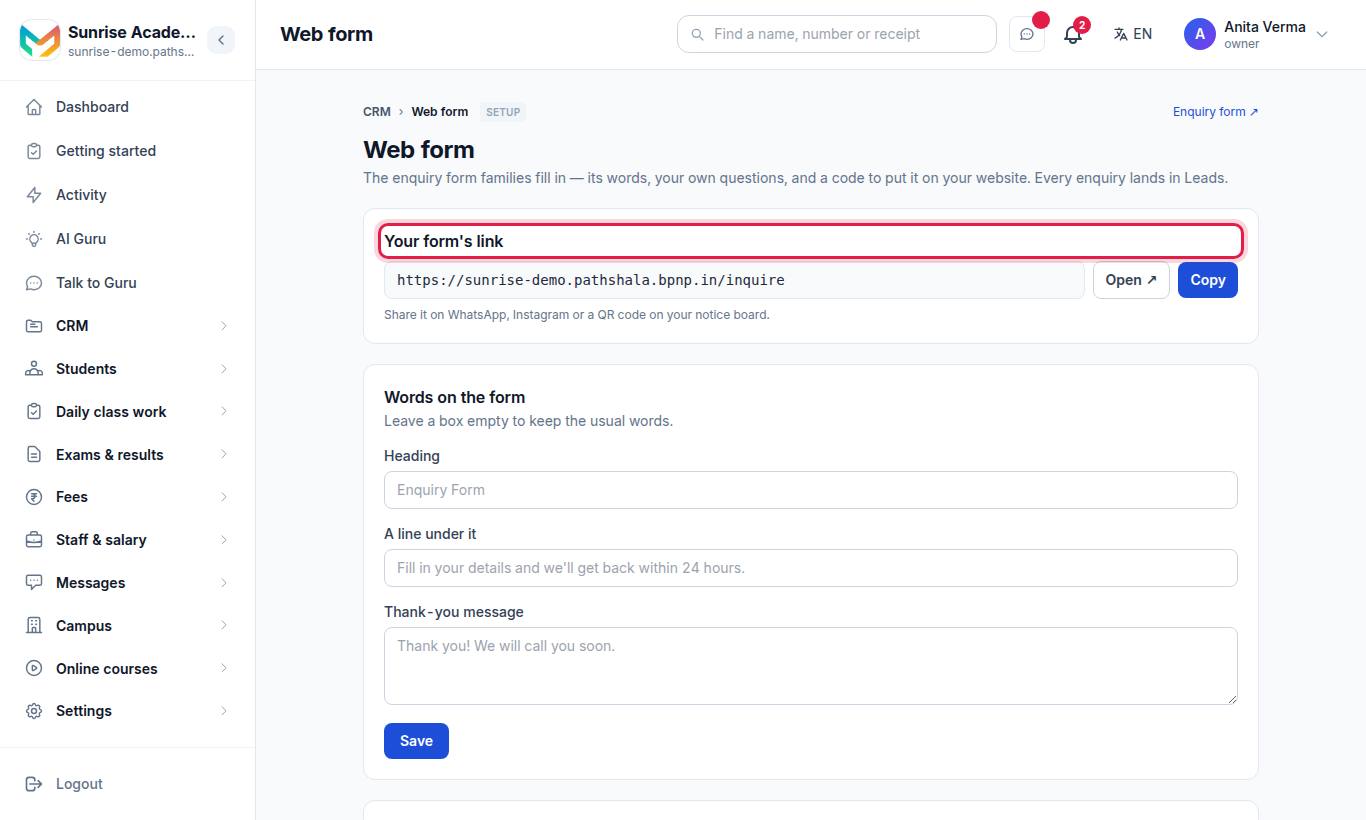
The Web form page has four parts.
#Your form's link
Your link looks like https://sunrise.pathshala.mjxtechnologies.com/inquire. Press Copy or Open ↗. "Share it on WhatsApp, Instagram or a QR code on your notice board."
Every CRM screen also has an Enquiry form ↗ link (Lead form for a business) at the top right that opens it.
#How to change the words on the form
- Under Words on the form, fill in any of:
- Heading (up to 80 characters; default "Enquiry Form"),
- A line under it (up to 300 characters),
- Thank-you message (up to 500 characters; shown after a person sends the form).
- Leave a box empty to keep the usual words.
- Press Save.
#Form builder
The Form builder card says what the form holds now and has Open the form builder →. Use it to add sections and your own questions, rename fields or take them off. See Custom fields and the form builder.
#Your own questions on the form (CRM Pro)
Your custom fields from Stages & fields are listed here. Tick On the form to ask it ("On the form now.") or untick it ("Taken off the form."). The answer is saved on the enquiry. With no fields yet, the page points you to Setup → Pipeline & fields.
Without Pro: "Asking your own questions (course wanted, budget, preferred batch…) comes with MJX CRM Pro."
#Put it on your website
Press Copy code to copy the one-line script. If your website does not allow scripts, open "Your website does not allow scripts? Use this instead" for an iframe code. Code details: Embed the web form.
#Extra web forms
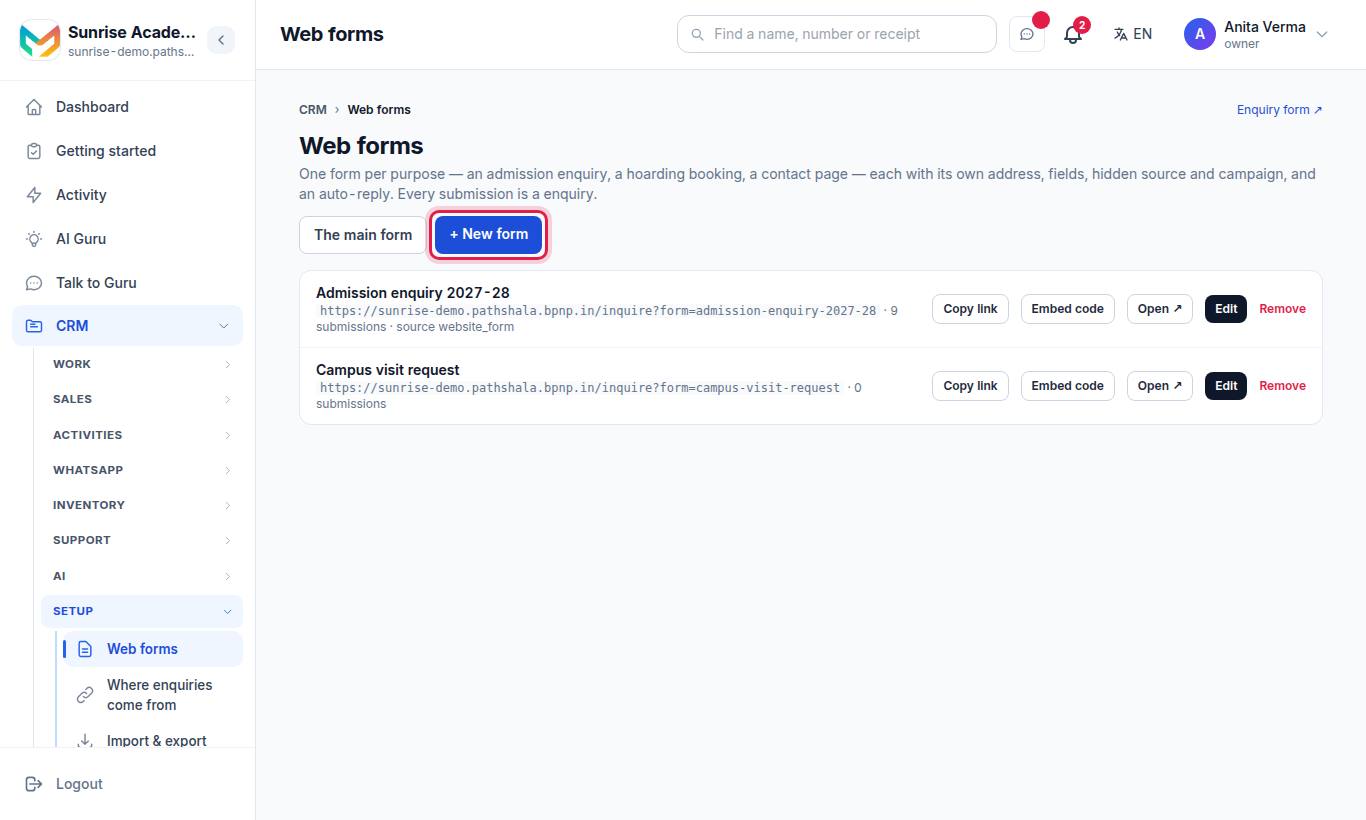
Make a form per purpose — an admission enquiry, a demo class booking, a hoarding booking, a contact page. Each has its own address, words, fields, hidden source and campaign, and an auto-reply.
#Steps to make a web form
- Press + New form.
- Fill in Name (required, e.g. "Admission 2027"), Heading on the form, A line under it and The thank-you.
- Under Fields on this form, tick what the form asks; tick must to make it required. Fields that are required on every form cannot be switched off. Your own fields are marked your field (Pro).
- Set Source written on each enquiry (e.g.
website_admissions) so Reports can tell this form apart. - Pick a Campaign (a Promotion from the CRM), or "— none —".
- Pick an Auto-reply on WhatsApp template, or keep "— the usual welcome —".
- Keep The form is live ticked.
- Press Save form.
The link's last part (the slug) is made from the name. If that name is already used, a number is added.
#Managing your forms
| Button | What it does |
|---|---|
| Copy link | Copies the form's link |
| Embed code | Shows an iframe code for this form |
| Open ↗ | Opens the form as a visitor sees it |
| Edit | Changes the form; below it, the form's own labels, choices, icons and button, and Open the form builder → |
| Remove | "Remove this form? Its address stops working at once; the leads it brought stay." |
A form that is not live is marked off. An unknown or switched-off form link shows your main form, so old links and printed QR codes never break.
Limits: up to 20 extra forms. Name and heading up to 80 characters, intro 300, thank-you 500.
#What the visitor sees
- The form opens with your name, logo and heading.
- They fill the fields and press the button (for example Send Enquiry).
- The thank-you page shows your thank-you message.
#What happens to each submission?
- A new enquiry is made with the source "Website form" (or the form's own source), linked to the form and its campaign.
- Your welcome message goes on WhatsApp, and a form with an Auto-reply on WhatsApp template sends that template. Your normal follow-up messages start. See Follow-ups and sequences.
- The owner and the team are told of the new enquiry.
#Tracked links
The Make my Google Maps link, Make my Instagram link and Make my QR link buttons on Where enquiries come from make extra web forms for you, already stamped with their source. They appear in this list. See Lead sources and connectors.
#Who can use it?
| Action | Who | Plan |
|---|---|---|
| Change the main form, make extra forms | Owner, Admin | Every plan |
| Your own CRM fields on a form | Owner, Admin | MJX CRM Pro |
| Fill the form | Anyone with the link | — |
Other users get "Only an owner or admin can change the form."
#Questions people ask
Where is my enquiry form?
At your institute's own address followed by /inquire. The Web form page shows the full link with Copy and Open buttons.
How many extra web forms can I make?
Up to 20, each with its own link (/inquire?form=<name>), fields, source, campaign and auto-reply.
What happens when I remove a form?
Its address stops working at once and shows your main form instead. The enquiries it brought stay in the CRM.
Does the web form need CRM Pro?
No. The form, its words, extra forms and the embed code work on every plan. Only your own CRM fields on a form need Pro.