
Cheque register — cleared and bounced fee cheques
Track every fee cheque and DD in Pathshala, mark it cleared or bounced, and let a bounce reopen the bill by itself.
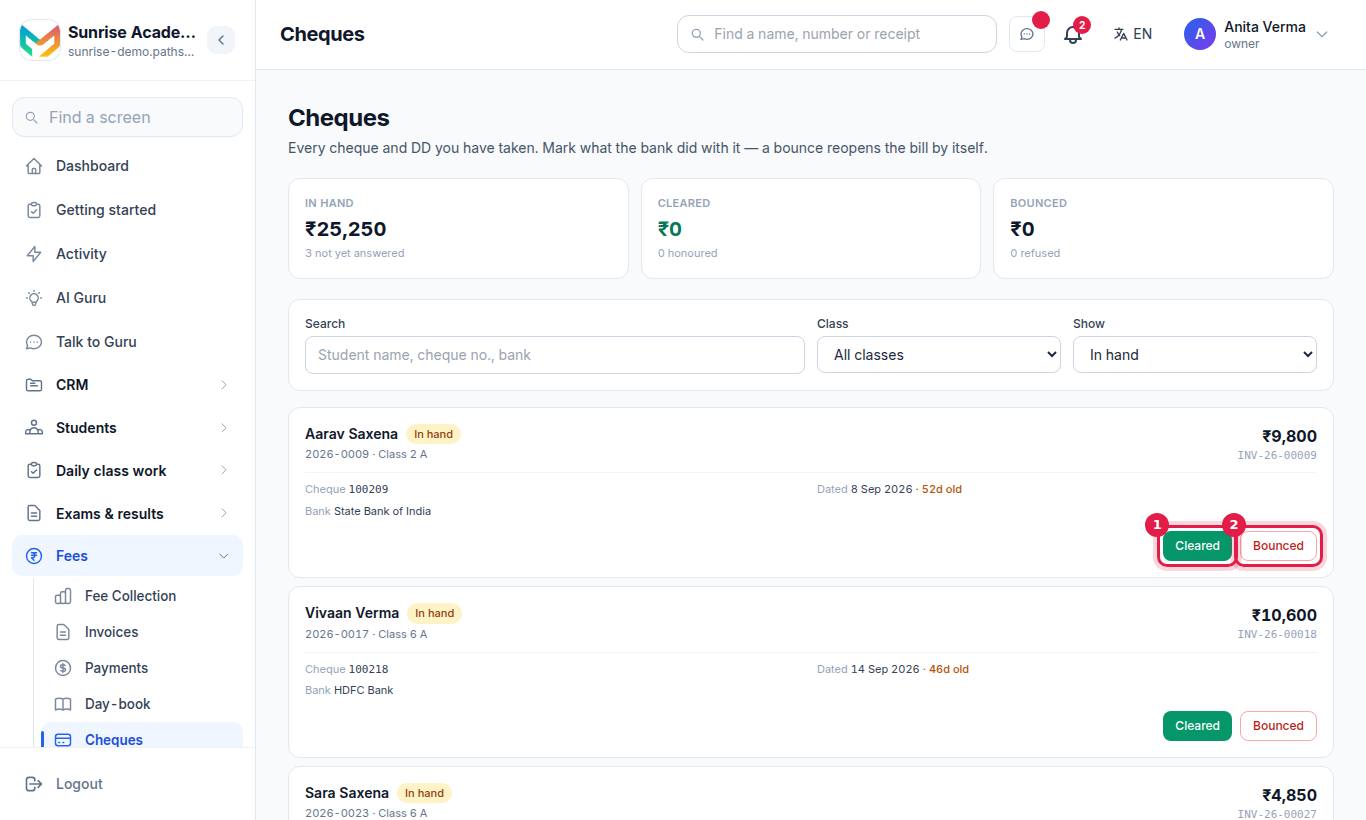
The Cheques screen in Pathshala lists every cheque and demand draft you have taken for fees. A cheque counts as a payment as soon as it is recorded, so the family gets a receipt — and when the bank answers, you mark it Cleared or Bounced. A bounce reopens the bill by itself.
#Who can use this?
| Action | Who |
|---|---|
| See the register | Owner, Admin, or staff with Manage Cheques (Accountant) |
| Mark Cleared or Bounced | Owner, Admin, or a role given the cheque-settling permission |
The cheque register is in MJX Fees Management Basic and above.
#How a cheque enters the register
Record the payment as usual (Collect a fee), choose a Cheque method and fill in Cheque Number, Cheque Date and Bank Name. The test is the cheque number: a DD recorded under a bank method with its number typed in the cheque field also joins the register.
#What the screen shows
Three tiles, which also act as tabs:
| Tile | Meaning |
|---|---|
| In hand | Cheques the bank has not answered yet — amount and count |
| Cleared | Cheques honoured |
| Bounced | Cheques refused |
Below, use Search (student name, cheque number, bank), the Class filter and Show (In hand, Cleared, Bounced, All cheques).
Each card shows the student, admission number and class, the amount, the invoice, the Cheque number, the date it is Dated (with n d old when an in-hand cheque is over 30 days old), the Bank, and once answered the date and who recorded it.
#How to mark a cheque cleared
#Steps
- Find the cheque under In hand.
- Press Cleared.
- Check the Date the bank answered (today by default; it cannot be in the future). A Note is optional.
- Press Mark cleared.
#How to record a bounced cheque
#Steps
- Find the cheque and press Bounced.
- Set the Date the bank answered.
- Type the reason in Note (required), for example Insufficient funds or Signature mismatch.
- Press Record bounce.
#Tips
- Look at In hand every week; anything over 30 days old is marked.
- When a cheque bounces, ask the family for a new payment and record it against the reopened invoice. Do not cancel the bounced payment — the bounce already reopened the bill.
- In Tally, cheques are posted to Cheques Received until you choose otherwise; see Day-book and Tally.
#Questions people ask
How does a cheque get into the register?
Any payment recorded with a cheque number joins it. Choose your Cheque method and type the cheque number, date and bank when you record the payment.
What happens when a cheque bounces?
Mark it Bounced with the date and a reason. The amount goes back onto what the family owes, the invoice opens again, and the money leaves your collection totals.
Is a bounce charge added?
No. Pathshala does not add a bounce charge by itself. If you charge one, add it to the family's next bill.
Who can mark a cheque cleared or bounced?
The owner or an admin, or a staff role given that permission. Others can see the register but not change it.