
CRM reports, analytics and monthly targets
See enquiries to admissions by period, source and person, revenue and pipeline against monthly targets, and set targets for your team.
MJX CRM has two report screens. Reports follows enquiries (leads, for a business) from arrival to admission (joined, won) over a period. Analytics shows how this month is going against your targets, with deals, revenue and campaigns. Both use only your own records.
| Screen | Best for | Plan |
|---|---|---|
| Reports | Conversion, sources, who has them, response time, weekly trend | CRM Basic |
| Analytics | This month vs targets, pipeline and revenue, campaigns, team | CRM Basic |
#Reports
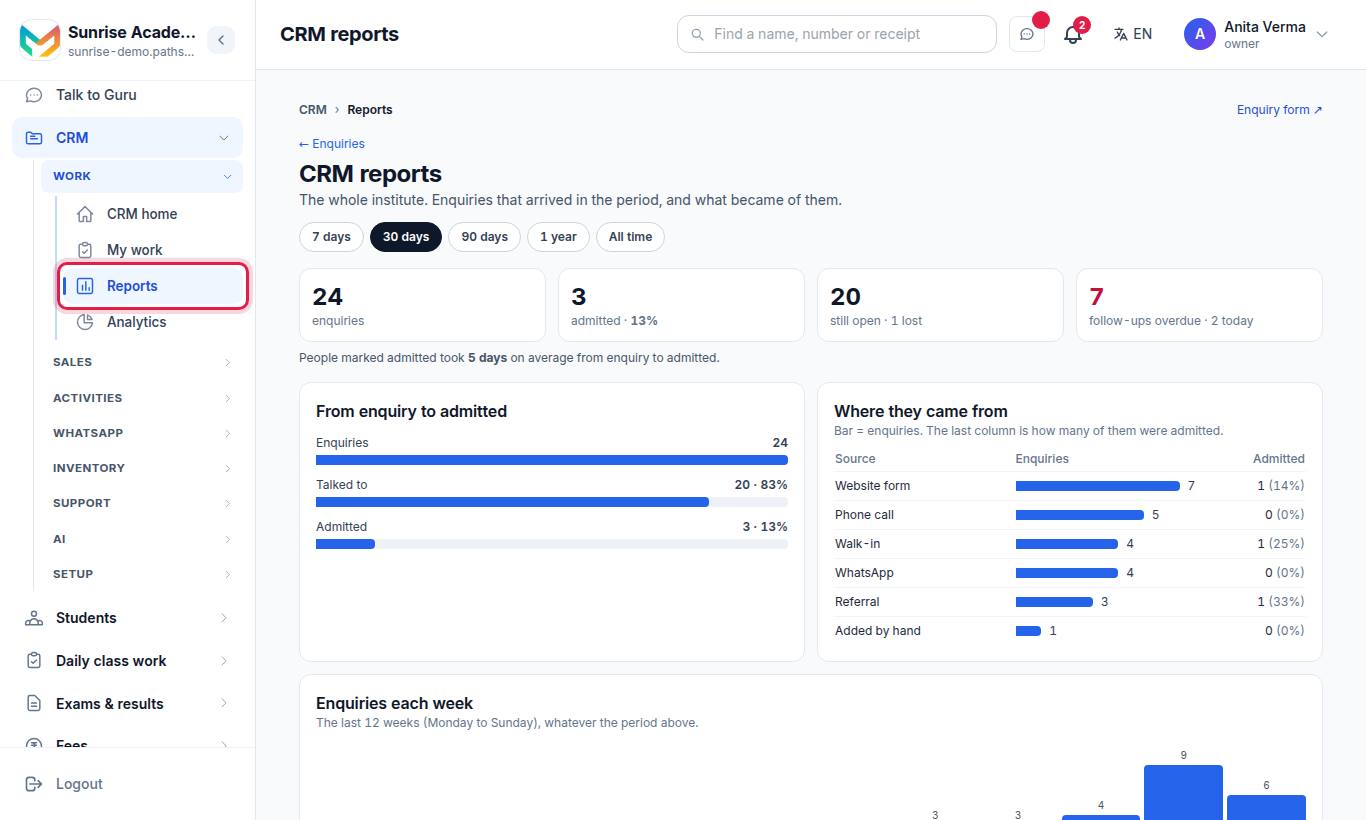
The page is titled CRM reports. Owners and admins see "The whole institute."; staff see the enquiries they can see.
#Period
Pick 7 days, 30 days, 90 days, 1 year or All time. The figures cover enquiries that arrived in that period, and what became of them.
#What it shows
| Section | What it shows |
|---|---|
| From enquiry to admitted | The funnel: enquiries → Talked to → Admitted (Joined, Won), with the share at each step |
| Totals | Received, talked, admitted, lost, still open, conversion rate; follow-ups overdue and due today |
| Average time | "People marked admitted took N days on average from enquiry to admitted." |
| Where they came from | Each source as a bar of enquiries; the last column is how many were admitted |
| Who has them | Each person (and Unassigned): received, admitted, open, conversion rate |
| How fast we answer | First-response time against your target — see Work queue and response time |
| Targets — <month> | Each person's admissions this month against their target |
| Enquiries each week | The last 12 weeks (Monday to Sunday), whatever the period above |
#How to set targets on Reports
- As the Owner or an Admin, press Set targets.
- Enter the First-response target (minutes).
- Give each person a number per month to reach.
- Press Save.
When none are set, the card reads "No targets set. Give each … a number to reach each month and this shows who is on track."
#Analytics
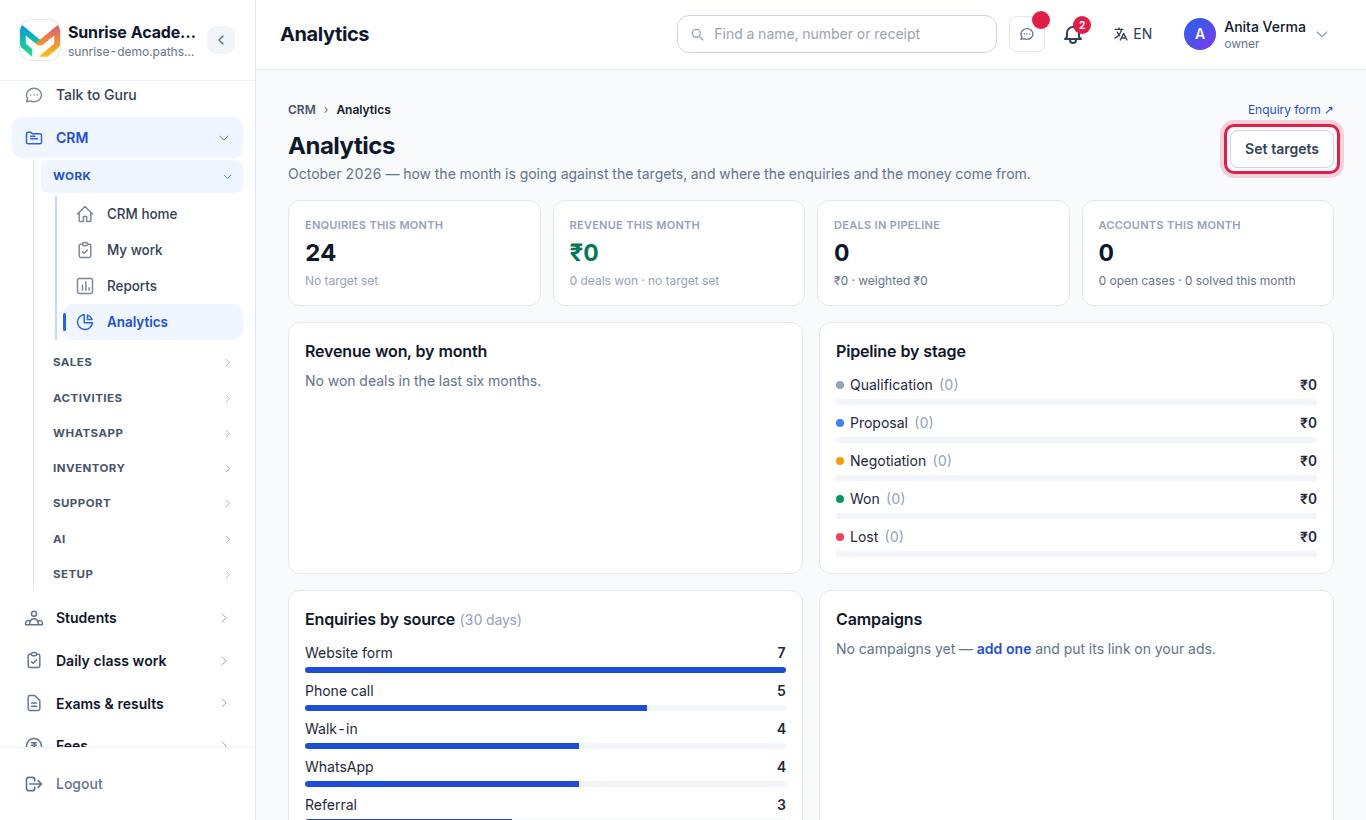
"How the month is going against the targets, and where the leads and the money come from."
| Card | What it shows |
|---|---|
| Leads this month | Count against the leads target, "… to go" |
| Revenue this month (₹) | Won deals this month against the revenue target |
| Deals won | Count this month ("no target set" when empty) |
| Deals in pipeline | Open deals, their total, and the weighted total (amount × probability) |
| Accounts this month | New accounts (Organisations / Companies) |
| Cases | Open cases, and solved this month |
| Pipeline by stage | Deals and amount in each deal stage |
| Revenue won, by month | The last six months |
| By source (30 days) | Leads per source in the last 30 days |
| Campaigns | Each Promotion: budget, leads and revenue won |
| The team this month | Each person: leads given this month, deals won and revenue |
#How to set monthly targets on Analytics
- As the Owner or an Admin, press Set targets.
- Enter the leads target (e.g. 100) and the revenue target in ₹ (e.g. 500000).
- Press Save targets.
Leave a box empty to remove that target.
#Who can use it?
| Action | Who | Plan |
|---|---|---|
| Open Reports and Analytics | Everyone with CRM access | CRM Basic |
| Set targets | Owner, Admin | CRM Basic |
On a plan without Reports, the menu rows show a lock and lead to the upgrade page.
#Ask in plain words
You can also ask questions such as "How many enquiries came from Instagram this month?" on Ask AI (CRM Pro), or connect an AI assistant through the MCP server.
#Tips
- Look at Where they came from every month and move your ad money to the sources that bring admissions, not just enquiries.
- Compare Who has them with How fast we answer — slow replies usually mean lower conversion.
- Set targets at the start of each month so the team sees progress every day.
#Questions people ask
Are the numbers estimates?
No. Every number is a count or a sum of your own records in the CRM.
Which plan includes Reports and Analytics?
Both come with MJX CRM Basic and above.
How do I see which advert brings the most admissions?
Give each advert or poster its own link or Promotion. Reports shows enquiries and admissions by source, and Analytics shows leads and won revenue by campaign.
Who can set targets?
Only the owner or an admin.