
Fee receipts — numbers, PDF, printing and WhatsApp
How Pathshala numbers fee receipts, what the PDF shows, how to print or resend it, and how to see whether the parent got it on WhatsApp.
Every completed fee payment in Pathshala gets a receipt number and a PDF receipt. The receipt is the family's proof of payment, so it is made the moment the payment is saved and, on Basic and above, sent to the parent on WhatsApp straight away.
#Receipt numbers
| Number | Format | When it is given |
|---|---|---|
| Receipt number | RCP-YY-00001 | Only to a completed payment |
| Payment number | PAY-YY-00001 | To every payment, including pending ones |
| Invoice number | INV-YY-00001 | To every bill |
YYis the two-digit year. Each count starts again at 00001 in a new calendar year.- Numbers are separate for every institute and are never reused — two staff saving at the same moment cannot get the same number.
- A payment that is not complete (for example a parent's claim you have not confirmed yet) has no receipt number. A cheque payment is complete when recorded, so it gets its receipt at once; if the cheque bounces later, see Cheques.
#What the receipt shows
- Your institute's name and logo (the logo set in Sidebar › Settings › Organisation › Organisation details › 🎨 Branding), with FEE RECEIPT and the receipt number.
- The student, class and dates.
- FEE DETAILS: each fee line with its amount, discount and any late fee.
- Amount paid, written in figures and in words (Indian system, with paise).
- PAID BY (the payment method) and the REFERENCE (transaction ID or cheque number).
- The invoice total, what has been paid and the balance still due.
- A footer on every page: This is a computer-generated receipt and does not require a signature.
The words on the receipt follow your institute type (Student or Learner, Parent or Guardian, Class or Course).
#How to download or print a receipt
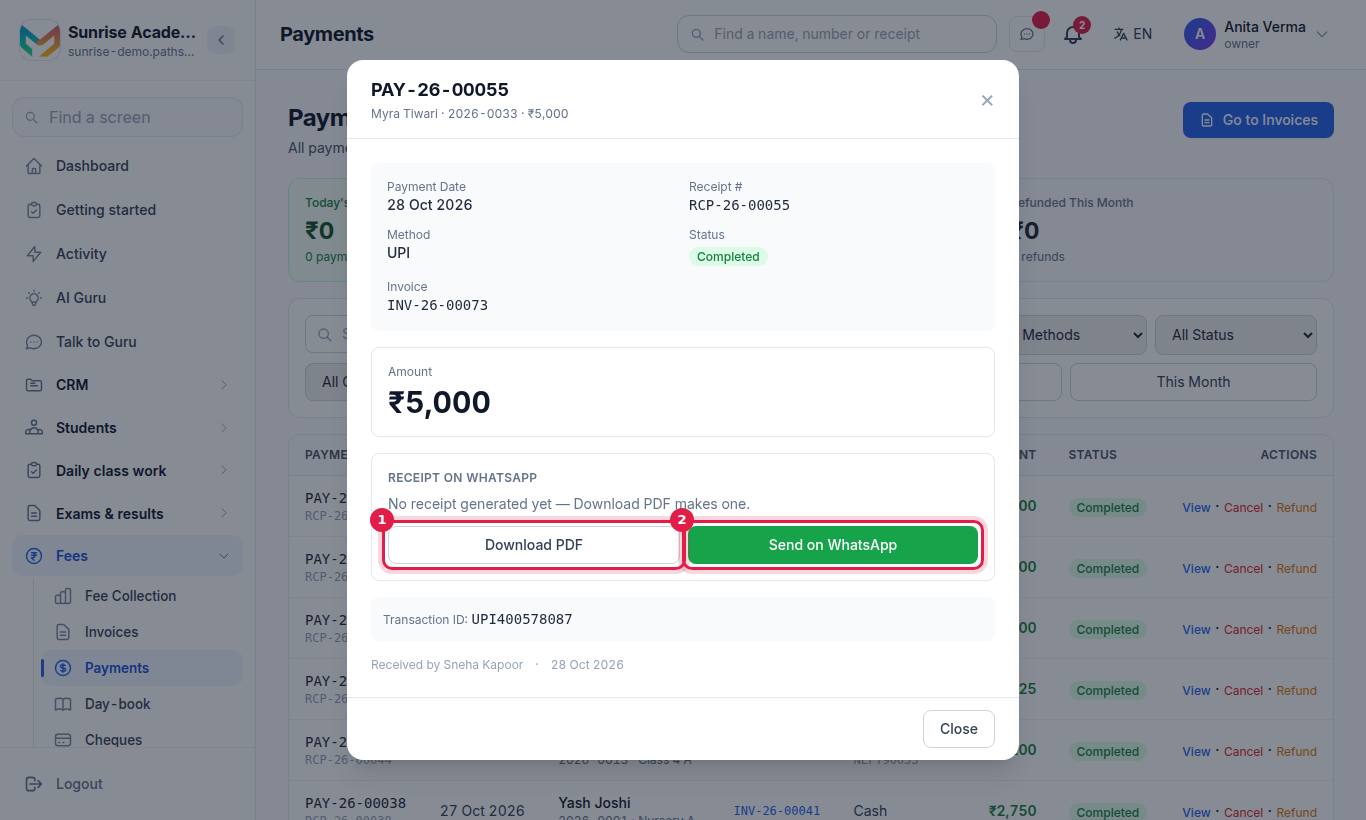
#Steps
- Find the payment (search by student, payment number, receipt number or reference).
- Press View.
- In the Receipt on WhatsApp card press Download PDF.
- The PDF opens in a new tab. Print it from your browser, or save it.
If the card says No receipt generated yet — Download PDF makes one., pressing Download PDF creates it.
#How the WhatsApp receipt works
- Automatic: when a payment is completed — at the counter, in the Teacher app, online, or when you confirm a parent's claim — the receipt goes to the parent's WhatsApp number (or phone number if no WhatsApp number is saved) with a short message: the receipt number, the amount and the student's name.
- Which number it leaves from: your own WhatsApp Business number if you have connected one, otherwise the shared MJX number. The record says own number or MJX number.
- Plan: sending receipts and invoices on WhatsApp needs Basic or above. WhatsApp messages are billed as WhatsApp usage.
#How to send a receipt again
- Open Apps › Fees › Payments, press View on the payment.
- Press Send on WhatsApp (it reads Send again on WhatsApp after the first send).
In the MJX Teacher app, open the student's payment and press Send the receipt again on WhatsApp.
#Did the parent get it?
The Receipt on WhatsApp card shows the best result so far, and a line for every attempt with the time, phone number, which number it left from and who sent it ("automatic" for the first send).
| What you see | What it means |
|---|---|
| Delivered and read by the parent | The parent opened it |
| Delivered to the parent's phone | It reached the phone |
| Sent — waiting for WhatsApp to confirm delivery | Accepted by WhatsApp; delivery not confirmed yet |
| Not delivered — Meta error … | WhatsApp could not reach that number |
| Not sent — this parent replied STOP to WhatsApp messages | The family opted out; give the receipt by hand |
| Not sent — every attempt was refused | Every try failed; check the number |
| Not sent to the parent yet | No send has been made |
If no phone number is saved, the attempt is recorded as No parent phone on this student — add the number on the student's record and send again.
#Who can use this?
| Action | Who |
|---|---|
| Download a receipt, send it again | Owner, Admin, or staff with Collect Fees |
| Send on WhatsApp | Same people, on Basic or above |
#Receipts for parents
Parents see their receipts in the MJX Parent app and on the parent page, next to their bills and payments.
#Tips
- Keep the parent's WhatsApp number correct on the student record — it is where receipts, invoices and reminders go.
- Never type a receipt number by hand anywhere; let Pathshala give it. Duplicate receipt numbers are flagged in Worth a look.
- A cancelled or refunded payment keeps its receipt in the history; Pathshala does not send any "reversed" message by itself.
#Questions people ask
How are receipt numbers made?
Every completed payment gets the next number in the form RCP-YY-00001, where YY is the year. Numbering is separate for each institute and starts again each calendar year.
Does the receipt go to the parent by itself?
Yes, on Basic and above. As soon as a payment is recorded, the PDF receipt is sent to the parent's WhatsApp number. On Forever Free it is made as a PDF but not sent.
Can I send the receipt again?
Yes. Open the payment and press Send again on WhatsApp. Staff can also do it in the MJX Teacher app.
Does the receipt need a signature or a seal?
No. The receipt says it is computer-generated and does not require a signature, so no signature or seal is printed on it.
Can receipts be emailed?
Not from the fees screens today. Download the PDF and attach it yourself if a family wants it by email.