
PF, ESI and professional tax in payroll
Type your own PF, ESI and professional-tax rates, leave people out, and download the EPFO ECR file, ESIC sheet and PT figures each month.
MJX Payroll Pro works out provident fund (PF), ESI and professional tax (PT) on each month's actual pay, at the rates your organisation types, and prints each line on the payslip with the Act named. Each month it then makes the files the EPFO, ESIC and state portals accept.
#How to set your rates
#Steps
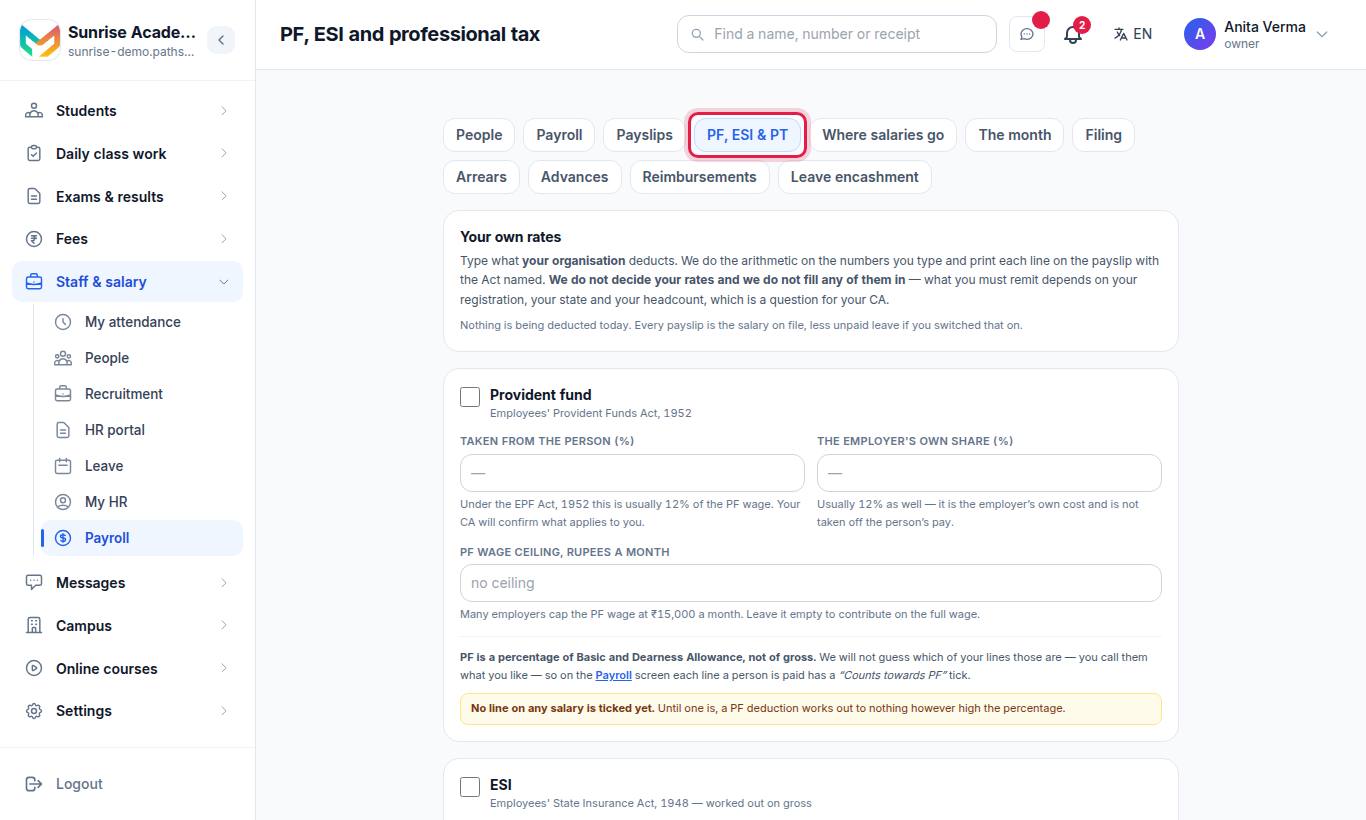
- Provident fund (Employees' Provident Funds Act, 1952) — tick it, then type:
- Taken from the person (%) — hint: usually 12% of the PF wage.
- The employer's own share (%) — hint: usually 12% as well.
- PF wage ceiling, rupees a month — hint: many employers cap at ₹15,000. Leave it empty to contribute on the full wage.
- ESI (Employees' State Insurance Act, 1948 — worked out on gross) — tick it, then type:
- Taken from the person (%) — hint: usually 0.75% of gross.
- The employer's own share (%) — hint: usually 3.25% of gross.
- Stop above a gross of, rupees a month — hint: usually ₹21,000. Leave empty for no limit.
- Professional tax (a state levy — a flat amount by band of monthly gross) — tick it, then:
- Whose ladder is this (printed on the payslip) — for example "Maharashtra".
- Type each band: "up to ₹ … pay ₹ …". + Add a band adds one. Lowest band first.
- Press Save.
Nothing to deduct? Save with nothing ticked. "Nothing is being deducted today" is a valid answer and completes the setup step.
#How to mark which lines are PF wages
PF is a percentage of Basic and Dearness Allowance, not of gross. On the Payroll screen, each paid line has a Counts towards PF tick. The PF, ESI & PT screen tells you how many salary lines are ticked. If none is, it warns: "No line on any salary is ticked yet."
See salary structures.
#How to leave somebody out
Under Leaving somebody out, everybody is included unless you untick them — "a consultant, a director, somebody already covered elsewhere". Untick Provident fund, ESI or Professional tax for that person and add a short reason (optional). Each person saves as you tick. A tick means included.
#How to file each month
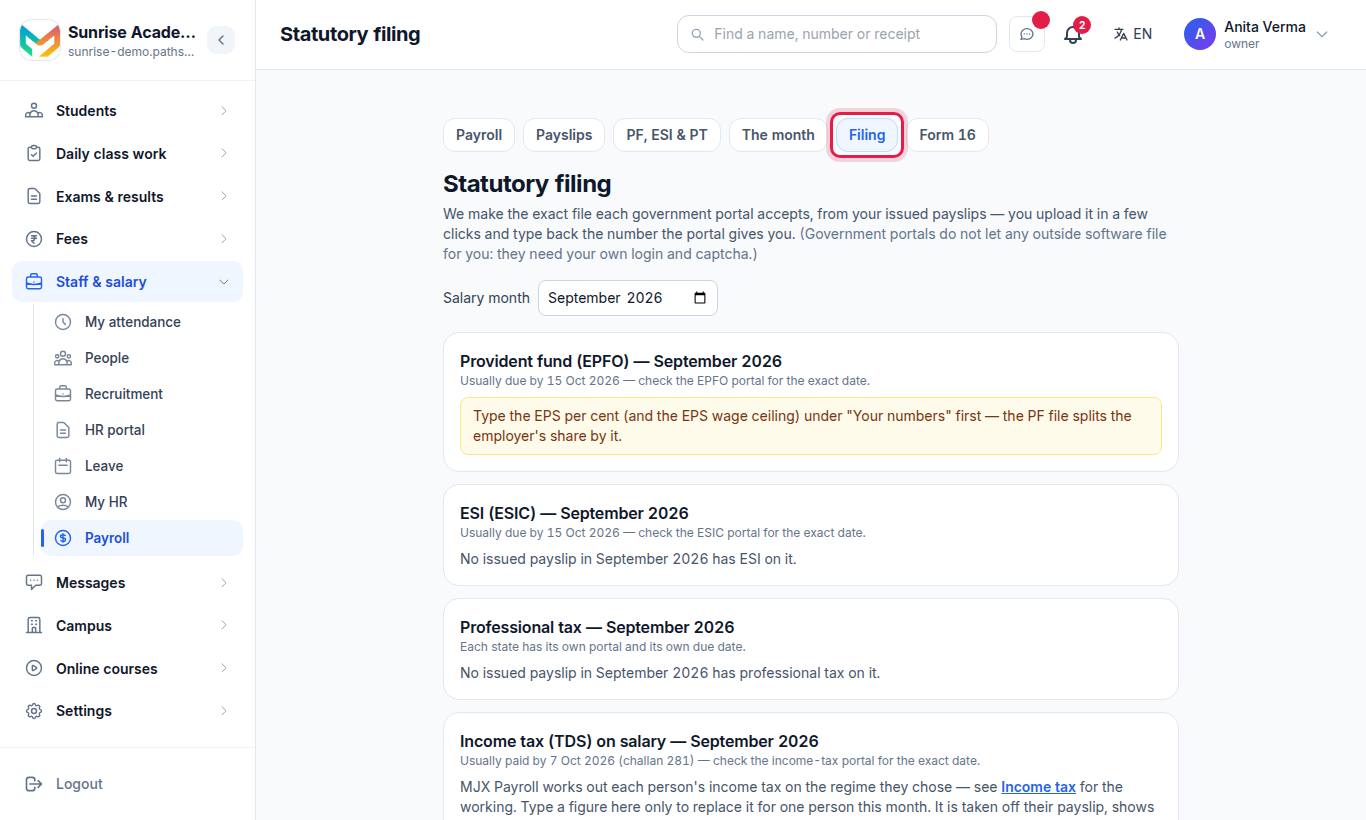
The Statutory filing screen makes "the exact file each government portal accepts, from your issued payslips". Choose the Salary month at the top. Files only include issued payslips — issue the month first.
#Your numbers (once)
Under Your numbers, type PF establishment code, ESIC employer code, TAN, Professional-tax registration no., EPS — per cent of the PF wage that goes to pension, and EPS / EDLI wage ceiling (₹ a month). Press Save.
#Each person's numbers
Under Each person's numbers, type each person's UAN (12 digits), ESIC IP (10 digits) and PAN, then Save. The PAN is kept locked away; only its last 4 characters are shown.
#Provident fund (EPFO)
- Check the totals: people in the file, employees' PF, employer's PF, pension (EPS).
- Press ⬇ Download the PF file (ECR).
- Open the EPFO employer portal, sign in with your establishment ID, go to Payments → ECR Upload, choose the month, upload, press Verify, then Prepare challan and pay.
- Type the TRRN the portal shows and press Mark filed.
Anybody aged 58 or more gets no pension (EPS) share — it all goes to their PF.
#ESI (ESIC)
- Press ⬇ Download the ESIC sheet (.xls).
- On the ESIC portal, go to Monthly Contributions → Upload, choose the month and upload. Generate the challan and pay.
- Type the challan number and press Mark filed.
Somebody paid for no days needs a reason code — the screen names them; fill it in the sheet before uploading.
#Professional tax
- Check the table Tax per person / People / Total.
- Press ⬇ Download the PT figures (.csv).
- File the return on your state's professional-tax portal and pay.
- Type the challan number and press Mark filed.
Income tax (TDS), challan 281 and Form 24Q are on the same screen. See income tax and TDS.
#Who can use it?
- Plan: MJX Payroll Pro. On a lower plan you can read the rates screen, and you can type your numbers on Filing, but nothing is saved on the rates screen and the files do not download.
- People: owner and admin, or anyone given Manage Filings. Anyone given Payroll Reports can read both screens and download the files, but not change rates, numbers or "filed" marks.
#Questions people ask
Does MJX Payroll fill in PF and ESI rates for me?
No. You type your own rates. The screen shows the usual figures as a hint (for example 12% PF), but what you must remit depends on your registration, state and headcount, which is a question for your CA.
Does MJX Payroll file the PF return on the EPFO portal?
No outside software can file for you — the portals need your own login and captcha. MJX Payroll makes the ECR file; you upload it and type back the TRRN.
Why is PF coming out as zero?
PF is worked out on the salary lines ticked "Counts towards PF". Until at least one line is ticked, a PF deduction works out to nothing however high the percentage.
Why is somebody missing from the PF file?
They have PF but no UAN, or their payslip is not issued yet. Add the UAN under "Each person's numbers" on Filing, and issue the month.
Which plan do I need?
PF, ESI, professional tax and the filing files come with MJX Payroll Pro.