
Fee reminders on WhatsApp
Send WhatsApp fee reminders to families with pending or overdue fees in Pathshala — preview each message, see delivery, and avoid double reminders.
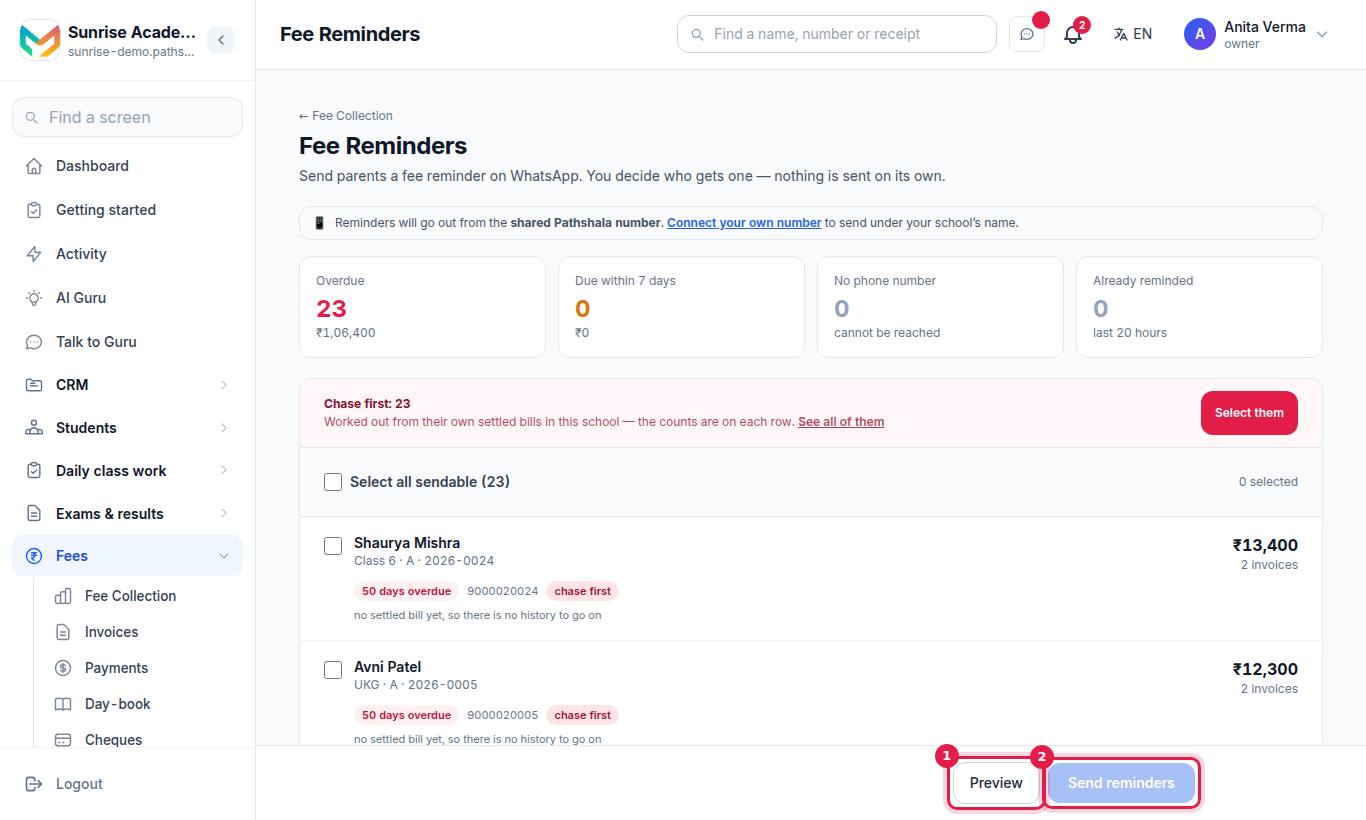
The Fee Reminders screen in Pathshala lists every family with a fee that is overdue or due within a week, and sends them a WhatsApp reminder with the amount and a View and Pay button. You decide who gets one — nothing is sent on its own.
#Who can use this?
| Action | Who |
|---|---|
| Open the screen and see history | Owner, Admin, or staff with Send Fee Reminders (the Accountant role has it; the Cashier role does not) |
| Preview and send reminders | Owner, Admin, or a role with Send Fee Reminders |
| Send again to families reminded in the last 20 hours | Owner and Admin only |
| Create the fee templates on your own number | Owner and Admin |
Fee reminders are in MJX Fees Management Basic and above. Each WhatsApp message is billed as WhatsApp usage.
#What the screen shows
Which number sends them. A line at the top says whether reminders will go from your own WhatsApp number or from the shared Pathshala number (with a Connect your own number (Settings › WhatsApp, at /settings/whatsapp on your portal) link).
Four counters:
| Counter | Meaning |
|---|---|
| Overdue | Families with a bill past its due date, and the amount |
| Due within 7 days | Families with a bill due in the next 7 days |
| No phone number | Families you cannot reach — add a number on the student record |
| Already reminded | Families reminded in the last 20 hours |
One row per student, showing the name, class and section, admission number, the pending amount, which instalment it is (when you use a collection plan) or how many invoices, n days overdue or due soon, the phone number (or no phone), and — once reminded — reminded … ago with the delivery result (read by parent, delivered, NOT delivered, awaiting receipt). Where there is enough payment history, each row also carries a payment-habit label, worked out from that family's own settled bills: chase first, watch, pays on time or no history yet.
#How to send fee reminders
#Steps
- Tick the families you want to remind, or tick Select all sendable. If a Chase first box appears, press Select them to pick the families most likely to pay late.
- Press Preview. Check each message: the phone number, the template, the parent's name, the amount and the due date or days overdue. Families that will be skipped are named with the reason.
- Press Send reminders and confirm.
#What the parent receives
- For an overdue bill, the
fee_overduetemplate: the fee is overdue by n days, and the amount due. - For a bill not yet due, the
fee_remindertemplate: the fee is pending, the amount and the due date.
The message is addressed to the parent by name (or to the learner, at an institute with adult learners), and all of one student's pending bills are added up in one message.
#Why a family is skipped
| Reason shown | What to do |
|---|---|
| no phone number | Add the parent's phone or WhatsApp number on the student record |
| already reminded today | Wait, or (owner/admin) use Send again |
| reminded less than 60 minutes ago — try again shortly | Wait an hour |
| parent has opted out (replied STOP) | Phone the family instead; WhatsApp will not deliver |
#How to remind a family again the same day
Only the owner or an admin sees this.
- In the yellow band, tick Send again to n … already reminded in the last 20 hours.
- Those families become selectable. Nobody is selected for you — tick the ones to chase.
- Press Preview, then Send reminders.
A family reminded under 60 minutes ago still cannot be sent again; the row says can be sent again in under 60 min.
#Reminder history
Press reminded … ago on any row to open Reminder history for that student: every reminder with date and time, delivery result, and notes such as never left — the send failed, not sent — this parent replied STOP, or this was the bill, not a reminder (an invoice you sent is shown but not counted as a reminder).
If some families' last reminders were not delivered, a band at the top says so. They can be selected again, but the same number usually fails the same way — a phone call is better.
#Using your own WhatsApp number
If you have connected your own WhatsApp Business number, Meta must approve the two fee templates on your number before reminders can go from it. The screen lists each template with its state — Approved — ready to send, Sent to Meta — waiting for approval, Meta turned it down and so on.
- Press Create these on my number (owner or admin).
- Wait for Meta — usually a few minutes. The page shows Approved when they are cleared.
You can also open the Message Templates screen from the link on this page.
#Reminders in the Teacher app
In the MJX Teacher app, Apps › Fees › Who owes lists the families who owe money. The owner or an admin can pick families there and send a reminder; the same rules apply.
#Tips
- Send reminders a few days before the due date as well as after it; the screen lists bills due in the next 7 days for this reason.
- Fix the No phone number list once a week.
- Look at Collections (Pro) to see who to chase first and why.
- Late fees are not added by a reminder. They are added when the next invoice is generated — see Fee heads and structures.
#Questions people ask
Are fee reminders sent automatically?
No. Pathshala never sends a fee reminder by itself. You pick the families on the Fee Reminders screen and press Send reminders.
Which families are listed?
Active students with an unpaid or part-paid bill that is overdue or due within the next 7 days. Cancelled and fully paid bills are not listed.
Will a parent get several messages for several bills?
No. All of one student's pending bills go in a single message with the total.
Can I remind the same family twice in a day?
A family reminded in the last 20 hours is held back so two staff cannot message them by accident. The owner or an admin can tick Send again to chase them anyway, but not within 60 minutes of the last reminder.
Which number do reminders come from?
Your own WhatsApp Business number if it is connected and its fee templates are approved; otherwise the shared Pathshala number.