
Get leads from your website, Facebook, Google, IndiaMART and more
Bring every enquiry into MJX CRM — website button or embed, Facebook and Instagram ads, Google Ads, LinkedIn, IndiaMART, JustDial, QR, missed calls.
In MJX CRM, every place people enquire from can feed the same list of enquiries (leads for a business). Each lead keeps its source, so Reports can tell you which channel brings the admissions or sales.
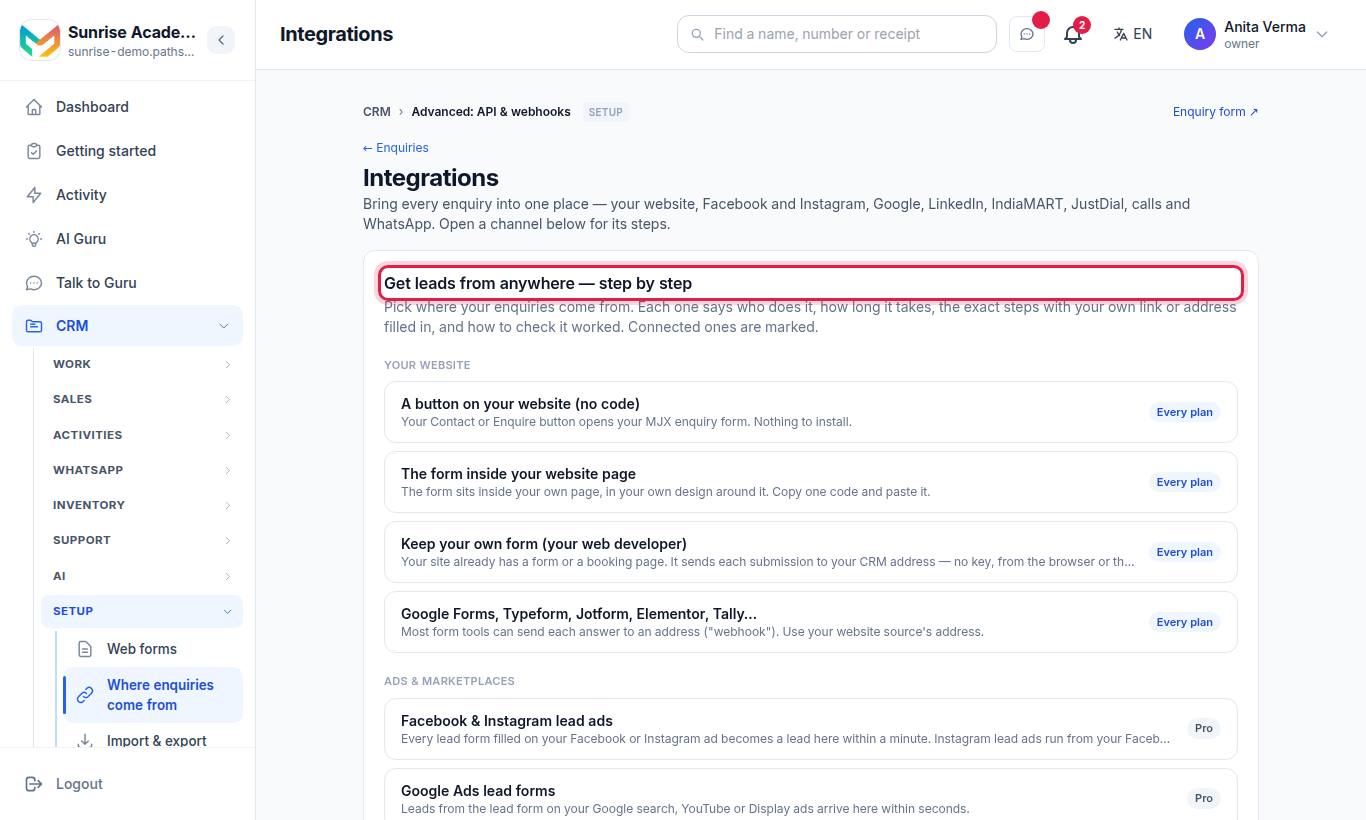
For a business the menu row reads Where leads come from. The page title is Integrations, and it opens with Get leads from anywhere — step by step: one card per channel, with Who does it, Time, the steps with your own link or address filled in, Check it works and Good to know. Cards marked Every plan work on any plan; the others need MJX CRM Pro.
Only the Owner or an Admin can open this page and add sources.
#The 16 ways in
| Group | Card | Who does it | Time | Plan |
|---|---|---|---|---|
| Your website | A button on your website (no code) | You | 2 minutes | Every plan |
| Your website | The form inside your website page | You | 5 minutes | Every plan |
| Your website | Keep your own form (your web developer) | Your web developer | 15 minutes | Every plan |
| Your website | Google Forms, Typeform, Jotform, Elementor, Tally… | You | 5 minutes | Every plan |
| Ads & marketplaces | Facebook & Instagram lead ads | You (an admin of the Facebook Page) | 2 minutes | Pro |
| Ads & marketplaces | Google Ads lead forms | You (Google Ads admin) | 5 minutes | Pro |
| Ads & marketplaces | LinkedIn lead gen forms | You (admin of the LinkedIn ad account) | 3 minutes | Pro |
| Ads & marketplaces | IndiaMART | You | 3 minutes | Pro |
| Ads & marketplaces | JustDial | JustDial (on your request) | 1–3 days | Pro |
| Social & maps | Google Maps (Business Profile) | You | 3 minutes | Every plan |
| Social & maps | Instagram bio and Facebook page button | You | 2 minutes | Every plan |
| Social & maps | A QR code on posters, hoardings and visiting cards | You | 3 minutes | Every plan |
| Calls & WhatsApp | Nobody — it is automatic | — | Every plan | |
| Calls & WhatsApp | Missed call → lead | You | 10 minutes | Pro |
| Developers & AI | Your own software (API and webhooks) | Your developer | — | Pro |
| Developers & AI | AI assistants (MCP) | You | 5 minutes | Pro |
#Your website
#A button on your website (no code)
- On the card, press Copy form link. Your link is your institute's address followed by
/inquire. - In your website editor, open the page or menu where the button should go (Contact, Enquire now, Book a visit).
- Make a button or menu link and paste the link as its address. Save and publish.
Want a separate form per purpose? Make one under Apps › MJX CRM › CRM settings › Web forms and use that form's link. See Web forms.
#The form inside your website page
- Press Copy the code to copy the iframe code.
- Paste it into your page: WordPress "Custom HTML" block, Wix "Embed HTML", Shopify page HTML, Webflow "Code Embed", Squarespace "Code" block or Google Sites "Embed code".
- If your builder removes the code, use Copy the one-line script instead — it grows to fit the form.
#Keep your own form
- Press Add website source. You get a private address.
- Send it to your web developer: "When the form is submitted, POST it to this address — JSON, form fields or FormData all work. No key needed."
- Field names do not need to match. Every field is read, and anything unknown is kept on the lead as Additional details.
Developer details: Lead webhooks.
#Google Forms, Typeform, Jotform, Elementor, Tally
Use your website source's address as the tool's webhook:
| Tool | Where to paste the address |
|---|---|
| Elementor Pro | Edit the form › Actions After Submit › Webhook |
| Typeform | Connect › Webhooks › Add a webhook |
| Jotform | Settings › Integrations › Webhooks |
| Tally | Integrations › Webhooks › Connect |
| Google Forms | No webhook — use Make.com or Zapier ("New response" → HTTP POST), or share your MJX form link instead |
#Ads and marketplaces (CRM Pro)
| Channel | What you do on this page |
|---|---|
| Facebook & Instagram lead ads | Press Connect Facebook, sign in as a Page admin, allow every permission, pick the Page. Instagram lead ads come through the same Page. |
| Google Ads lead forms | Press Add Google Ads source, then paste the address and the Key for Google Ads into the lead form's Webhook integration. Press "Send test data". |
| LinkedIn lead gen forms | Press Connect LinkedIn and pick the ad account — leads arrive every 10 minutes. No button? Use Add LinkedIn source (Make / Zapier). |
| IndiaMART | Press Add IndiaMART source, paste the CRM key from Lead Manager › CRM Integration and press Save key. Enquiries are pulled every 10 minutes. |
| JustDial | Press Add JustDial source and send the address to your JustDial account manager. |
Full steps, including the by-hand Facebook route: Lead connectors setup.
#Social and maps: tracked links (every plan)
These channels cannot send leads by themselves, so the CRM makes a form link stamped with the channel's name.
- Press Make my Google Maps link, Make my Instagram link or Make my QR link.
- Copy the link ("Your link is ready").
- Put it where people see it:
- Google Maps: business.google.com › Edit profile › Contact › Website (and Appointment link).
- Instagram: Profile › Edit profile › Links › Add external link.
- QR poster: Settings › QR Codes › New › paste the link › download and print.
The lead arrives with the source "Google Maps profile", "Instagram bio" or "QR poster". Make one link per poster or place on Web forms to compare them.
#Calls and WhatsApp
- WhatsApp — nothing to set. A new number that messages your WhatsApp becomes a lead, source "WhatsApp", and the chat is in WhatsApp inbox. See WhatsApp in the CRM.
- Missed call → lead (Pro) — publish one Plivo number. Callers hear your line, the call ends, and they become a lead with a high-priority call-back task due in 30 minutes. Press Add missed-call source, write what callers hear, and set the address as the number's Answer URL in Plivo. See Calls and telephony.
#Your sources list
Under Where leads come from — your sources every source shows:
| Item | Meaning |
|---|---|
| Name · kind | e.g. "Website · Any form or tool" (and "off" when switched off) |
| hits · leads | How many calls arrived and how many new leads they made |
| Address and Copy | The private address of this source |
| Verify token / page token saved | Meta sources only |
| Callers hear | Missed-call sources only |
| Key for Google Ads | Google Ads sources only |
| Connected | One-click Facebook or LinkedIn, with the Page or account name |
| Last problem | The last error, e.g. a wrong key |
| Switch off / Switch on · Remove | Removing asks "Remove this source? Its address stops working at once." |
You can have up to 20 sources.
#Who can use it?
| Action | Who | Plan |
|---|---|---|
| Open the page, add or remove sources | Owner, Admin | Website and tracked links: every plan; the rest: Pro |
| See the leads that arrive | Anyone with access to Enquiries | Any |
On a plan without Pro, the Pro cards and list items show a lock 🔒 and the sentence: "IndiaMART, JustDial, Facebook & Instagram, LinkedIn, Google Ads and missed-call sources come with MJX CRM Pro. Your own website connects on every plan — pick "Any form or tool"."
#Tips
- Connect your website first — it is free on every plan and usually the biggest source.
- Give each poster, ad or page its own link so Reports can compare them.
- Check Last problem on a source if leads stop arriving.
- Leads from your MJX enquiry form (the button, the embedded form and tracked links) start your normal follow-up messages. Leads that arrive through a source address, a connector or the API are not messaged automatically — a counsellor sets the call-back date, or an Auto action does. See Follow-ups and sequences.
#Questions people ask
Which lead sources work on the Basic plan?
Your website (button, embedded form, your own form), other form tools, Google Maps, Instagram bio and QR tracked links, and WhatsApp. Facebook and Instagram ads, Google Ads, LinkedIn, IndiaMART, JustDial and missed calls need MJX CRM Pro.
What if the same person enquires from two places?
The CRM matches the phone number (or email). No second lead is made; a note "Enquired again via …" is added to the first one.
Can I see which source brings the most admissions?
Yes. Every lead carries its source, and Reports shows enquiries and conversions by source.
Are my old Facebook or IndiaMART leads brought in?
Facebook, Google Ads and LinkedIn send only new leads — download older ones and use Import enquiries. IndiaMART's first pull brings the last 24 hours.