
Student attendance — register, reports and alerts
Mark the class register on a phone, see the month report, catch attendance shortage early and send absent or late alerts to parents on WhatsApp.
In Pathshala, a teacher opens the class, taps a status against each name and saves — about thirty seconds on a phone. From that one register come the month report, the shortage list, the patterns screen, the attendance figure on the report card, and what parents see in the app.
This page is about students. For staff check-in, shifts and biometric machines, see the People / HR docs.
#The attendance screens
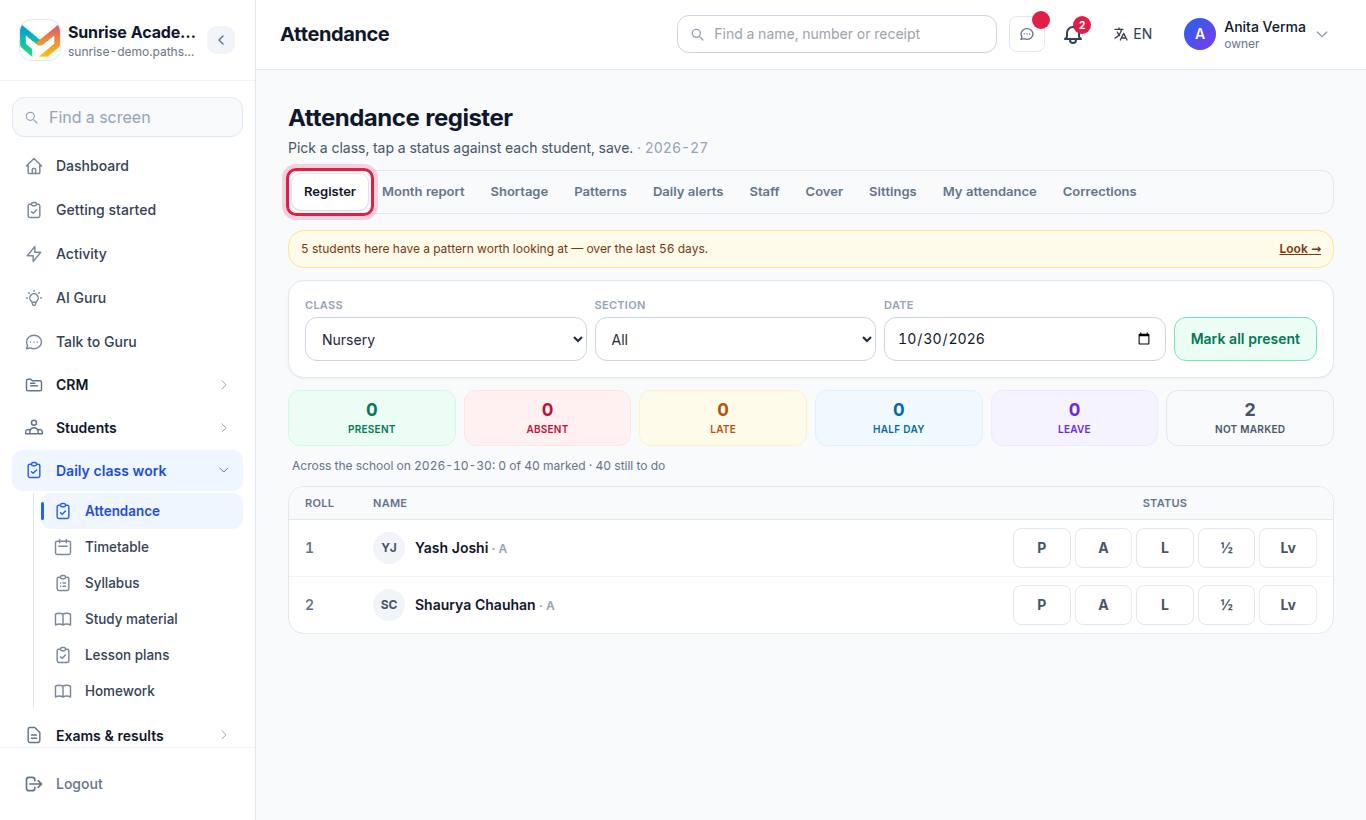
The Attendance page has tabs along the top:
| Tab | What it is for | Plan |
|---|---|---|
| Register | Mark the day | Every plan, including MJX Academic Forever Free |
| Month report | Every student against every day of a month | MJX Academic Basic and up |
| Shortage | Everyone below your attendance line | MJX Academic Basic and up |
| Patterns | Changes in attendance, weeks before a shortage shows | Pro |
| Daily alerts | Tell families about absent or late students | MJX Academic Basic and up |
| Cover | Who takes a class when its teacher is away (owner/admin) | MJX Academic Basic and up |
| Sittings | Extra registers per period or subject (owner/admin) | MJX Academic Basic and up |
A tab your plan does not include shows a padlock with Not in your plan and opens the upgrade page. Staff attendance tabs (Staff, My attendance, Corrections) belong to the staff side.
#Steps to mark the register
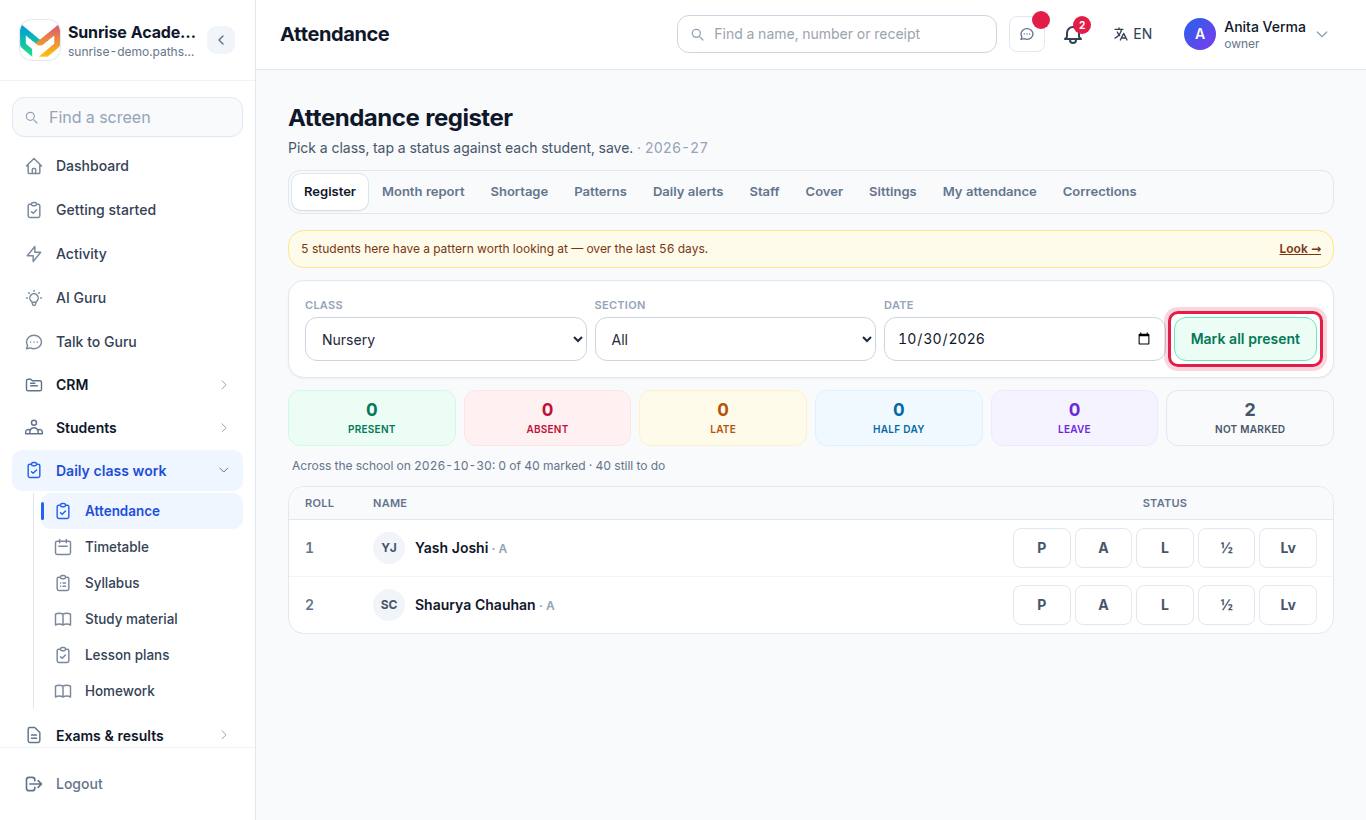
- Pick the Class and, if you like, the Section.
- Check the Date (today by default).
- If your class has sittings, choose Which register — the Daily register or a sitting.
- Tap a status against each student, or press Mark all present and change the few who are not.
- Press Save.
| Status | Short | Counts as |
|---|---|---|
| Present | P | Came |
| Absent | A | Absent |
| Late | L | Came (late) |
| Half day | ½ | Came |
| Leave | Lv | Approved absence, not counted as absent |
A student nobody marked is Not marked — it is counted as a gap in the register, never as an absence.
#The month report
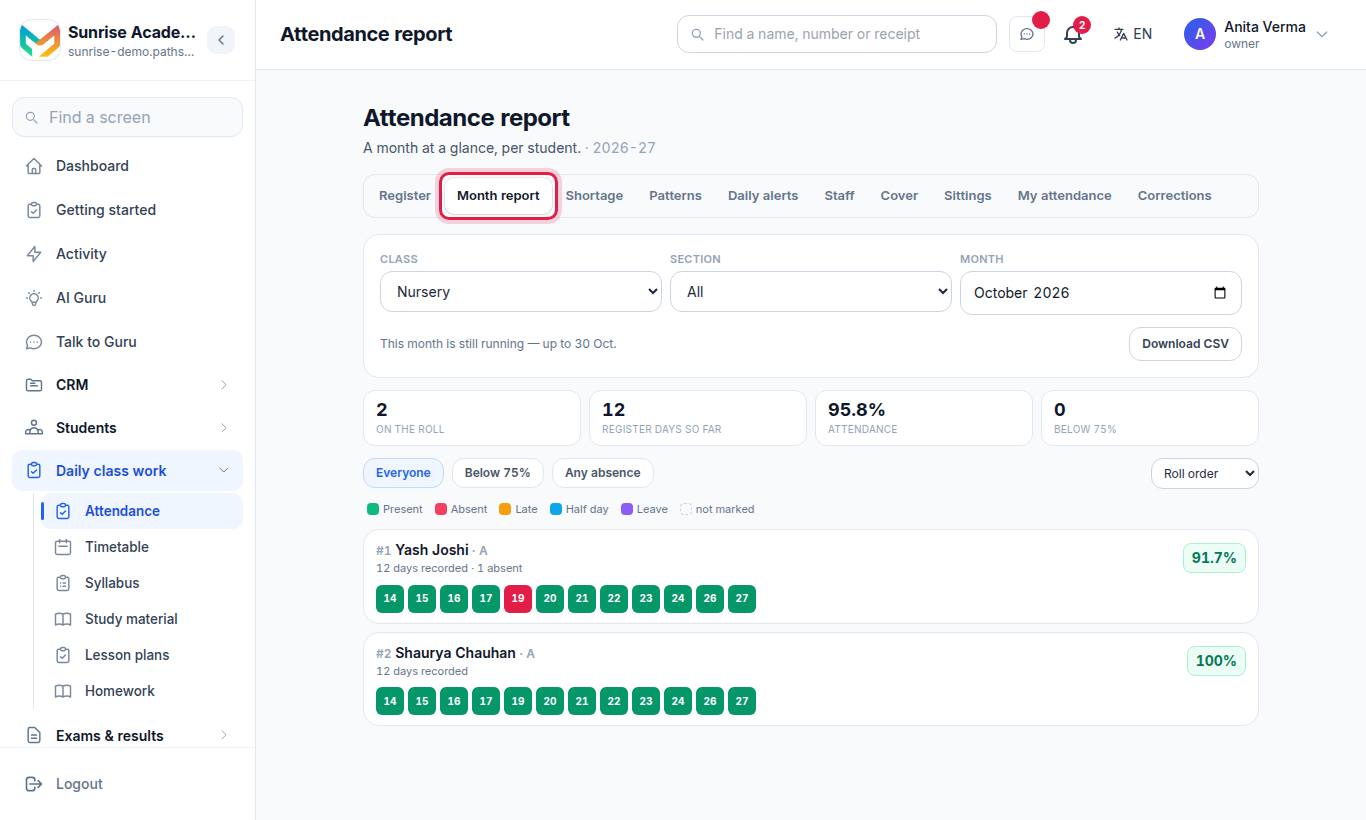
Pick the class, section, month and register. Filter Everyone, Below (your shortage line) or Any absence, and sort by Roll order, Lowest % or Most absent. Press Download CSV for Excel.
#The shortage list
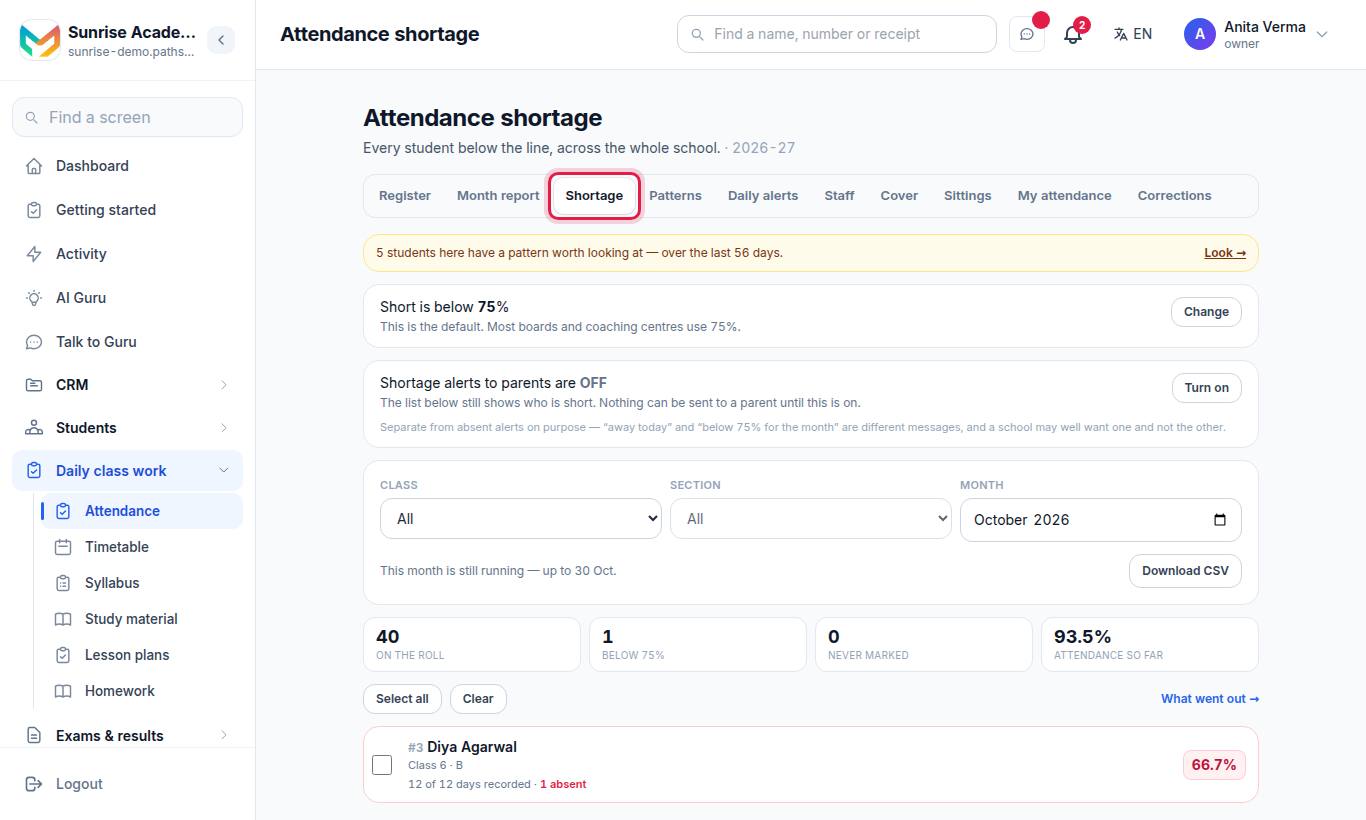
Every student below the line, across the whole institution, for the month you choose. Tabs: Below the line and Never marked.
- Short is below shows your line (75% by default). The owner presses Change, types a Shortage percentage between 1 and 100 and presses Save. It changes who appears here and who gets a shortage alert.
- Shortage alerts to parents are separate from absent alerts. The owner turns them on with Turn on.
- To message families: tick students (or Select all), press Preview to read the exact message, then Send. What went out → shows the history.
#Patterns (Pro)
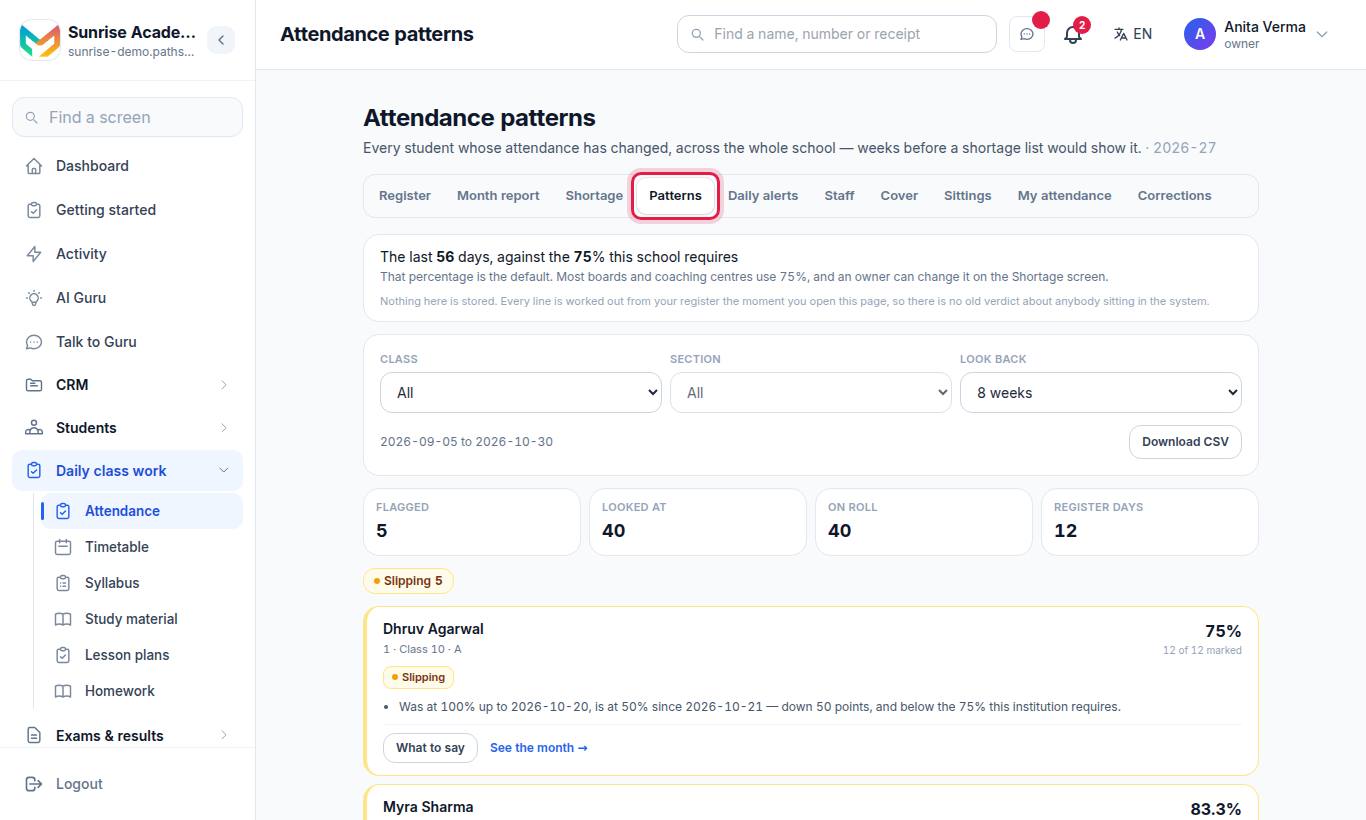
Students whose attendance has changed, over a Look back of 4 weeks, 8 weeks, 12 weeks or 6 months. Nothing is stored — each line is worked out from the register when you open the page.
| Pattern | What it means |
|---|---|
| Not coming | Absent on several register days in a row, and still absent on the latest one |
| Slipping | The later half of the window is well below the earlier half, and below your line |
| One day of the week | The same weekday missed again and again while the rest of the week is attended |
| Not marked | The class kept taking the register but there is no mark for this student — a gap, not an absence |
Press Download CSV to take the list away.
#Daily alerts to parents
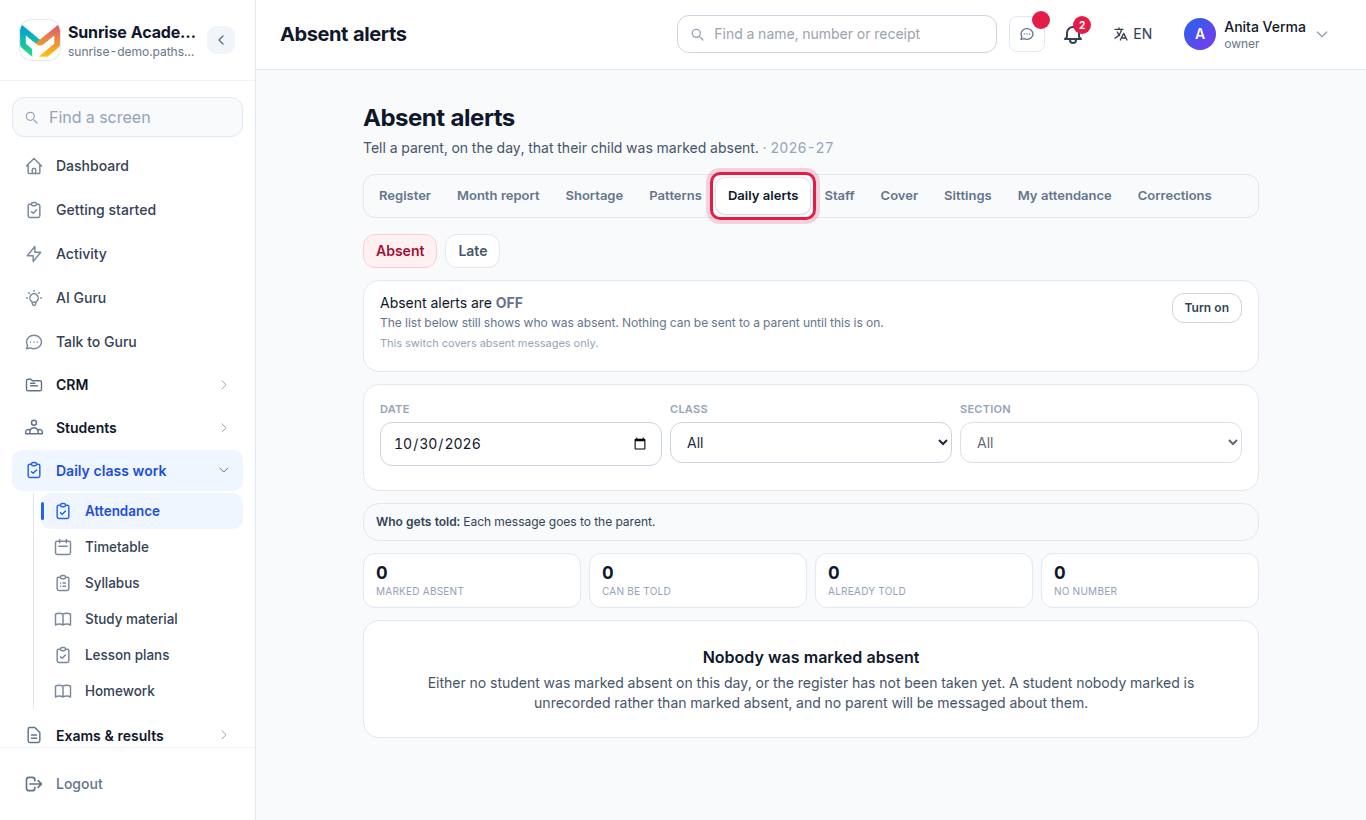
Two kinds: Absent and Late. Each has its own switch (Absent alerts are ON/OFF, Late alerts are ON/OFF) that only the owner can change.
- Pick the Date, Class and Section.
- Check Who gets told: tick families, or Select all / Clear.
- Press Preview to read the message.
- Press Send.
#Sittings — a register per period or subject
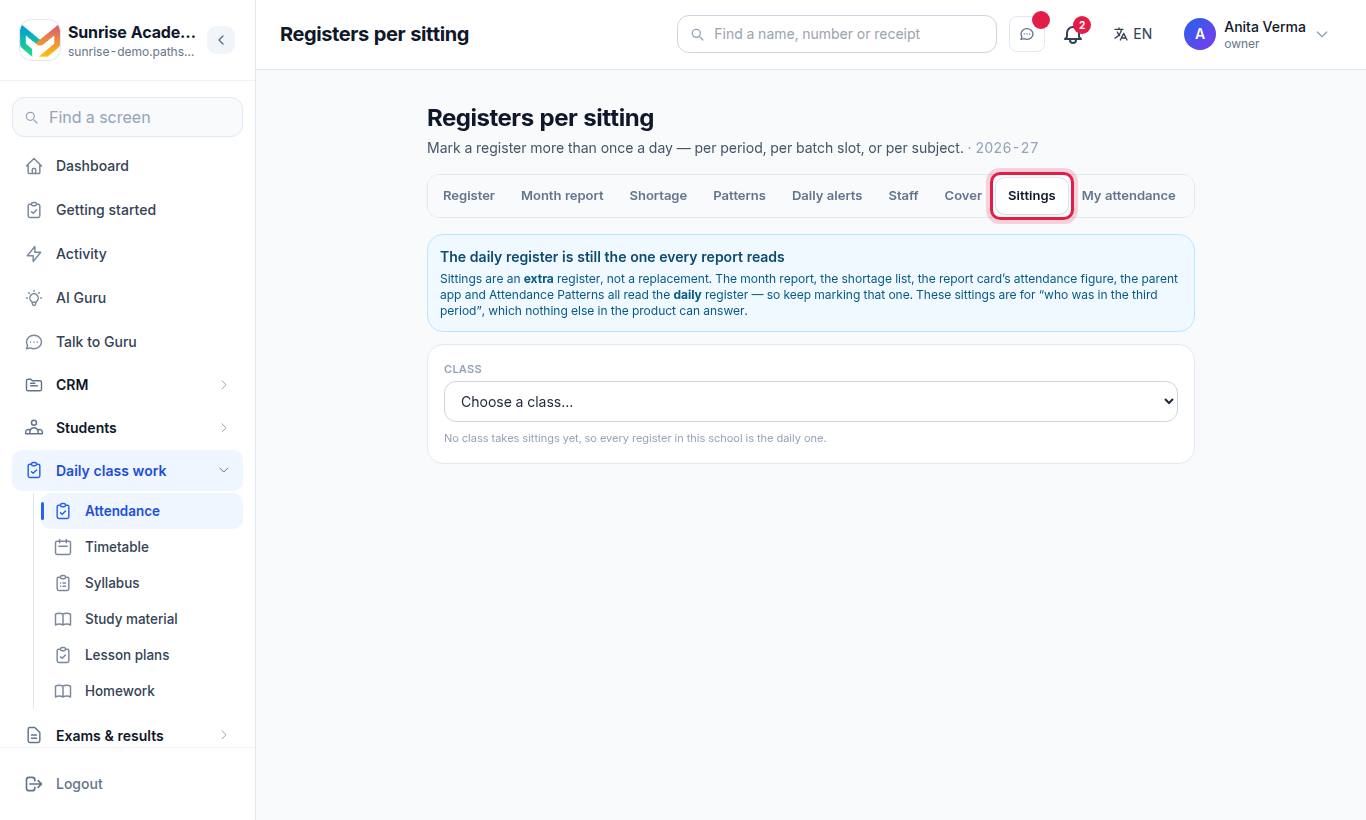
For colleges and coaching centres that take attendance more than once a day.
- Choose a class.
- Under Add a sitting, type What is it called? (what a teacher sees on the register, such as "Period 3" or "Physics lab").
- Optionally tie it to a Subject.
- Press Add.
Sittings are an extra register, not a replacement. The month report, shortage list, report card figure, parent app and Patterns all read the daily register.
#Who can do what?
| Action | Default roles |
|---|---|
| See and mark the register | Owner, Admin, Staff (teachers see their own classes) |
| Month report, Shortage, Patterns | Owner, Admin, Staff |
| Send absent, late or shortage alerts | Owner, Admin, Staff |
| Turn alerts on or off, change the shortage line | Owner |
| Manage sittings | Owner, Admin |
Which classes are a teacher's own is set by the owner or an admin on the Staff screen (class teacher or subject teacher for a class).
#Tips
- Mark the register before the first period ends — that is when a parent's call about a missing child is most useful.
- Look at Patterns every Monday and Shortage at mid-term, not the week before exams.
- A student's Biometric ID can be stored on their record, but fingerprint machines send punches for staff attendance only.
#Troubleshooting
| What you see | What it means | What to do |
|---|---|---|
| "No classes are yours yet" | Nobody has written down which classes you teach | Ask the owner or an admin to set it on the Staff screen, or arrange a cover |
| "No classes set up yet" | The class list is empty | Add classes and students first |
| "Nobody in this class yet" | The class has no active students | Add students to it |
| "Nothing to save. Clearing a status on screen does not remove a mark that is already saved." | You cleared a status, but saved marks are not removed that way | Pick the right status and save |
| "There are unsaved changes on this register. Leave them?" | You tried to leave before saving | Stay and press Save |
| Send is not possible | Alerts are switched off, or the WhatsApp template is not approved | Owner turns alerts on; use Create this on my number |
#Related
#Questions people ask
Does Pathshala send absent messages to parents automatically?
No. Nothing is sent on its own. You see who will be messaged and the exact message, and somebody presses Send. The owner must also switch the alerts on.
Does a late mark count as present?
Yes. Late and half day count as having come. Leave is an approved absence and is not counted as absent.
Why does a teacher only see some classes?
The register is marked by class, so a teacher sees the classes they are responsible for, plus any they have been asked to cover. The owner or an admin sets this on the Staff screen.
What is the shortage percentage?
The line below which a student is short of attendance. It starts at 75% and only the owner can change it.
Can I mark attendance per period?
Yes. Add "sittings" for a class on the Sittings tab and pick the sitting on the register. Keep marking the daily register too; the reports read that one.
Does a holiday on the calendar mark the register?
No. The register has its own Holiday handling and a person still sets it.