
Ask AI — questions and actions on your enquiries in plain words
Ask MJX CRM in plain words how many enquiries came, which follow-ups are late or who has not been called — and approve tasks, sharing or tags in bulk.
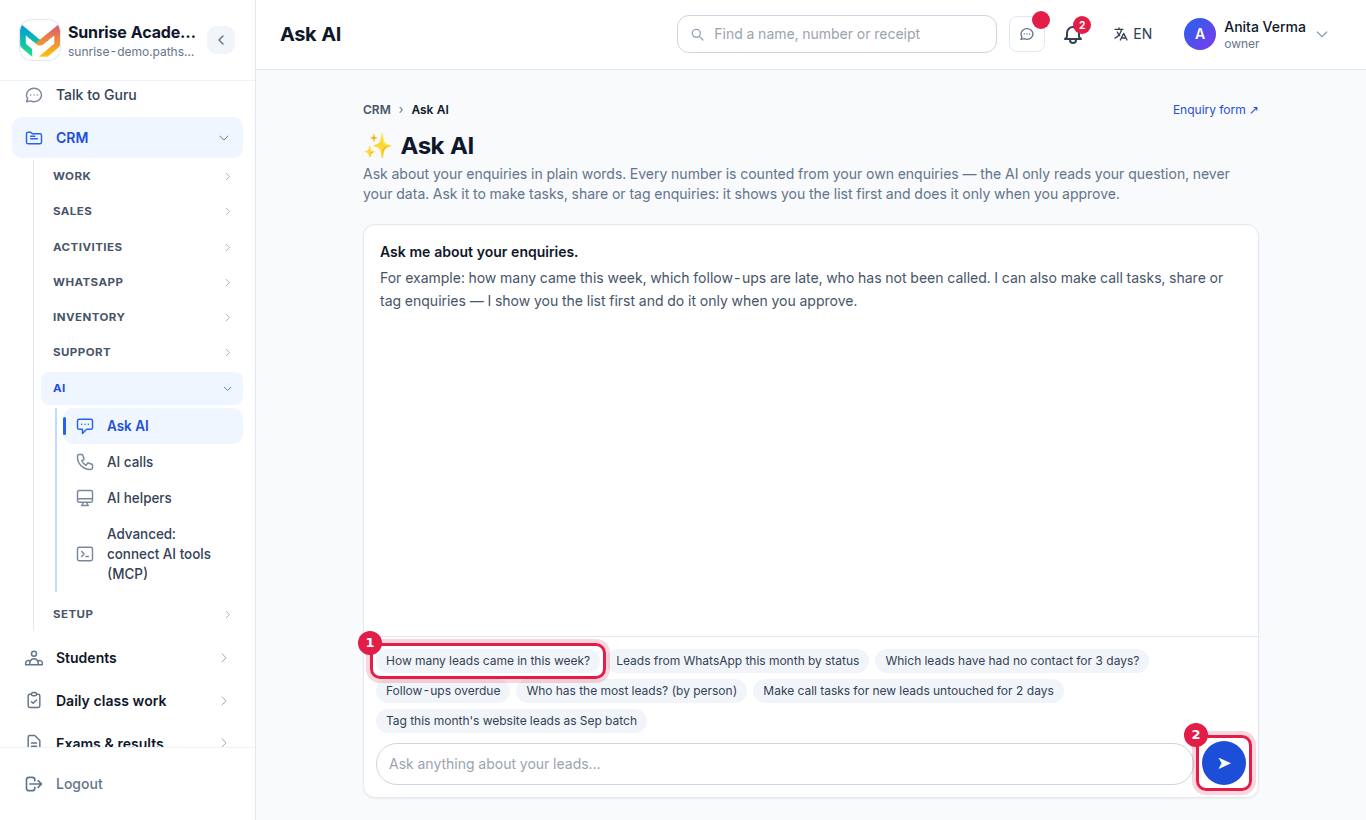
Ask AI lets you ask about your enquiries (leads, for a business) in plain words — "how many came this week", "which follow-ups are late", "who has not been called" — and get an answer counted from your own records. It can also make call tasks, share enquiries with your team, or tag them: it shows you the list first and does it only when you approve.
Ask AI comes with MJX CRM Pro. Without it the page shows "🔒 Ask AI comes with MJX CRM Pro."
#How to ask a question
- Type in Your question ("Ask anything about your leads…"), up to 300 characters.
- Press Enter or the ask button.
- Read the answer. Under it, Counted: lists exactly what was counted (for example "This week · From WhatsApp · Open"), so you can check it.
If the CRM needed the AI to understand the question, the chips say "(read with AI — check)".
#Example questions
| Question | Kind of answer |
|---|---|
| How many leads came in this week? | A count |
| Leads from WhatsApp this month by status | A breakdown |
| Which leads have had no contact for 3 days? | A list |
| Follow-ups overdue | A list |
| Who has the most leads? (by person) | A breakdown by person |
You can ask by period (today, this week, this month, last month…), step (New, In conversation, Follow-up due, Joined, Lost, Open), source (website, WhatsApp, walk-in, phone, referral…), "untouched N days", follow-ups due or overdue, a person's name, a tag, or hot / warm / cold; and group "by source", "by status" or "by person".
#How to run an action
- Ask for an action, for example:
- "Make call tasks for new leads untouched for 2 days"
- "Give this week's website leads to Meena and Ravi"
- "Tag this month's website leads as Sep batch"
- Ask AI lists the matching enquiries. Nothing is done yet.
- Untick any you want to leave out.
- Press Approve for … — or Cancel ("Cancelled — nothing was done.").
| Action | What it does | Who |
|---|---|---|
| Make tasks | A task on each enquiry | Staff: tasks only for themselves. Owner, Admin: for anyone |
| Share (give out) | Assigns the enquiries, in turn when you name several people | Owner, Admin only ("Only an owner or admin can give leads to someone else.") |
| Tag | Adds a tag to each enquiry | Anyone, on enquiries they can see |
Rules:
- An action with no step named works only on open enquiries — never on joined or lost ones unless you ask.
- At most 200 enquiries at once ("…and N more that are not included (at most 200 at once — ask more narrowly).").
- Every enquiry is checked again against what you may see before anything is done.
#Done by Ask AI
Every action you approve is listed — who approved it, what it did, and to how many enquiries. "Nothing yet." means no action has been approved.
#Privacy and accuracy
| Promise | How |
|---|---|
| Your data stays in the CRM | Most questions are read by our own parser, with no AI. When the AI is used, it gets only your sentence and fixed lists — no enquiries, names, tags or your organisation's name |
| Numbers are real | Every number is a count our system made from the enquiries you may see |
| Answers are checkable | The Counted: chips show the exact filters |
| A person decides | Actions run only after you approve |
AI use is counted under your organisation's monthly AI allowance.
#Who can use it?
Everyone with CRM access, on MJX CRM Pro. Owners and admins ask across all enquiries; staff get answers about their own, unassigned and their department's enquiries.
#Errors you may see
| Message | Meaning |
|---|---|
| Type a question about your leads. | The box was empty |
| Keep the question under 300 characters. | Shorten it |
| Tick at least one lead. | You unticked every enquiry before approving |
| That person is not on your staff. | The name did not match an active staff member |
| None of those leads can be changed by you. | They are no longer visible to you |
#Related
- On an enquiry's page, ✨ AI help gives Brief me before I call and Draft a WhatsApp reply — see WhatsApp in the CRM.
- Connect Claude or another assistant to your CRM: MCP server.
#Questions people ask
Does the AI read my enquiries' data?
No. Our own reader handles most questions with no AI at all. When it cannot, the AI sees only your question and fixed lists of steps and sources — never your enquiries, staff names or tags.
Can the AI make up a number?
No. Every number is counted from your own records, and the sentence is written by the CRM, not by the AI. Each answer shows what was counted.
Does Ask AI change anything by itself?
No. For an action it first shows the matching enquiries. Nothing is done until you press Approve.
Which plan includes Ask AI?
MJX CRM Pro.
How many enquiries can one action change?
At most 200 at once. Ask more narrowly for more.