
MJX Library plans and pricing
MJX Library Forever Free, Basic and Pro compared — prices, member and staff limits, Reports and Excel, the 14-day trial and how to upgrade.
MJX Library has three plans: Forever Free, Basic and Pro. All three run seats, shifts, monthly fees with receipts, check-in and book lending. They differ in limits, and Pro adds Reports, Excel and your own logo and colours. Prices are per library, not per member.
#Plans compared
| Forever Free | Basic | Pro | |
|---|---|---|---|
| Price (before 18% GST) | ₹0 | ₹499/month, or ₹4,999/year | ₹999/month, or ₹9,999/year |
| Seats, shifts and monthly fees | ✓ | ✓ | ✓ |
| Book lending | ✓ | ✓ | ✓ |
| Reports and Excel | — | — | ✓ |
| Your logo and colours | — (MJX look) | — | ✓ |
| Members | Small limit (30 at the time of writing) | Up to 300 | No limit |
| Staff logins (you included) | 1 | Up to 3 | No limit |
"Seats, shifts and monthly fees" means members, a seat map per shift, memberships and renewals, receipts, dues and check-in. "Book lending" means the catalogue with copies, issue and return to members, due dates and fines. "Reports and Excel" means the month's collection, renewals, occupancy and dues, and every list in Excel.
#The 14-day free trial
Every sign-up starts with a 14-day trial of every feature, with no card. After it you stay on Forever Free until you pay — nothing is deleted. You can pay at any time during the trial.
#How to upgrade
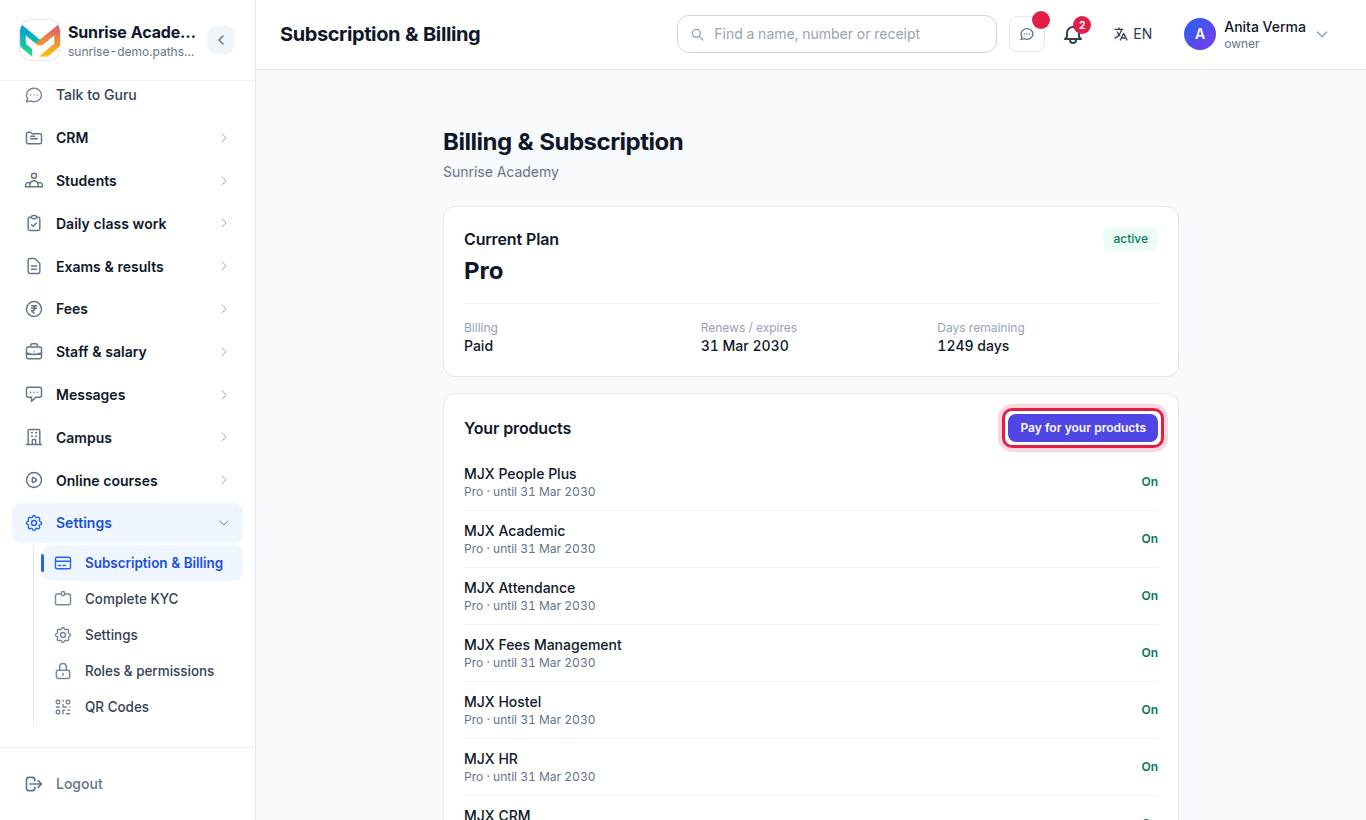
- On the website, pay for MJX Library Basic or Pro from Subscription & Billing › Pay for your products. The padlocked Reports row and the Excel · Pro button also open the plan page.
- In the app, open More › Account and plan and tap Upgrade now (or Upgrade or pay). Choose Monthly or Yearly and pay by UPI, card or net banking through Razorpay.
#What Reports shows (Pro)
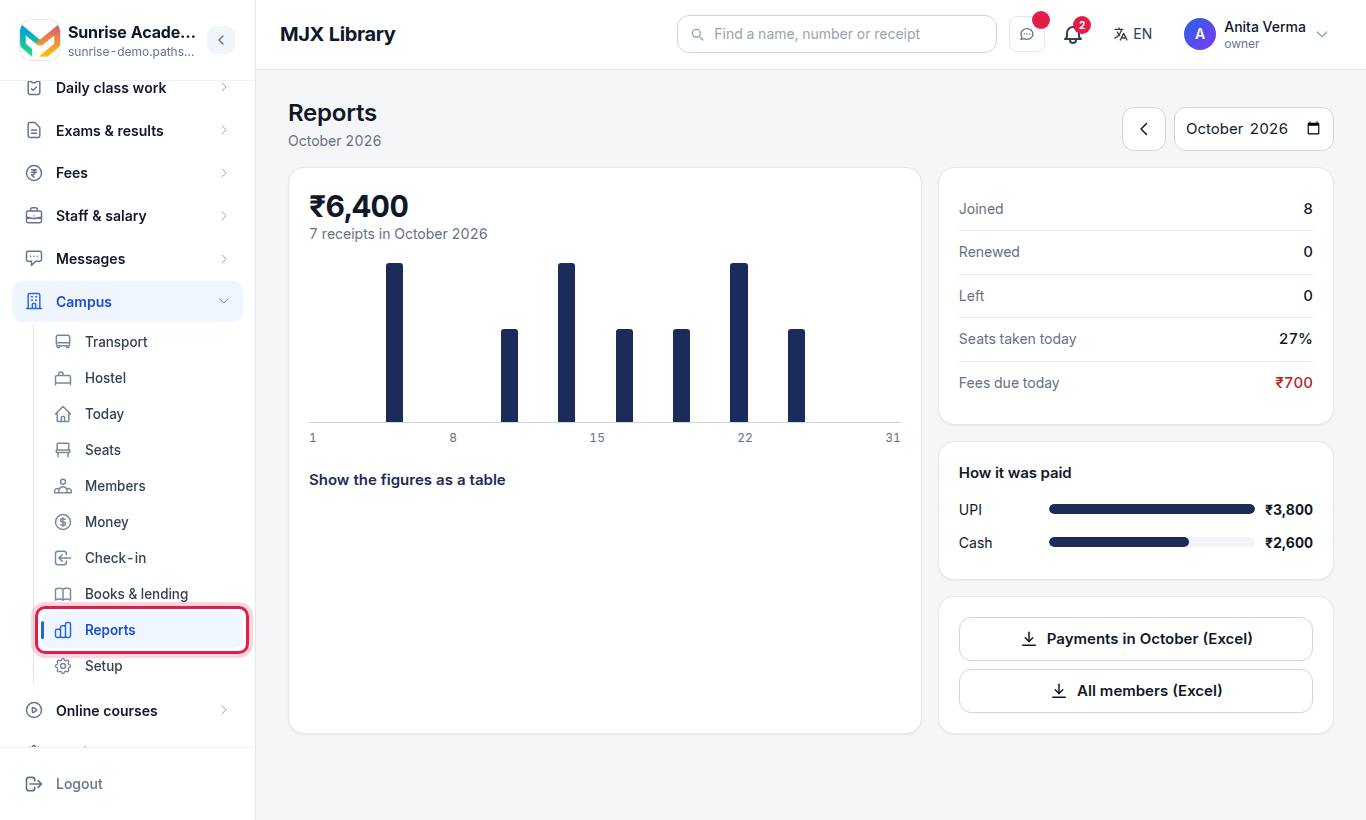
One month on one screen: the amount collected and the number of receipts, a day-by-day chart (with Show the figures as a table), Joined, Renewed, Left, Seats taken today, Fees due today, and How it was paid (Cash, UPI, Card…). Buttons download **Payments in month (Excel) and All members (Excel)**. Owner and admin only.
On Basic and Forever Free, Reports says what Pro adds and shows See MJX Library Pro. "Members, seats, fees, receipts and check-in keep working on every plan."
#When a limit is reached
Adding one more member than your plan allows shows a message like:
You are on the Forever Free plan, which allows up to 30 members. Everything you already have stays — upgrade to add more.On a paid plan it names the plan instead. Members you Mark as left stop counting.
#Questions people ask
Is MJX Library priced per member?
No. It is priced per library, monthly or yearly. The plans differ in how many members and staff logins they allow, and Pro adds Reports and Excel.
What happens when my 14-day trial ends?
You stay on MJX Library Forever Free until you pay. Nothing you added is deleted.
What happens when I reach my plan's member limit?
Everyone you already have stays. New admissions are refused with a message that names your plan's limit, until you upgrade or mark members as left.
Are prices with GST?
No. Prices are before 18% GST.
Can I pay before the trial ends?
Yes. Basic keeps your remaining free trial days; Pro starts at once.