
Run payroll and issue payslips
Create the month's pay run, approve it to issue payslips, send them on WhatsApp and email, record the payment, and handle arrears and advances.
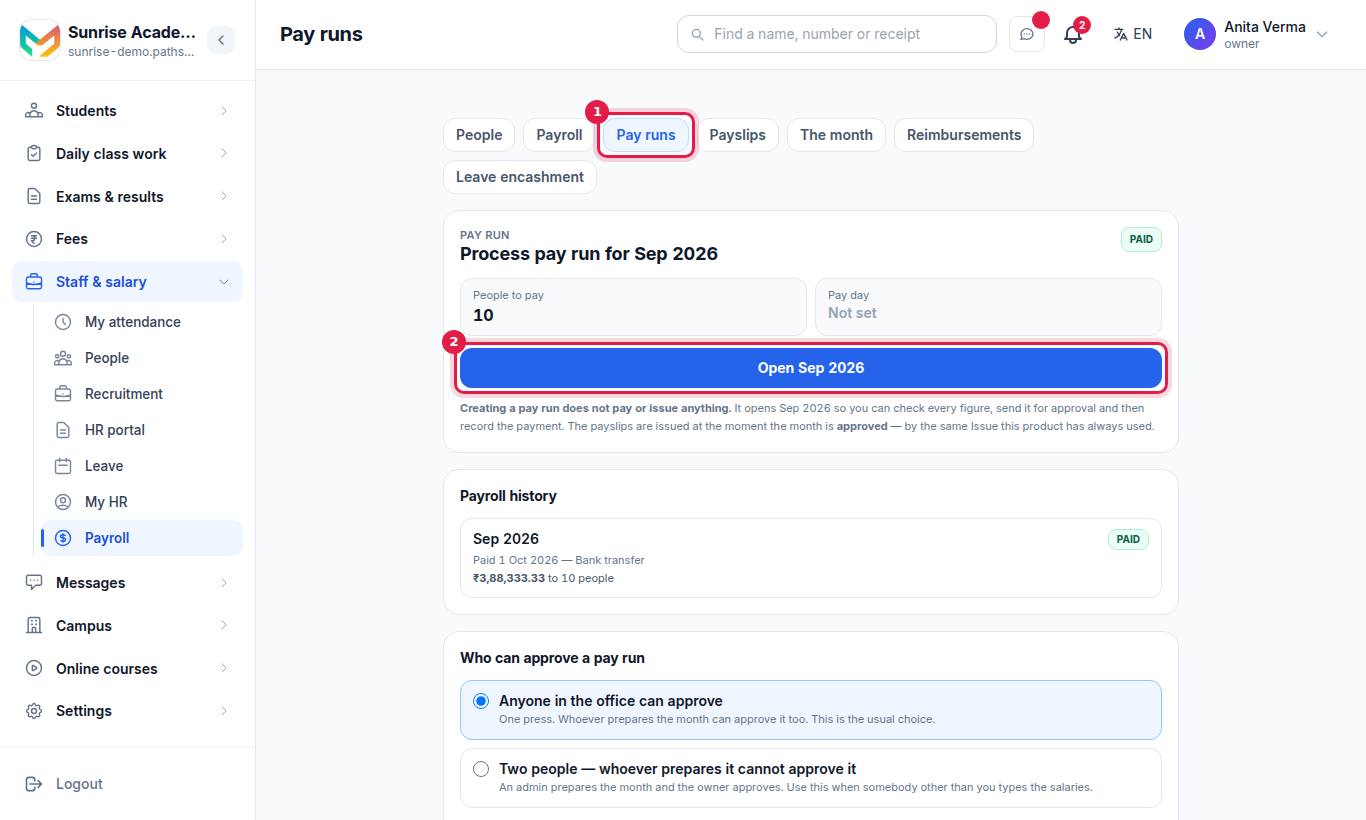
Every month in MJX Payroll follows the same path: DRAFT → WAITING FOR APPROVAL → PAYMENT DUE → PAID. You create the pay run, check it, approve it (which issues the payslips), pay through your bank, and record the payment. The button on screen always names the next step.
#How to run the month
#Steps
- The top card says Process pay run for October 2026 (the current month), with People to pay and Pay day.
- Press Create pay run. If one exists, press Open October 2026.
- On the month's page, read Worth sorting out first — gaps such as people with no salary or no bank account. None of them stops you approving.
- Check the summary: Payroll cost, Total net pay, People, Pay day, Payslips issued, and the lines Gross earnings, Arrears, Reimbursements, Leave encashment, Deductions, Loss of pay, PF, ESI, professional tax and income tax, Advance repayments.
- Open Who is on this run and tap a person to see their payslip: (+) Earnings and what came off.
- Leave Send each payslip to its person on WhatsApp and email ticked (MJX Payroll Basic and above).
- Press Submit and approve. If your organisation uses two people, the button is Submit for approval and the owner or another admin then presses Approve October 2026 — or Send it back with a reason.
- Pay the salaries through your bank. The bank advice sheet link on the page has every account on it.
- Press Record payment. Fill in The day you paid, How you paid (Bank transfer, Cheque, Cash or UPI) and A note (optional) — for example a UTR or cheque number. Optionally tick Send the payslips to everyone again. Press Save the payment.
#What the statuses mean
| Tag | Meaning |
|---|---|
| NOT STARTED / READY | No pay run for the month yet |
| DRAFT | Open and being checked |
| WAITING FOR APPROVAL | Sent up, waiting for the approver |
| PAYMENT DUE | Approved, payslips issued, payment not recorded yet |
| PAID | Payment recorded — the month is finished |
A month that was sent back shows "This month was sent back by …" with the reason. Fix it on the Payroll or Payslips screen, then send it up again.
If pay day has passed, the page says "Pay day was … — N days ago."
#How to reopen a month
On a PAYMENT DUE month, Open this month again takes it back to draft. It is only possible once every payslip for the month has been withdrawn. A PAID month cannot be reopened — money has gone.
#The Approvals inbox
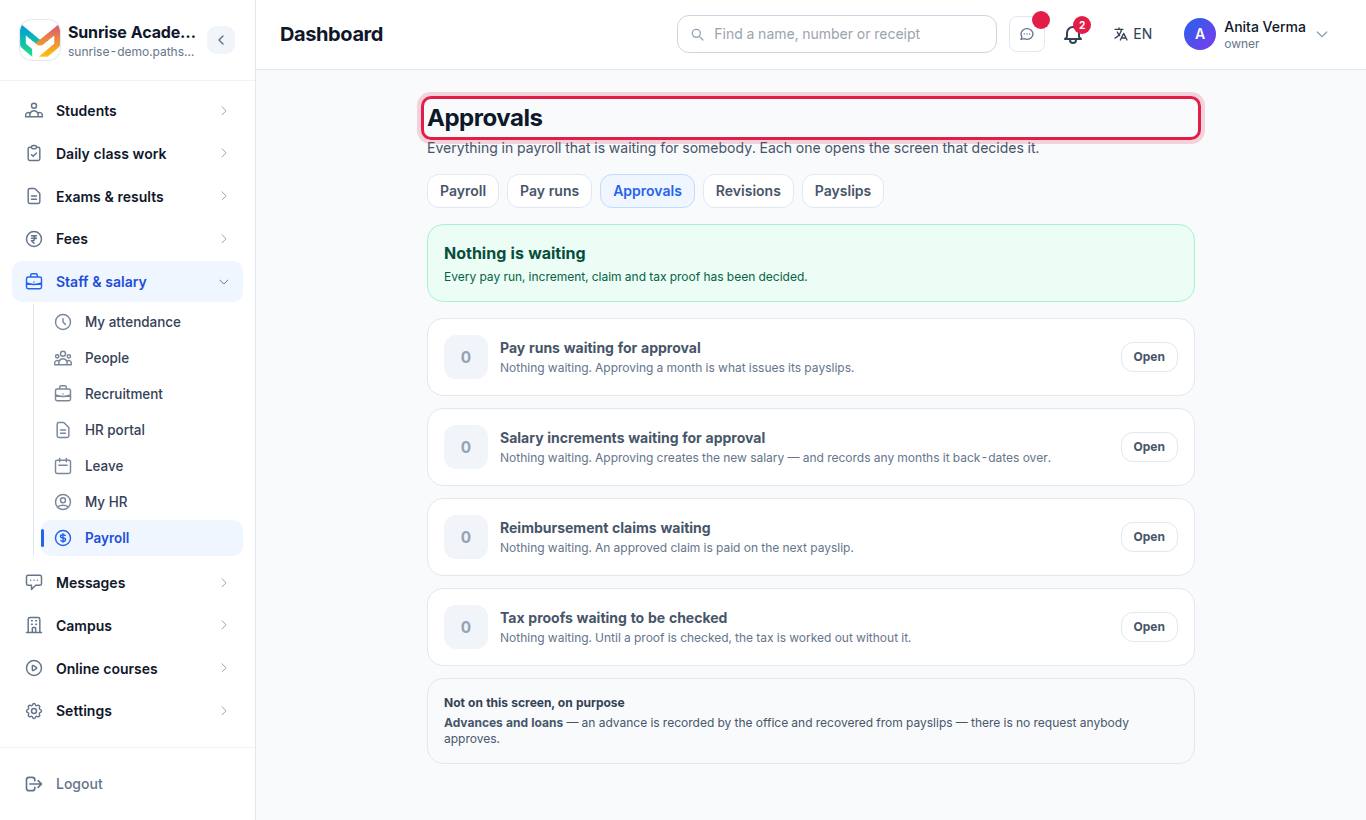
"Everything in payroll that is waiting for somebody." It counts four queues, each with Review or Open:
- Pay runs waiting for approval
- Salary increments waiting for approval
- Reimbursement claims waiting
- Tax proofs waiting to be checked
When nothing is waiting it says "Every pay run, increment, claim and tax proof has been decided."
#How to issue payslips without a pay run
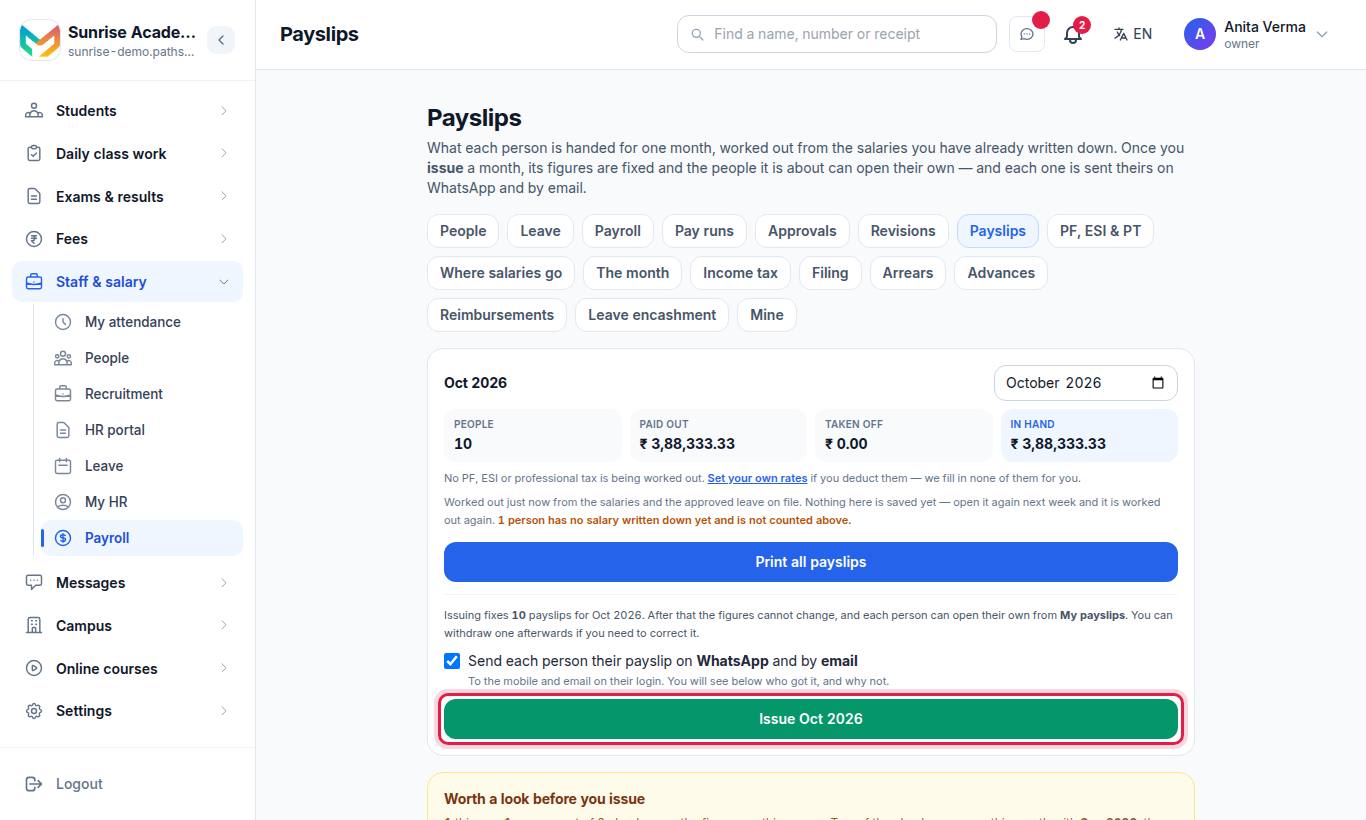
The Payslips screen works on its own too. Pick the month, check the totals (People, Paid out, Taken off, In hand), and press Issue October 2026. "Issuing fixes N payslips for October 2026. After that the figures cannot change, and each person can open their own from My payslips."
If the month is already in a pay run, the screen says so and links to it instead — the run issues the payslips.
Other actions on this screen:
| Button | What it does |
|---|---|
| Print all payslips | One PDF with everybody's payslip for the month |
| Print payslip | One person's payslip |
| Send / Send again | Sends one issued payslip to the person on WhatsApp and by email (Basic and above). Each card shows "✓ WhatsApp sent", "Email not sent" and why. |
| Withdraw | Takes back one issued payslip. "They will stop seeing it. The withdrawn slip is kept, and you can issue the month again." |
When statutory deductions are on, the screen also shows To remit this month (from them and from you) and Costs you (salaries plus your own contributions).
#Checks before you issue (Pro)
With MJX Payroll Pro, a Worth a look before you issue card lists things to look at, such as pay that moved a lot since the last issued month, somebody paid last month with nothing to issue now, a typed deduction or income tax as big as half the gross, arrears larger than a whole month, more than half a month unpaid, somebody with no salary, two people whose bank details look like one account, and an issued slip the figures no longer agree with. None of them stops you issuing. When all is fine it says Nothing worth a look.
#Arrears, advances, reimbursements and leave encashment
These four screens add named lines to the next payslip. Writing a line does not pay or take anything — it is settled when the payslip is issued, and withdrawing that payslip puts it back. All four need MJX Payroll Pro; without it you can read the screen but nothing can be saved.
| Screen | Use it for | How |
|---|---|---|
| Arrears — "Money owed for a month that has already gone" | A back-dated raise, a missed allowance | Who, Which month it was earned in, How much, Why (printed on the payslip) → Add to the next payslip. It prints as "Arrears for <month>". |
| Advances — "Money you have given, coming back a bit each month" | Festival advance, salary paid early | Who, How much you gave, Coming off each month, First month it comes off, What it is for → Record it. Later: Change monthly, Stop it, Start it again, Delete. |
| Reimbursements — "Money somebody spent for you, handed back" | Bus fare, small purchases | Who spent it, How much, The date on the bill, What it was for, The bill (optional, from Documents) → Record it. Then Allow it or Refuse it; Undo the decision if needed. |
| Leave encashment — "Unused leave, paid out when somebody leaves" | The full and final payslip | Choose the month of the last working day → Show. Type days, Amount paid and What for → Put it on the settlement. |
Good to know:
- An advance's last instalment is only ever what is left, and a month without enough pay takes less or nothing — the balance carries on. It comes off after PF, ESI and professional tax and never pushes take-home below zero.
- A reimbursement is added to take-home and is never reduced. It is not a wage, so it does not change PF, ESI or professional tax.
- Arrears do not change PF, ESI or professional tax for the month they are paid in.
- Leave encashment lists only people with an accepted exit and a last working day in the month. Record the exit in HR first. Pathshala does not work out the amount — you type it, per your own policy.
#What employees see
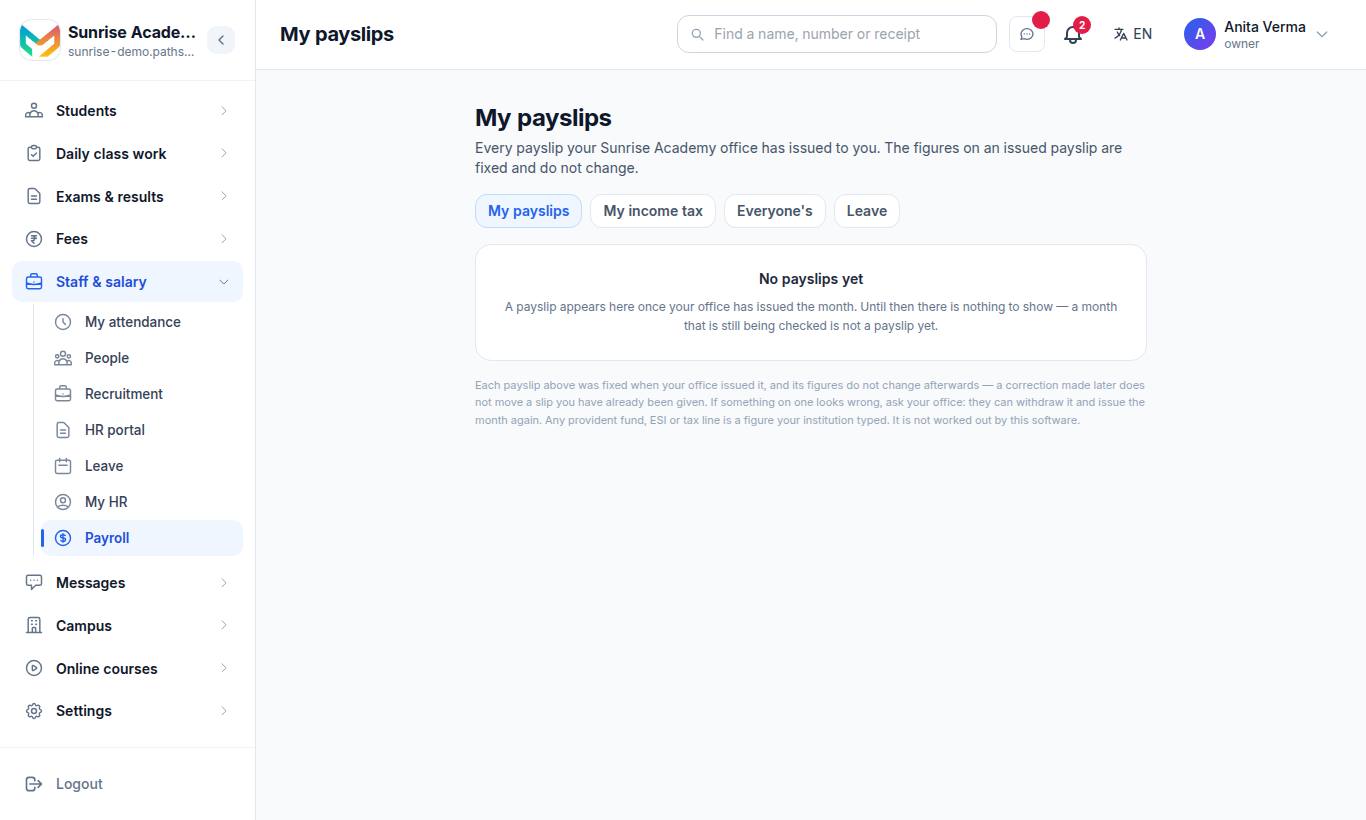
My payslips lists "Every payslip your office has issued to you". Each month shows In hand, Paid out, Taken off, days without pay, leave taken, and Open payslip for the PDF. "No payslips yet" until the office issues a month. Employees with the MJX People app see the same in its Payslips tab. See the HR portal for employees.
#Who can do what?
| Task | Default | Permission |
|---|---|---|
| Create and submit a pay run, Where salaries go | Owner, admin | Prepare a Pay Run |
| Approve, send back, record payment, issue or withdraw payslips | Owner, admin | Approve a Pay Run |
| Read everyone's payslips, print | Owner, admin | View Payslips |
| Send a payslip again | Owner, admin | Send Payslips |
| Arrears, leave encashment | Owner, admin | Full and Final |
| Approvals inbox | Owner, admin | Prepare a Pay Run or Approve a Pay Run |
| Advances, reimbursements | Owner, admin only | — |
| My payslips | Every employee | — |
#Questions people ask
Does creating a pay run pay anybody?
No. Creating a pay run does not pay or issue anything. It opens the month so you can check every figure. The payslips are issued when the month is approved.
Does Pathshala transfer the salaries?
No. Pathshala does not move money. Pay through your bank using the bank advice sheet, then press Record payment on the pay run.
A payslip is wrong after I issued it. What do I do?
On Payslips, press Withdraw on that person's slip, correct the salary or leave, and issue the month again. The withdrawn slip is kept on record.
Can I reopen an approved month?
Yes, with Open this month again — but only once every payslip for that month has been withdrawn. A paid month cannot be reopened.
Where do employees see their payslips?
On My payslips (web) or the Payslips tab of the MJX People app. Each payslip appears once the office has issued the month.