
MJX Library — library management software
What MJX Library does — members, seat map by shift, monthly fees with receipts, check-in and book lending — who it is for, plans and where to start.
MJX Library runs a self-study library or a lending library from one screen: members with a number each, a seat map for every shift, monthly fees with numbered receipts, renewals and dues, who is inside right now, and a book catalogue with issue, return and fines. It is part of Pathshala by MJX Technologies, but you can buy it on its own.
#Who is MJX Library for?
- Self-study libraries and reading rooms that rent seats by shift (morning, evening, full day) for a monthly fee.
- Lending libraries that issue books to members and take them back.
- Schools and colleges with a library — the same catalogue and lending desk, for students and staff.
- Anyone still running members, seats and fees from a register and a WhatsApp group.
#What can you do with it?
#How the library is laid out
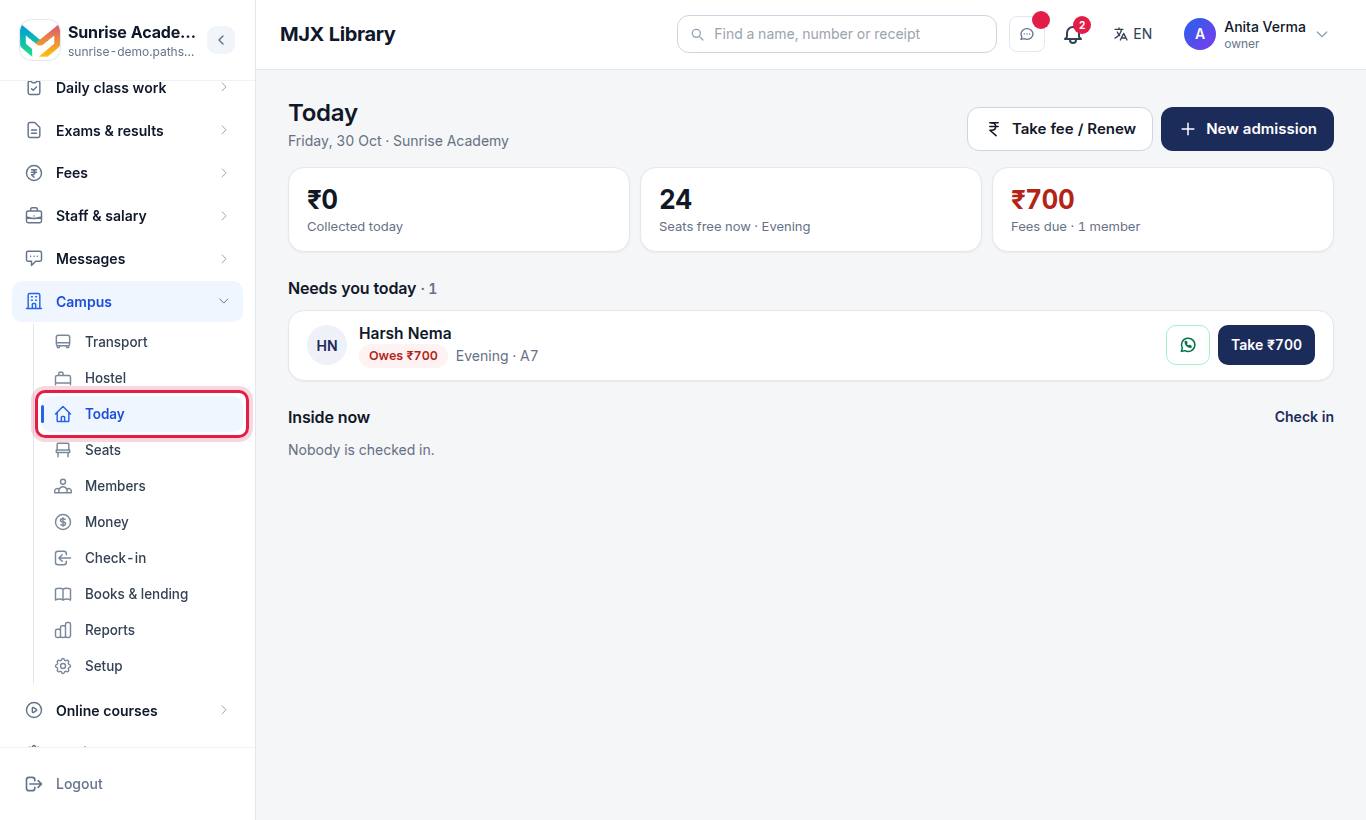
After you sign in, press Apps and choose MJX Library. These are its menu rows:
| Row | Address | What it is | Who sees it |
|---|---|---|---|
| Today | /library | Collected today, seats free now, fees due, "Needs you today" and "Inside now" | Everyone at the desk |
| Seats | /library/seats | The seat map for one shift at a time | Everyone at the desk |
| Members | /library/members | Search and filter every member | Everyone at the desk |
| Money | /library/fees | Receipts by date, and who owes money | Owner and admin |
| Check-in | /library/attendance | Check members in and out, and who came on any day | Everyone at the desk |
| Books & lending | /library/books | The catalogue; the lending desk is at /library/lending | Everyone (lending has its own rule) |
| Reports | /library/reports | The month on one screen, and Excel | Owner and admin, on Pro |
| Setup | /library/settings | Shifts, seats and lending rules | Owner and admin |
On a phone-sized screen, a bar at the bottom mirrors the app. For the owner and admins it shows Today · Lending · + · Members · Money. The + button opens "What do you want to do?" with New admission, Take fee / Renew and Check in.
#Who can do what?
MJX Library uses the three Pathshala roles: Owner, Admin and Staff.
| Task | Owner / Admin | Staff (counter staff) |
|---|---|---|
| New admission, take fee, renew, check in | Yes | Yes |
| See totals, the Money page, Reports and Excel | Yes | No — they still take a fee and print that member's receipt |
| Void a receipt, cancel a booking | Yes | No |
| Change shifts, seats and lending rules | Yes | No |
| Add or change books and copies, print labels | Yes | No (they can search the catalogue) |
| Lend and take back books | Yes | Only when the owner switches on Staff can lend |
| Waive a fine, change a due date | Yes | No |
Add counter staff under Sidebar › Team › People — see users and roles.
#Web and app
The website and the MJX Library app use the same account, the same login and the same data. Anything done at the counter on the phone shows on the website at once, and the other way round. See the MJX Library app.
#Plans at a glance
| Plan | Price (before 18% GST) | In short |
|---|---|---|
| MJX Library Forever Free | ₹0 | Seats, shifts, fees and book lending for a small library run by one person |
| MJX Library Basic | ₹499/month or ₹4,999/year | Bigger limits and more staff logins |
| MJX Library Pro | ₹999/month or ₹9,999/year | No limit on members, books or staff logins, plus Reports and Excel and your own logo and colours |
Full details are on Plans and the live MJX Library product page.
#Where to start
- Sign up and set up your library — about five minutes.
- Read seats and shifts if you rent seats, or book lending if you lend books.
- Install the MJX Library app on the counter phone.
- Keep the best practices checklist handy for the first month.
#Need help?
WhatsApp or call MJX on +91 79968 37555, or email info@mjxtechnologies.com.
#Questions people ask
What is MJX Library?
MJX Library is library management software from MJX Technologies for India. It runs a self-study library (seats rented by shift for a monthly fee) and a lending library (books issued and returned) in one place.
Is it for a self-study library or a book library?
Both. Use seats, shifts and fees for a reading room, the catalogue and lending for books — or both together.
Do I need any other MJX product?
No. MJX Library is sold on its own. Sign up, add your shifts and seats, and start adding members.
Is there a phone app?
Yes. The MJX Library app for Android (com.mjxtechnologies.app.library) does the same desk work as the website, with the same login.
How is it priced?
Per library, not per member. MJX Library Basic and MJX Library Pro are sold monthly or yearly. Every sign-up starts with a 14-day trial, and MJX Library Forever Free keeps a small library running at no cost after that.