
My HR — what every employee sees
The employee's own page in MJX HR — leave balance, payslips, letters, policies, holidays, documents, Ask HR and resignation, on the web and phone.
My HR is each employee's own page in MJX HR. It shows your leave, payslips, letters, policies, holidays and documents in one place, and lets you ask HR for something or resign. In Pathshala, every person in an organisation with MJX HR has one — on every plan, including Forever Free.
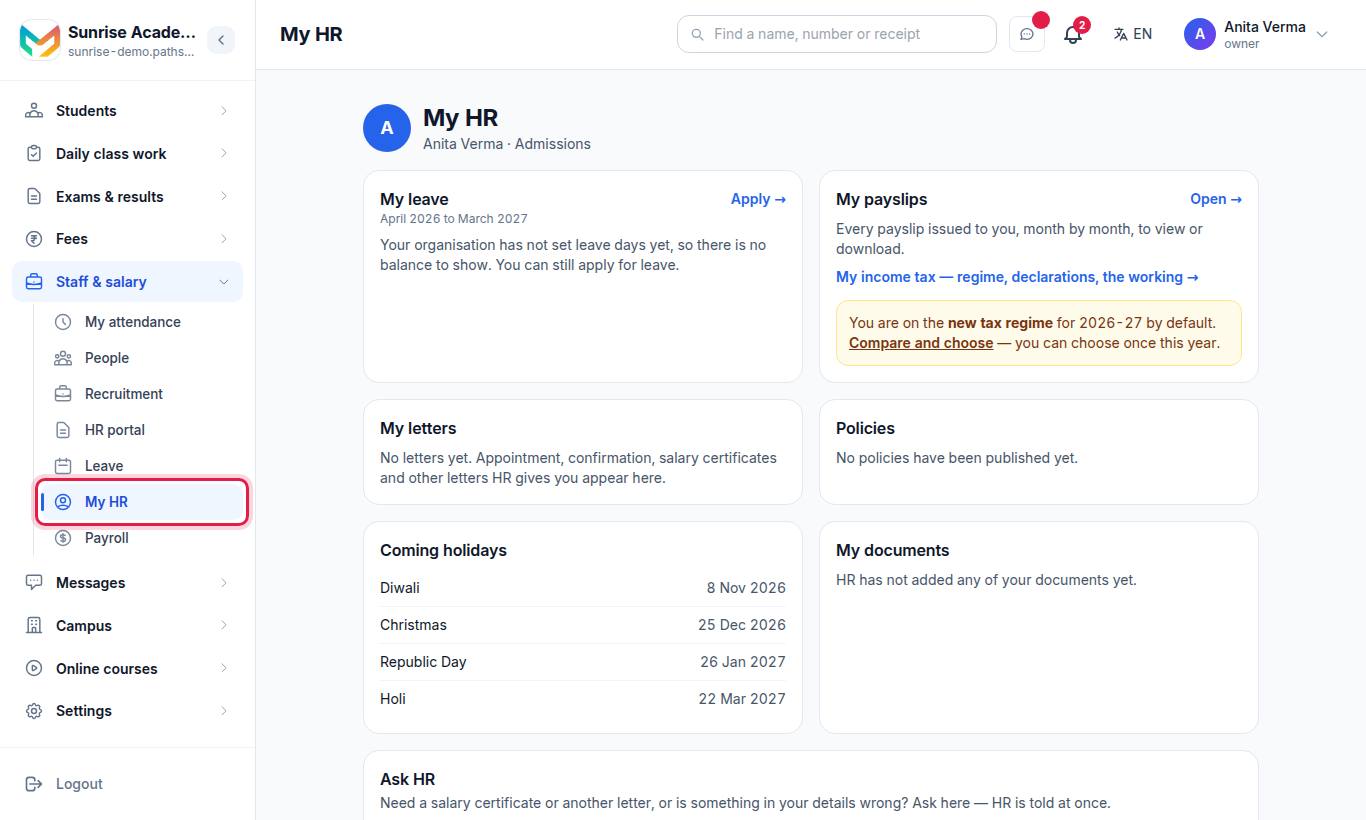
An employee of an HR, Payroll or Attendance organisation sees a short menu: My HR, Leave, My attendance (with MJX Attendance Basic) and My payslips (with MJX Payroll).
#What is on My HR?
| Section | What you see and do |
|---|---|
| Announcements | Notices from HR at the top, pinned ones first |
| From HR | Policies to read — press Read →, then I have read and agree. Your own onboarding or exit lines, to tick. |
| My leave | x left of y · taken, and Apply →. Anything waiting for approval. Managers see waiting for your answer →. |
| My payslips | Open → every payslip issued to you. My income tax — regime, declarations, the working →. (MJX Payroll) |
| My letters | Appointment, confirmation, salary certificates and other letters HR gives you — Open for the PDF |
| Policies | Each policy — To read, Please read or ✓ Agreed |
| Things you have from us | The laptop, ID card or keys you hold. Please return them when you leave. |
| Coming holidays | The next holidays HR has listed |
| My documents | Files HR has kept for you — Download |
| Ask HR | Ask for a letter, a correction or anything else — see Ask HR |
| Resign | Send your resignation — see Onboarding and exits |
| My details | Employee code, Job title, Department, Reports to, Joined on, Email, Mobile, Date of birth, Blood group, Emergency contact, Qualification, Address |
#Income tax reminders
With MJX Payroll, My HR may show lines such as "You are on the new tax regime for (year) by default. Compare and choose — you can choose once this year." and "Upload proof of your rent and investments by (date)." See the Payroll docs on income tax and TDS.
#Steps to apply for leave from My HR
- Under My leave, press Apply →.
- Choose the kind, first and last day (or half day), and an optional reason.
- Press Apply. Your reporting manager — or the office — answers it.
#Steps to ask HR for a salary certificate
- In Ask HR, choose 📄 A letter.
- Choose Salary certificate and type what it is for, for example a home loan.
- Press Send to HR.
- When HR issues it, Open your letter → appears beside the request, and it is under My letters.
#On the phone
Everything here — except letters and policies, which open My HR in the browser — is in the MJX People app: Check in, Leave, Payslips, Office (Ask HR, announcements, holidays) and Me.
#Who sees what?
| Plan | What My HR shows |
|---|---|
| MJX HR Forever Free | Leave, holidays, details, documents |
| MJX HR Basic | + Letters, Ask HR, announcements |
| MJX HR Pro | + Policies, onboarding and exit lines, assets |
| With MJX Payroll | + Payslips and income tax |
#Questions people ask
How do I get to My HR?
Sign in on your organisation's website with your mobile number. If your organisation uses MJX HR, you land on My HR.
My details are wrong. Can I change them myself?
No — ask HR. In Ask HR, choose Correct my details, pick what is wrong and type what it should say.
Where do I download my payslip?
Under Your name (top right) › My payslips › Open → on My HR, or in the MJX People app's Payslips tab. Payslips need MJX Payroll.
Can I see my leave balance?
Yes, under My leave, once your organisation has set leave days. Until then you can still apply for leave.
Can my colleagues see my page?
No. My HR shows only your own records. HR and the office see what they manage.