
Book catalogue, issue and return, and late fines
Add books and copies, issue and take back books with a barcode gun or phone camera, and set due dates and late fines your way.
MJX Library keeps every book you own and every copy of it, lends copies to members (and, in a school, to students and staff), works out the due date and any late fine from your own rules, and takes books back with one scan.
#How the catalogue works
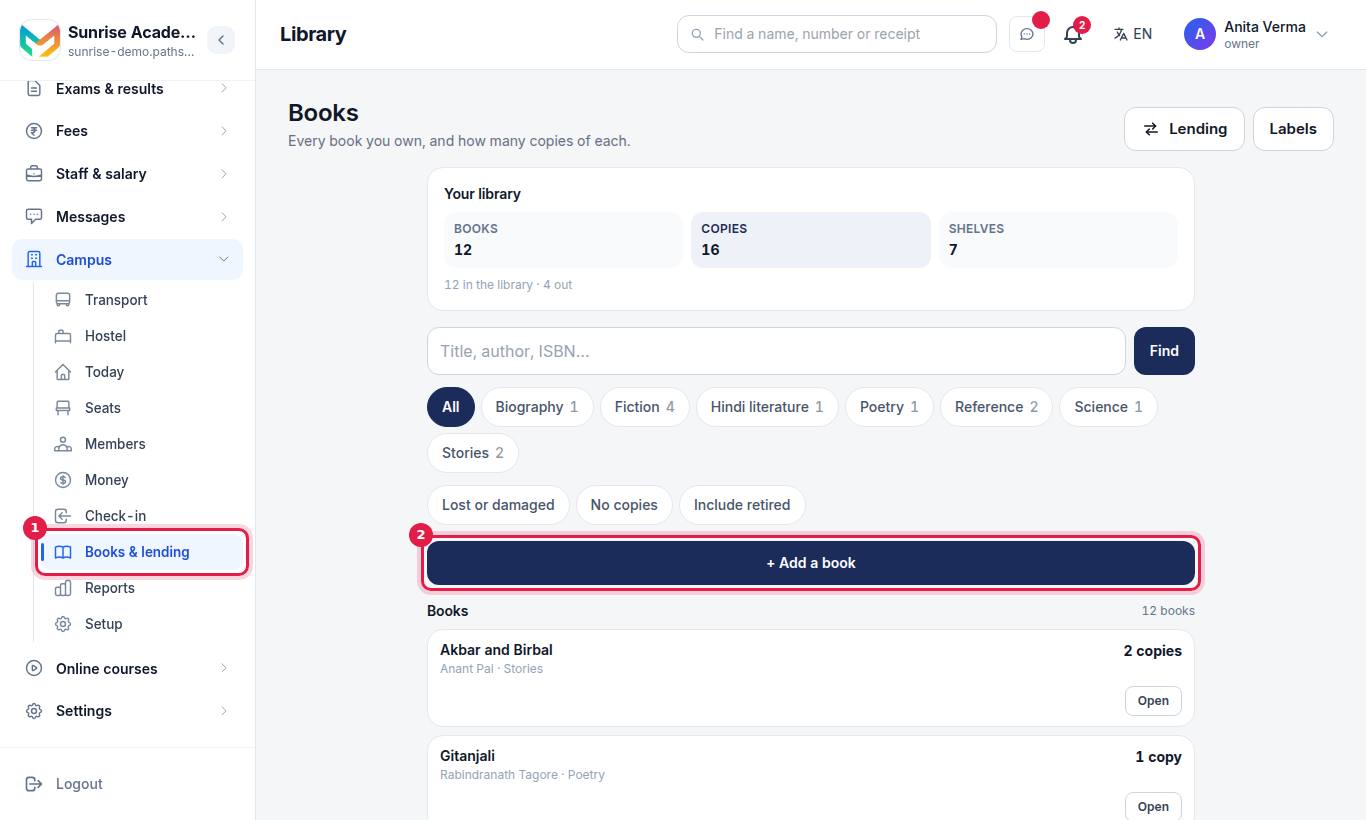
The Books page shows Your library — how many Books, Copies and Shelves you have — then a search box ("Title, author, ISBN…") with Find, one chip per shelf, and the filters Lost or damaged, No copies and Include retired.
A book is a title (one entry for Wings of Fire). A copy is one physical book with its own accession number — the number written inside the cover.
#Steps to add a book
- Press + Add a book.
- Press Scan the barcode and hold the back cover to the camera — or just point a barcode gun at it. The ISBN fills in. If the library already has that book, you are offered Open it to add copies instead.
- Type Name of the book (the only box you must fill). Author and Shelf are optional.
- Open More details for Publisher, ISBN, Edition, Language, Year published, Where it is kept (like Rack 3), Notes and Retired.
- Type How many copies? and press Save.
If a book with a similar name exists, you see a warning, never a refusal — a library can hold two editions.
#Steps to number copies and add more
- Open the book. The copies lists each copy with its accession number and condition.
- Type each copy's number, or scan its label: a scanned label goes on the first copy without a number, or adds a new copy with that number.
- Change a copy's condition to In the library, Lost, Damaged or Withdrawn.
- Type a number and press + Add more copies for more.
Remove this book from the catalogue removes the book and every copy. If you still own the copies, tick Retired instead: they stay on the register but are no longer lent.
#How to set your lending rules
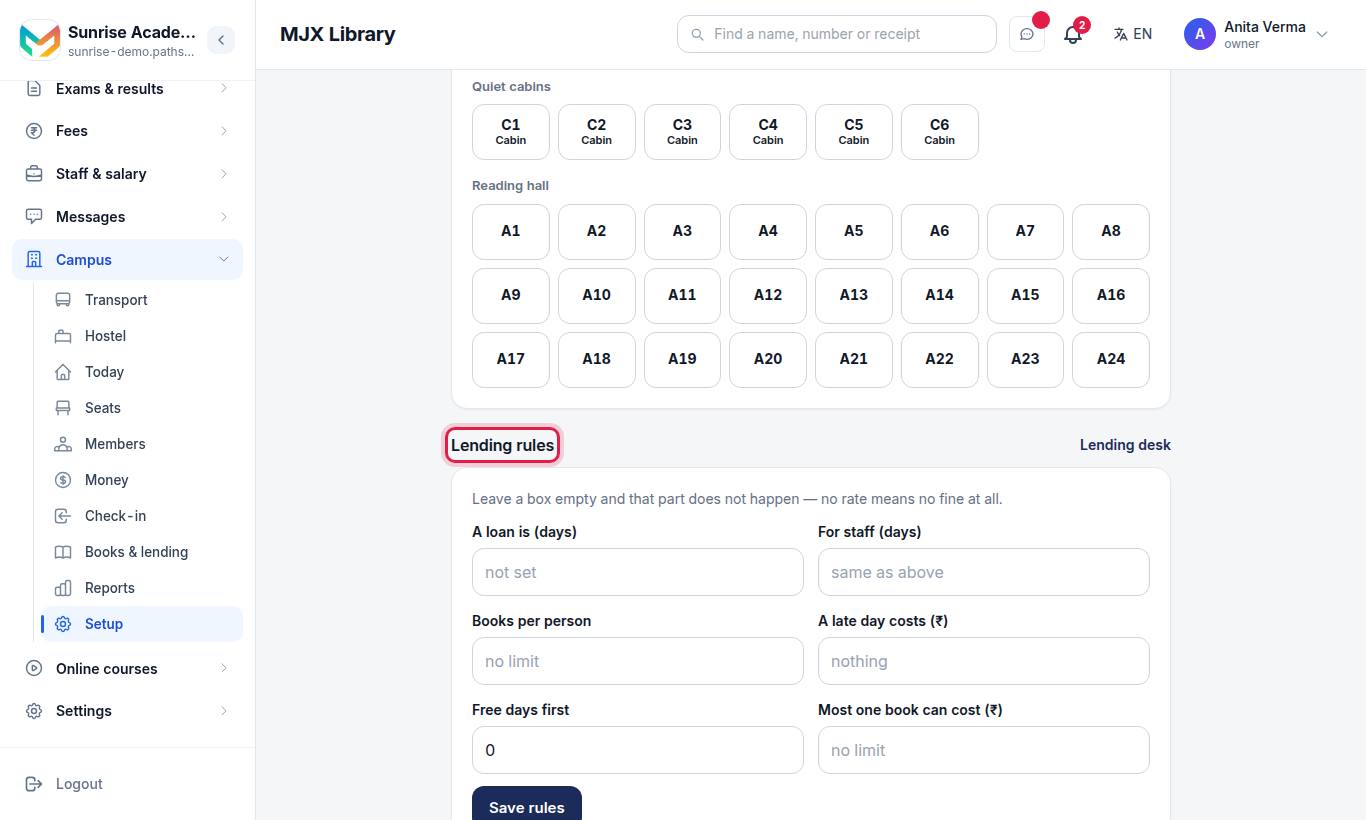
(Also on the lending desk under Your lending rules.) Leave a box empty and that part does not happen.
| Setting | What it does | Empty means |
|---|---|---|
| A loan is (days) | Fills the due date by itself | You type a due date on every loan |
| For staff (days) | A different loan length for staff (schools) | Same as above |
| Books per person | Most books one person may hold | No limit |
| A late day costs (₹) | The fine per late day | No fine at all |
| Free days first | Late days before any fine starts | 0 |
| Most one book can cost (₹) | A cap on one book's fine | No limit |
| Staff can lend | Counter staff may lend and take back | Only owner and admins lend |
Press Save rules (on the lending desk, Save these rules).
Staff can lend appears only in a library that is its own business. In a school, staff are teachers and do not get the desk.
#How to give a book out
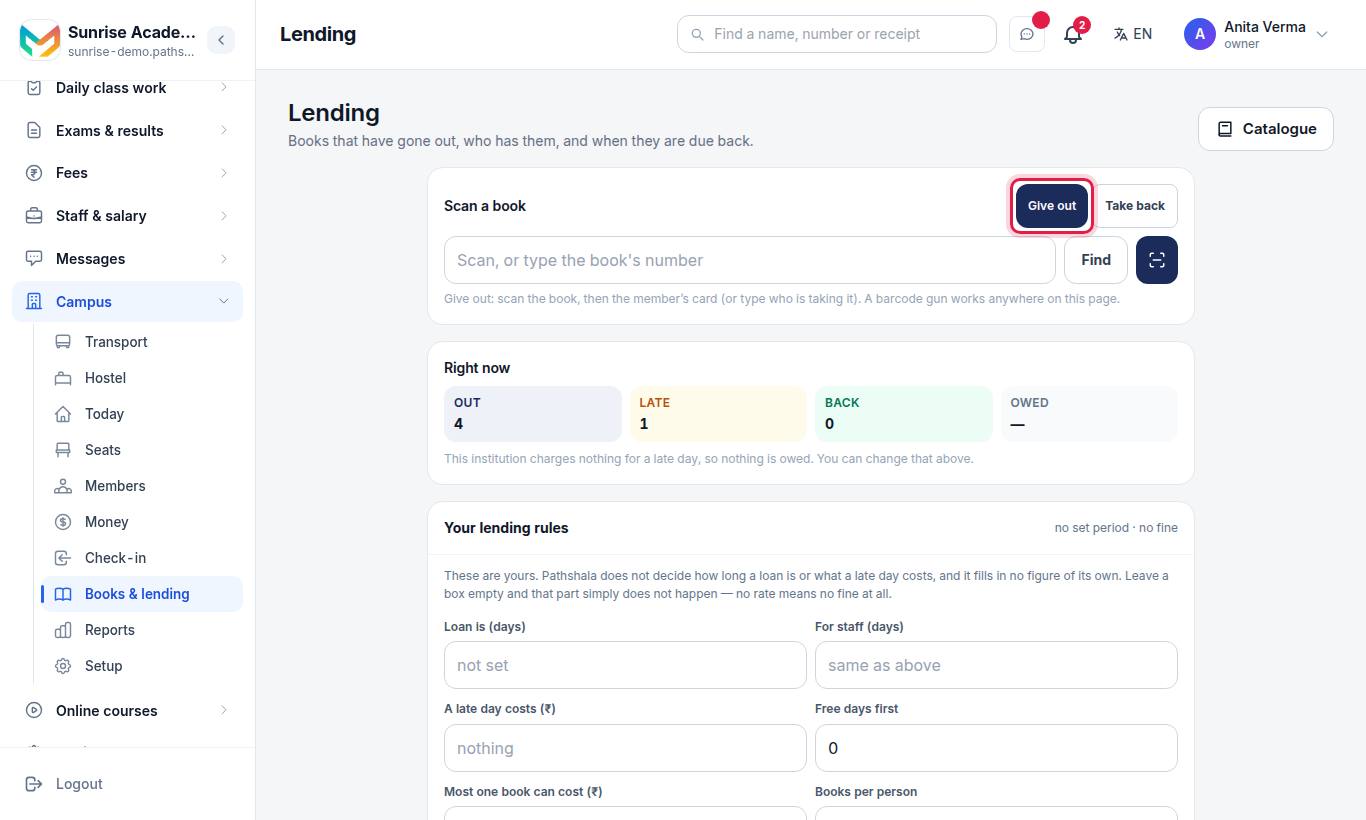
- Under Scan a book, choose Give out.
- Scan the copy's label (gun or the camera button), or type the number and press Find. You can also search the title under Give a book out and pick the copy.
- Scan the member's card (anything carrying their member number, like M-0012), or type in Who is taking it — "Name, member code, phone or admission no." In a school, pick Member, Student or Staff to narrow it.
- Check Going out on and Due back. Due back fills itself from your loan days; if you have none, type it.
- Press Give it out.
#How to take a book back
- Under Scan a book, choose Take back — "every book you scan comes straight back in."
- Scan each copy. Or find the loan in the list and press Take it back.
- If it is late and you charge fines, the fine is worked out and shown on the loan.
Scanning a member's card in Take back mode lists the books they hold — scan each one to take it back.
#The loans list
Tabs: Out now, Late, Back and Everything, with a search box ("Who has it…"). Right now shows how many books are Out, Late, Back and the fines Owed on books already returned.
- Change the date — move a due date (owner and admin).
- Waive the fine — forgive all or part of a fine once the book is back (owner and admin).
#Scanning: gun or camera
- Barcode gun (USB or Bluetooth) — it types the code fast and presses Enter. MJX Library catches it wherever your cursor is and takes the typing back out of any box it landed in.
- Camera — press the camera button. If the browser cannot open the camera, type the number in Or type the number and press Use.
- What a scan finds, in order: a copy's number, then an ISBN (10 or 13 digits, with or without hyphens), then a member's number.
Print the labels to scan from Labels and printing.
#Who can use it?
| Task | Owner / Admin | Staff |
|---|---|---|
| Search the catalogue | Yes | Yes (in a school, teachers too) |
| Add or change books and copies | Yes | No |
| Lend and take back | Yes | Only with Staff can lend on |
| Rules, waive a fine, change a due date | Yes | No |
Book lending is on every plan. Forever Free and Basic may limit how many copies you keep; see plans.
#Questions people ask
Can I use a barcode gun?
Yes. A USB or Bluetooth barcode gun works anywhere on the Books and Lending pages, without clicking a box first. The phone or laptop camera works too.
What can I scan?
A copy's own label (its accession number), the ISBN barcode on the back cover, or a member's number such as M-0012. The library checks them in that order.
Does MJX Library charge a late fine by default?
No. Pathshala fills in no figure of its own. Leave A late day costs empty and there is no fine at all.
Does it make up accession numbers?
Never by itself. You type or scan them, or you number all unnumbered copies in one go from Labels, choosing how the numbers start.
Can counter staff lend books?
Only when the owner ticks Staff can lend in the lending rules. Waiving a fine, changing a due date and the rules stay with the owner and admins.
A book went missing. Should I delete it?
No. Mark the copy Lost. A loss the register cannot show is a loss nobody finds at the stock check. Remove a copy only when it was typed by mistake.