
HR policies with read-and-agree acknowledgements
Publish leave, conduct, POSH, IT and travel policies; every employee reads and presses I have read and agree, and you see who has not.
Policies in MJX HR let you write your handbook once. When you publish one, every staff member is asked to read it and press I have read and agree on their My HR page — and you can see who has not.
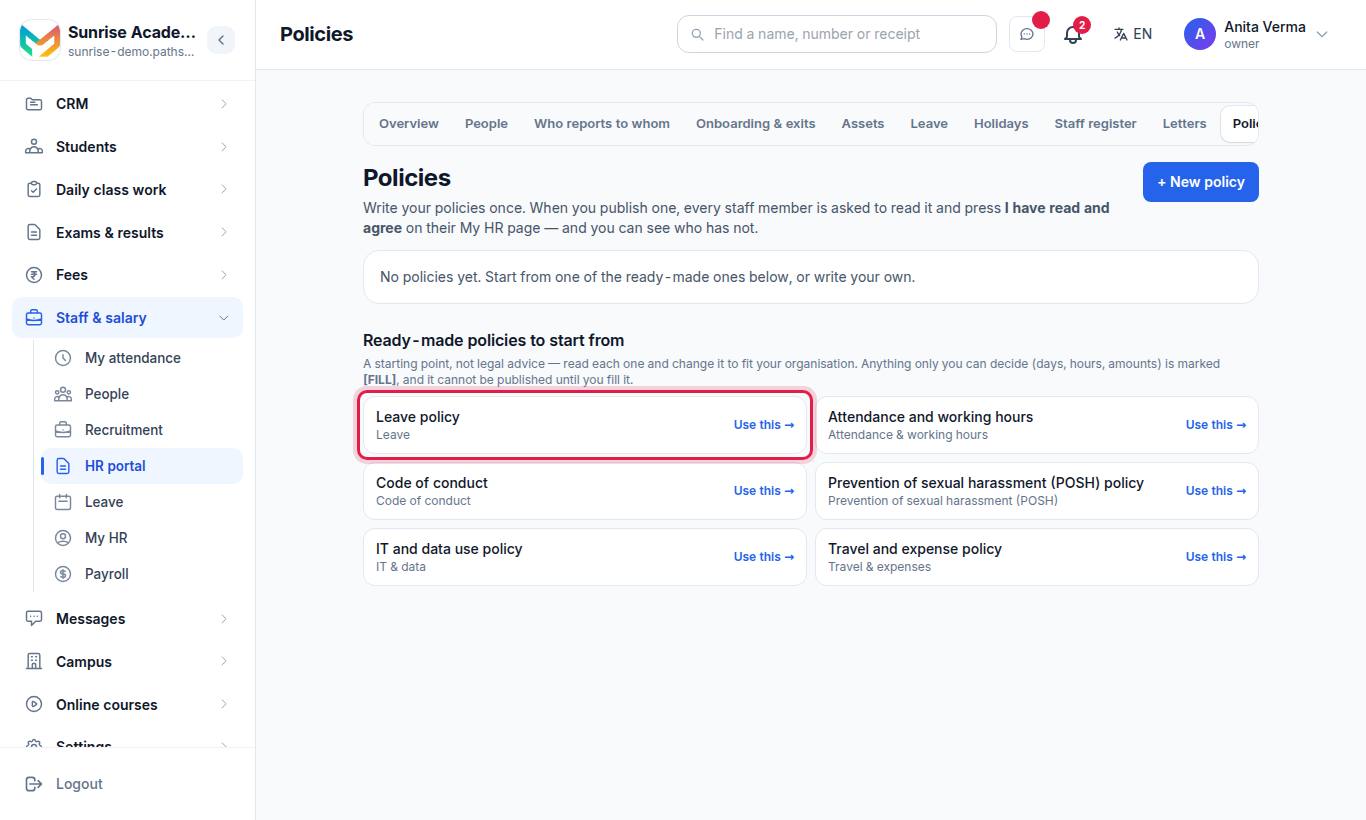
#Ready-made policies to start from
Leave policy · Attendance and working hours · Code of conduct · Prevention of sexual harassment (POSH) policy · IT and data use policy · Travel and expense policy.
Press Use this → beside one to open it in the editor.
#Steps to write and publish a policy
- Press + New policy, or Use this → on a ready-made one.
- Fill in Title, Kind and Takes effect from (optional).
- Write The policy — a blank line starts a new paragraph; start a line with
#for a heading,-for a point. - Optional (AI): under ✨ Draft with AI, write a few notes (for example 12 casual leave, 8 sick leave, apply 2 days before) and press Write the draft. The AI never puts in a number you did not give; those are left as
[FILL]. - Replace every
[FILL: …]. - Keep Ask every staff member to read it and press "I have read and agree" ticked.
- Press Save draft (later Save), or Publish and confirm. To change a published policy, edit it and press Publish changes as version 2 (and so on).
#Status of a policy
| Status | Meaning |
|---|---|
| Draft | Staff cannot see it until you publish it |
| Published, version n | Live; staff are asked to read this version |
| Retired | Staff are no longer asked to read it. Press Bring it back to restore. |
Press Retire to stop asking. Everything already agreed stays on record.
#What the employee sees
On My HR, a box From HR says "Please read each one and press 'I have read and agree'." Opening one shows the policy, its version and Takes effect from. They tick I have read this policy and I agree to follow it. and press I have read and agree. The screen then says "✓ You read and agreed to this version on (date)."
#Who can use it?
Owner, Admin and the HR job write and publish; every employee reads and agrees. Policies are MJX HR Pro; on Basic the screen shows a 🔒.
#Questions people ask
Are the ready-made policies legal advice?
No. They are a starting point. Read each one and change it to fit your organisation. Anything only you can decide is marked [FILL], and the policy cannot be published until you fill it.
What happens when I publish a new version?
Everybody is asked to read it again. What each person agreed to before stays on record, word for word.
Can I publish a policy without asking for acknowledgement?
Yes. Untick the acknowledgement box and it shows as "For reading only — nobody is asked to acknowledge it."
Which plan has policies?
MJX HR Pro.