
Staff attendance — check in on the phone, shifts, GPS and selfie
Run the staff register, let staff check in from their phone, count late marks, set shifts and overtime, office radius, selfies and corrections.
MJX Attendance keeps a daily staff register: the office can mark it, and — on MJX Attendance Basic and above — each person checks in and out from their own phone. In Pathshala, approved leave shows on the register by itself, and the month adds itself up.
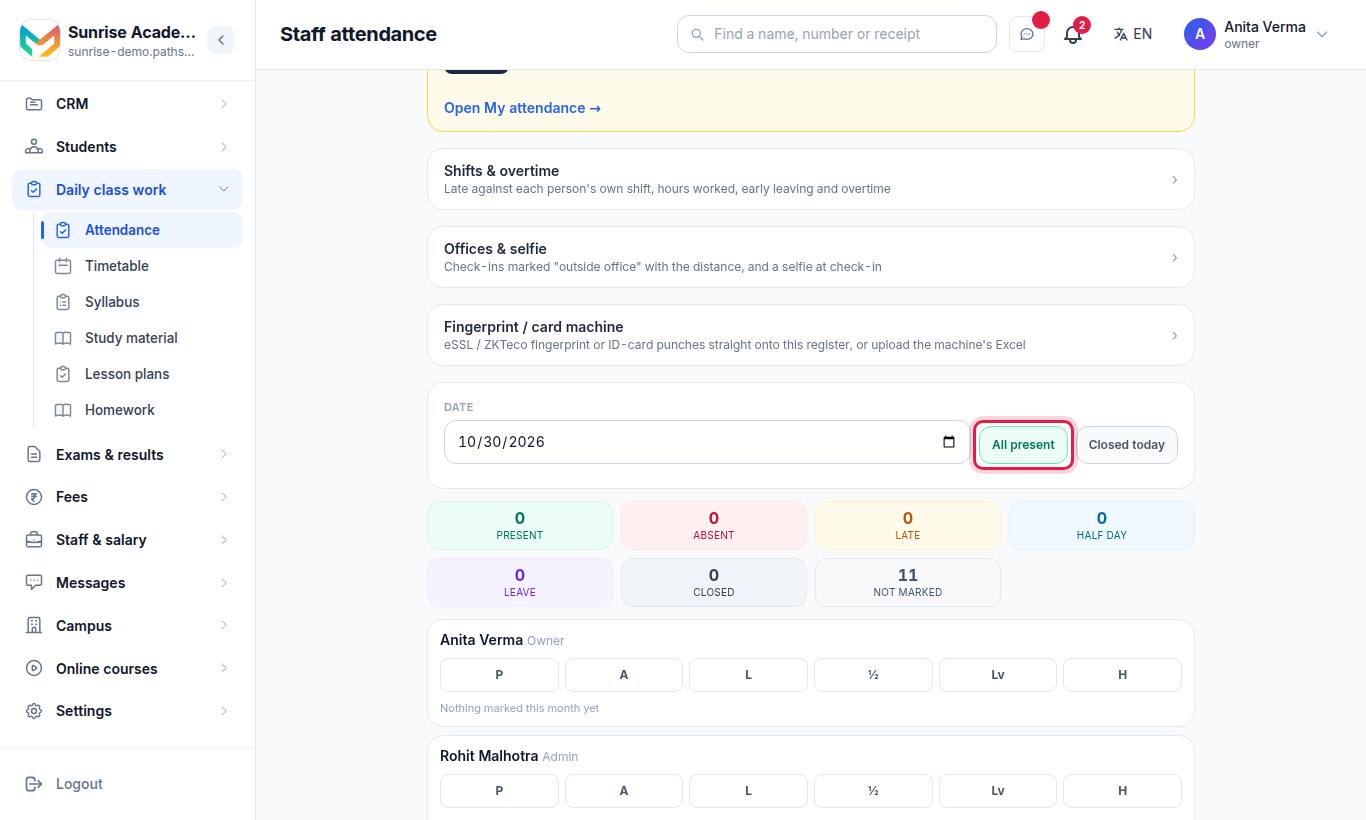
At a school or coaching centre, it is Attendance › Staff. In the HR portal it is Time › Staff register.
#How to mark the staff register (office)
- Pick the Date.
- Tap a status against each person: Present (P), Absent (A), Late (L), Half day (½), Leave (Lv) or Holiday (H).
- Or press All present (fills only the people not yet marked), or Closed today for a day the office is shut.
- Press Save.
| Button | What you get |
|---|---|
| Download | The month as an Excel/CSV file for your accountant |
| Punch log | Every punch of the month, in order: Date, Name, Time, In / out, Counted, How, Device, Outside the office, Distance (m), Selfie, Note |
Tap a person's punch list to see the day: each IN and OUT, where it came from (phone, machine, card), "outside" if it was, a 🤳 link to the selfie, and "Day = first IN …, last OUT …".
#How to switch on phone check-in
At the top of Staff attendance:
- Tick Staff check themselves in — "Let everybody here press Check in and Check out themselves. If you have already marked someone for the day, your mark stands."
- Optional: Late after (optional) — a check-in after this time is recorded as Late. Leave it empty and nobody is marked late.
- Optional: tick Tell me when people have not checked in and set Ask this many minutes after the shift starts (for example 45 with a 09:30 shift asks at 10:15).
- Press Save.
The "not checked in" message is one message a day for each shift — never one per person. It goes to the owner and admins, in the bell and on their phone, and each reporting manager is told about their own people only, in the MJX People app. People on approved leave, a weekly off day or a staff holiday are left out.
#How staff check in
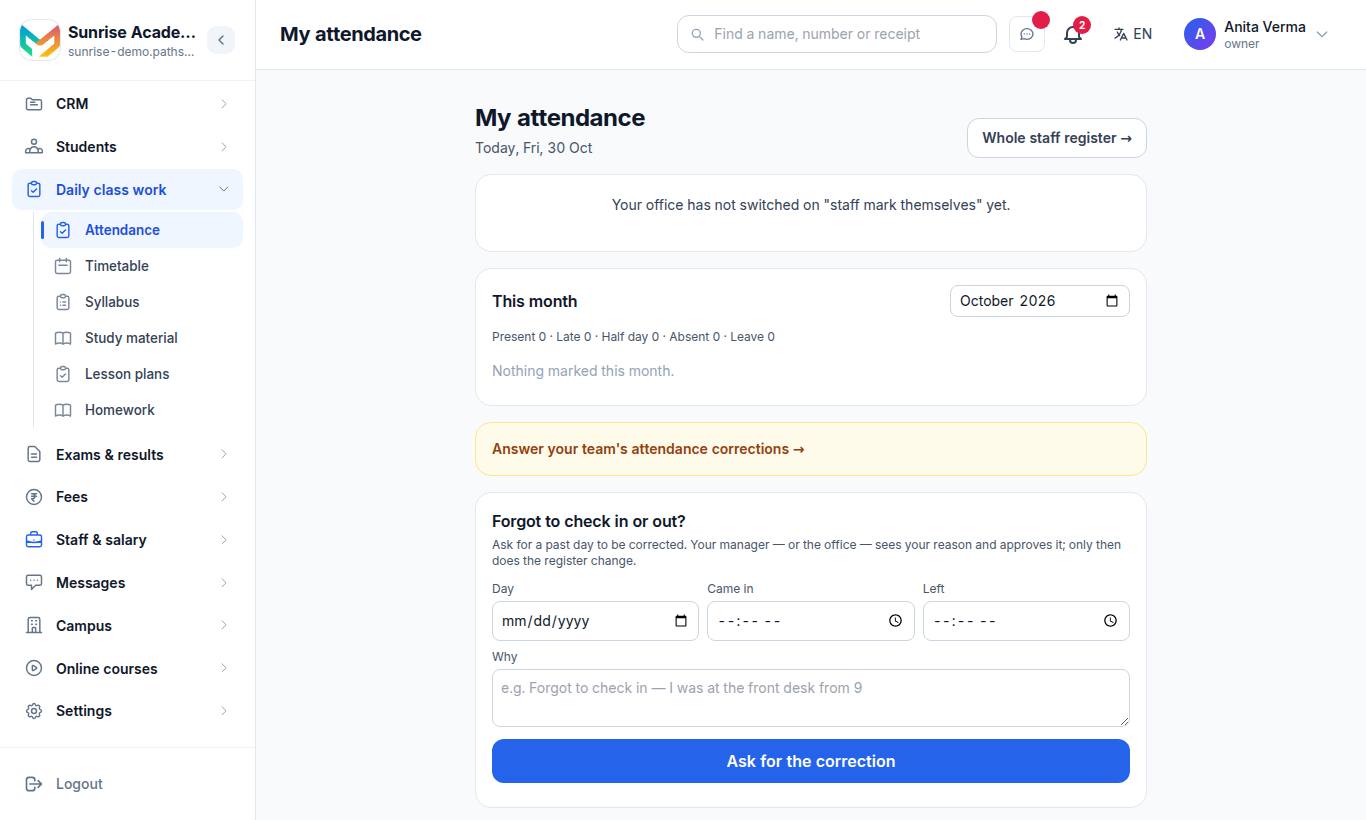
On the website, My attendance (/attendance/staff/me); on the phone, the MJX People app's Check in tab. They sign in with the same login.
- Press Check in on arrival. If the office asks for a selfie, the camera opens.
- Press Check out when leaving.
- Coming back later? Press Check in again.
The card shows "Your shift: …" and "After … counts as late." This month lists every day: Present, Late, Half day, Absent, Leave, Holiday — with "(marked by your office)" or "(corrected)" where that applies.
#Corrections: forgot to check in or out?
For the employee — on My attendance (or the app), under Forgot to check in or out?:
- Choose the Day (a past day, up to 31 days back).
- Type Came in, Left, or both. Leave a time empty if it was right.
- Type Why, for example Forgot to check in — I was at the front desk from 9.
- Press Ask for the correction (in the app: Send for approval).
For the manager or office:
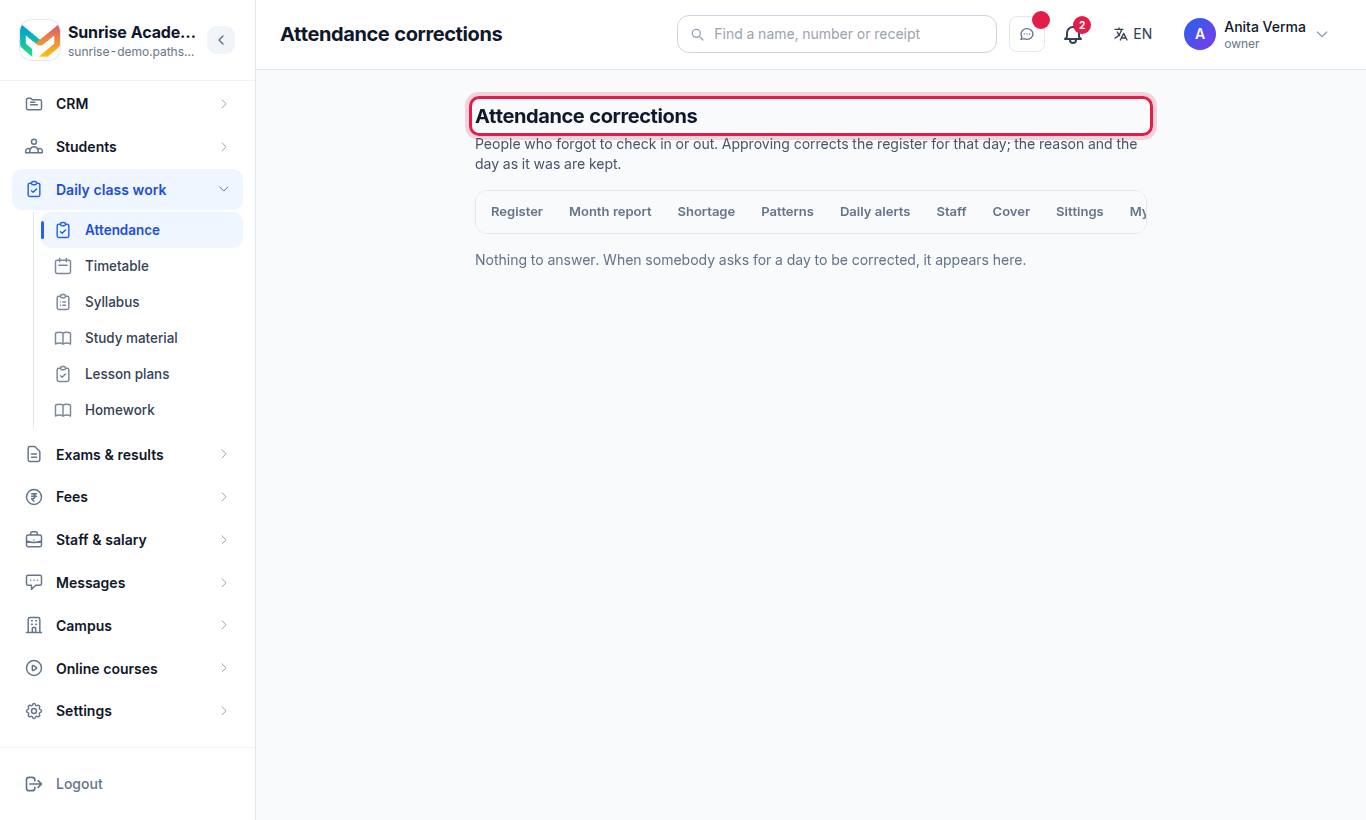
A reporting manager who is not the office gets there from My attendance, which says "… attendance corrections are waiting for your answer →".
- Read the request, which shows The register had: what was there before.
- Press Approve — the register changes for that day — or Not approved with a note (a note is needed).
The reason and the day as it was are kept. A person can withdraw a request that is still waiting.
#Shifts and overtime
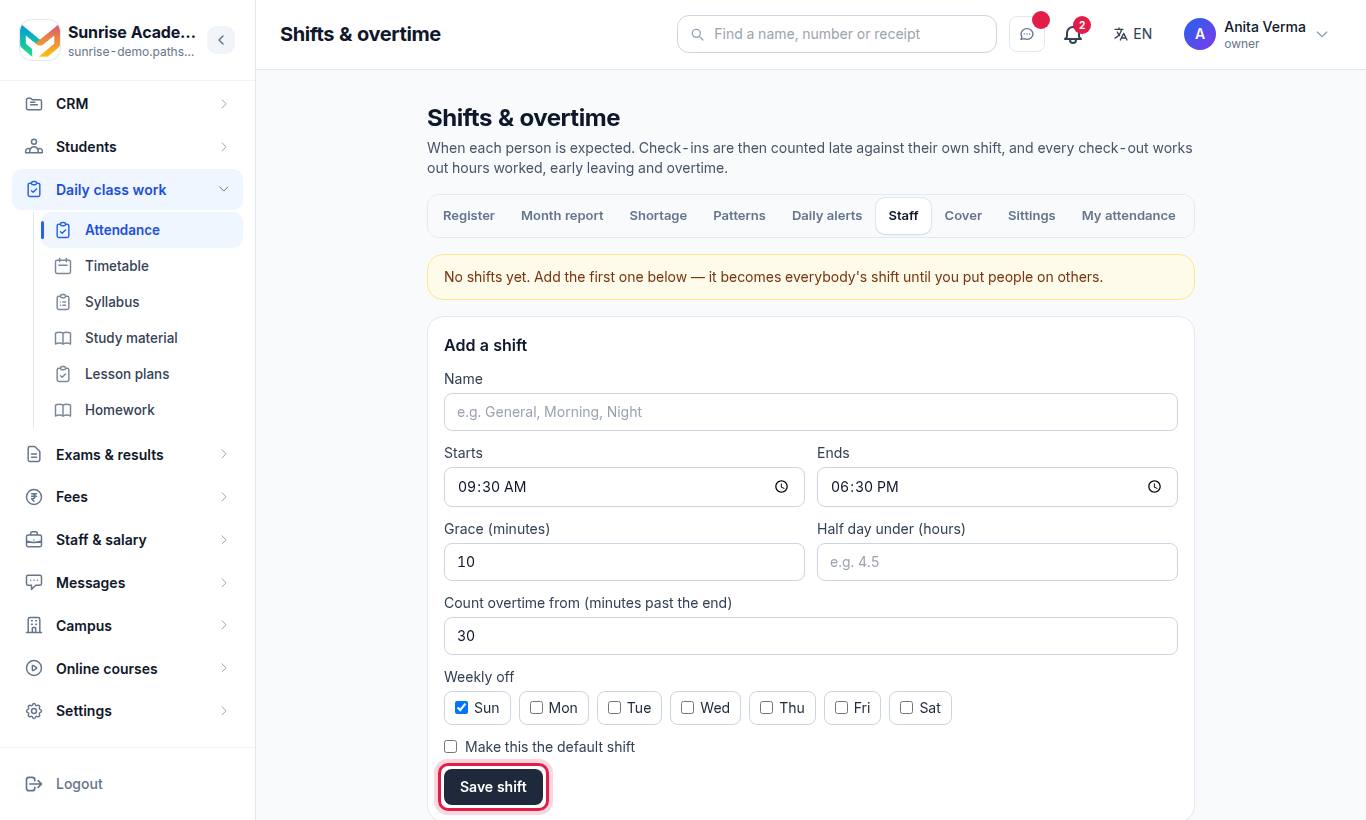
MJX Attendance Pro. When a person has a shift, late is counted against their own shift, and every check-out works out hours worked, early leaving and overtime.
- Under Add a shift, fill in Name (for example General, Morning, Night), Starts, Ends, Grace (minutes), Half day under (hours) (for example 4.5), Count overtime from (minutes past the end) and Weekly off days.
- Tick Make this the default shift for the first one.
- Press Save shift.
- Under Who works which shift, choose a shift for each person. Anybody left on "Default" works the default shift.
| Field | Limits |
|---|---|
| Grace | 0–240 minutes |
| Half day under | Hours between 0 and 24, or empty |
| Count overtime from | 0–600 minutes past the end |
To remove the default shift, make another shift the default first.
#Offices and selfie
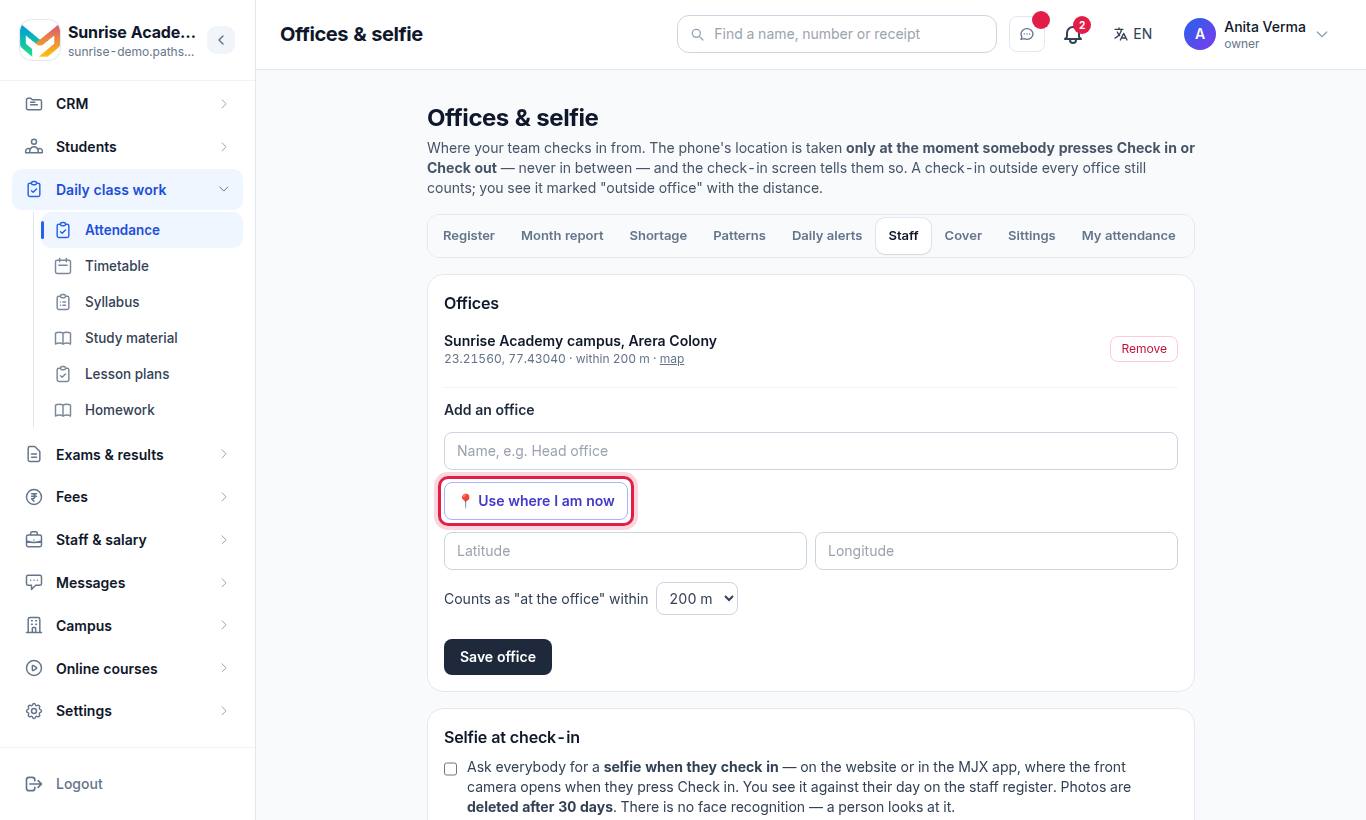
MJX Attendance Pro.
Add an office:
- Type a name, for example Head office.
- Press 📍 Use where I am now while you are there, or type the Latitude and Longitude.
- Choose Counts as "at the office" within: 50 m, 100 m, 200 m (default), 300 m, 500 m, 1 km or 2 km.
- Press Save office.
Until you add an office, check-ins record no location. A check-in outside every office still counts and is marked 📍 outside office with the distance.
Selfie at check-in: tick the switch. Everyone is asked for a selfie when they check in, on the website or in the app. You see it against their day on the staff register. Photos are deleted after 30 days. There is no face recognition.
#Loss of pay from the register
With MJX Payroll and MJX Attendance Pro, Payroll can Cut pay for days the attendance register says absent (a half day costs half), and optionally every few late marks costs half a day's pay. A day nobody marked is never counted, nor a day inside approved leave. This is set in Payroll — see Payroll.
#Screens for schools only
At a school or coaching centre, Attendance also has Cover (who is standing in for a class teacher, and until when), Shortage (students below the line, usually 75%) and Patterns (students whose attendance has changed). A Business does not see these — they are about students and classes.
#Who can use what?
| Screen | Who | Plan |
|---|---|---|
| Staff attendance (register, Punch log) | Owner, Admin (or anyone allowed to view staff attendance) | Every MJX Attendance plan |
| Staff check themselves in, My attendance, Corrections, the month Download | Everybody (their own); office and managers answer corrections | MJX Attendance Basic |
| Shifts & overtime | Owner, Admin, HR job | MJX Attendance Pro |
| Offices & selfie | Owner, Admin | MJX Attendance Pro |
| Check-in photos | Owner, Admin | MJX Attendance Pro |
A screen your plan does not include shows a 🔒 and opens the upgrade page.
#Common messages
| Message | Meaning |
|---|---|
| Your office has not switched on "staff mark themselves" yet. | The office has not ticked Staff check themselves in |
| Checking in on the phone comes with MJX Attendance Basic and above — ask your office to upgrade. | The organisation is on Forever Free |
| Your office has already marked you … today. | The office's mark stands for that day |
| You are checked in since … — press Check out when you leave. | Already checked in |
| Your office asks for a selfie at check-in — take one to check in. | Allow the camera and take the photo |
| A correction can be asked for up to 31 days back. | Speak to your office for older days |
#Questions people ask
Is the location tracked all day?
No. The phone's location is taken only at the moment somebody presses Check in or Check out — never in between — and the check-in screen tells them so.
Does a check-in outside the office count?
Yes. It still counts, and the office sees it marked "outside office" with the distance.
Is there face recognition?
No. The selfie is a photo shown to the office against the day and deleted after 30 days.
Can someone check in twice in a day?
Yes. Back again? Check in again — the first check-in stays, and the last check-out counts.
What if someone forgot to check out?
They ask for a correction for a past day, up to 31 days back. Their manager or the office approves it, and only then does the register change.
Which plan do I need for phone check-in?
MJX Attendance Basic. Shifts, office radius, selfies, machines and loss of pay are MJX Attendance Pro.