
The candidate's page — track an application
What job applicants see in MJX Hire: sign in with a code, track each application, join interviews, upload documents, verify with DigiLocker and sign the offer.
Every applicant in MJX Hire gets their own page where they follow their application, see interview times, send documents and sign their offer. There is no password — they sign in with a one-time code. Share this page with candidates so they stop calling to ask "what is my status?".
#How a candidate signs in
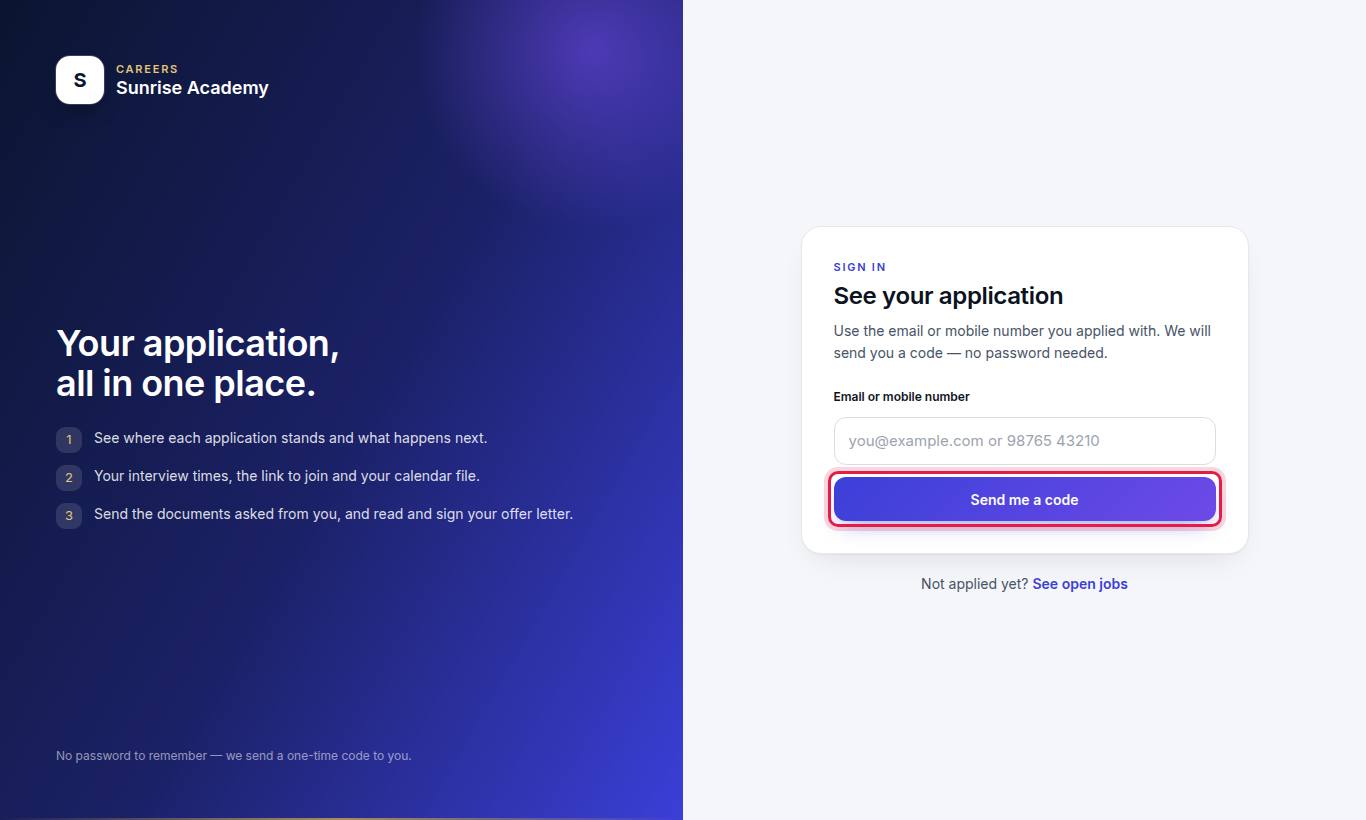
- Open the careers page and press Candidate sign-in or Track my application — or use the link in the "Thank you — your application is in." message.
- Type the Email or mobile number they applied with and press Send me a code.
- Type The 6-digit code and press Sign in.
Codes work for 10 minutes. After too many tries, they see "Too many tries from here. Please wait 15 minutes."
#What the candidate sees
The page greets them ("Hello, …") and counts their applications, interviews, documents to send and offers.
#Your applications
Each application shows the job, the date, and a progress line from Applied through Interview to Joined. They can press Withdraw this application; the team is told and it cannot be undone.
#Your interviews
The date and time (India time), length, and:
- 📍 the place for an in-person round,
- 📞 "The team will call you." for a phone round,
- Join the call for an online round,
- Add to my calendar for a calendar file.
#Video interview
If you sent an AI video interview, it shows the number of questions, the time per answer, and the last day. The candidate reads a notice first, agrees, checks their camera and microphone, and answers each question on camera. They can press I would rather talk to a person instead — it does not count against them. See AI video interview.
#Documents asked from you
PDF or a clear photo, up to 5 MB each. They are kept encrypted and only the team hiring the candidate can open them. If a file was sent back, they see "What needs fixing: …" and upload again.
For PAN, Aadhaar, photo ID and address proof they can press Verify with DigiLocker instead and sign in with their own DigiLocker. The government sends the signed card straight across.
#Your offer
When an offer is released and their stage is Offer, they see "Your offer letter is ready. Please read it and accept it with your signature by (date)." and press Read and sign.
#How a candidate signs the offer
- Read The letter. Press Make the letter bigger to zoom.
- Under Accept and sign, type Your full name.
- Sign here with a finger or mouse (Clear to redo).
- Tick I have read this offer letter and I accept it.
- Press Send me a code — a 6-digit code goes by email or WhatsApp — type it, and press Accept and sign.
They can also press Decline this offer and give a reason (optional).
| What they see | When |
|---|---|
| To sign | The offer is waiting for them. |
| Accepted | "You accepted and signed this offer on (date) as "(name)"." |
| Declined | "You declined this offer." |
| On hold | "This offer is on hold for now. (Organisation) will be in touch with you — there is nothing you need to do." |
| Lapsed | "This offer was open until (date) and has lapsed. Please contact the team if you still want it." |
#Who can use this?
Anyone who applied to your organisation through MJX Hire, on every plan. Interviews, documents and offers appear only when your plan includes them (Basic or Pro). The candidate's page never shows your billing.
#Questions people ask
Do candidates need a password?
No. They sign in with the email or mobile number they applied with, and get a one-time 6-digit code.
Can a candidate withdraw an application?
Yes. On their page they press Withdraw this application. The team is told, and it cannot be undone.
Are uploaded documents safe?
They are kept encrypted, and only the team hiring the candidate can open them.
Why can a candidate not see the offer letter?
An offer shows on the candidate's page only while their stage is Offer, and not while it is on hold or after it was withdrawn.
Can a candidate download the offer letter?
No. It is shown on the page to read, with their name printed across every page. It is not given as a file to download.