
Course completion certificates with your signature and seal
Give learners a certificate when they finish a course in MJX Learn — choose a design, colour and wording, and add your signature and seal.
A course in MJX Learn can give a completion certificate: a PDF with the learner's name, your institute's name and the course, that the learner downloads once they have finished every topic. You choose the design per course and add your signature and seal once.
#How to turn on a certificate for a course
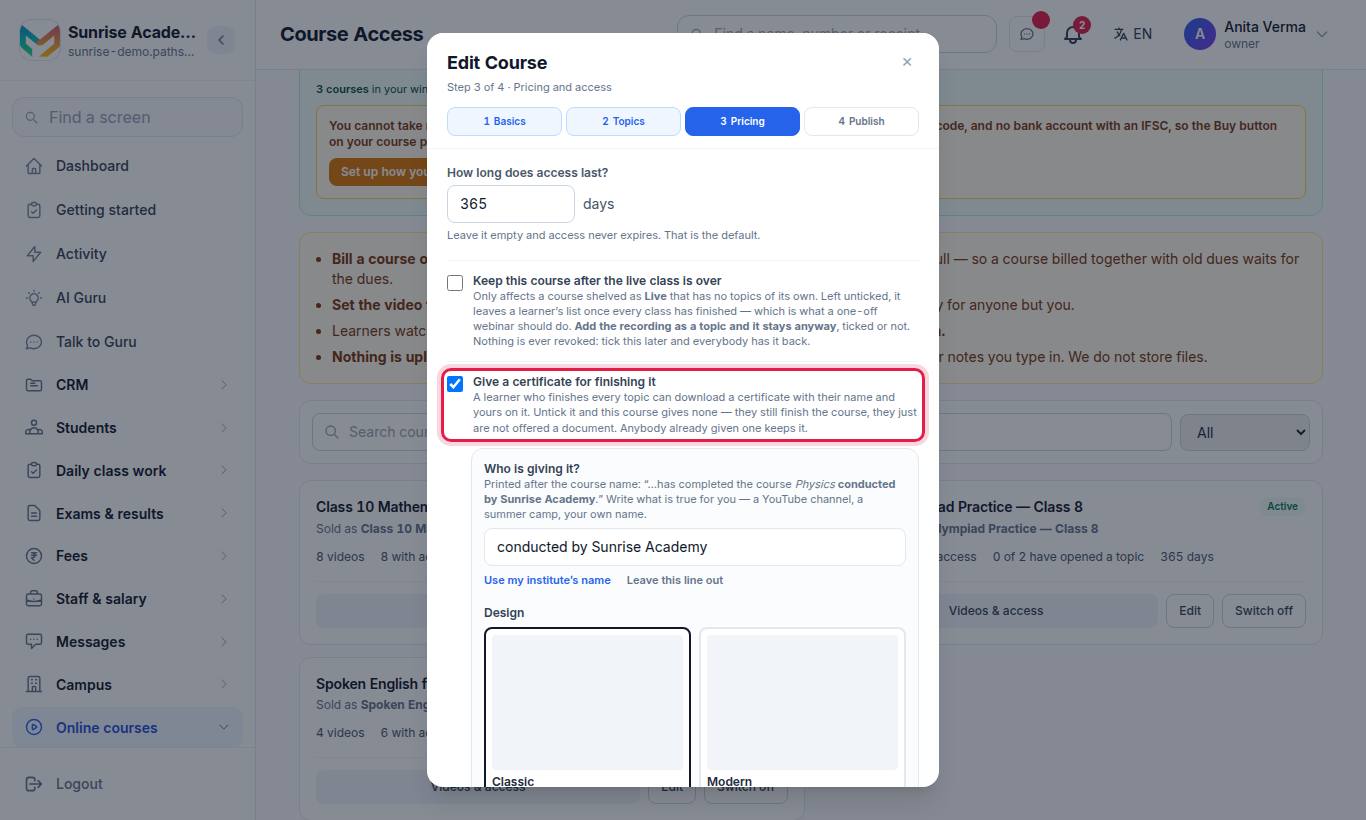
It is ticked by default. With it ticked, the design panel opens:
| Setting | Options |
|---|---|
| Who is giving it? | Printed after the course name ("…has completed the course Physics conducted by …"). Press Use my institute's name or Leave this line out, or type your own. |
| Design | Classic (double border, serif lettering), Modern (a colour band and bold type), Elegant (framed card with a gold line), Minimal (white, one line of colour). |
| Page | Landscape or Portrait. |
| Colour | Auto (the design's own), Brand (your brand colour) or a set colour. Any colour needs Full Branding. |
| Your own wording | Title and sentence — with MJX Full Branding. You can use {course} {date} {institute} {topics}. |
Press See a sample certificate to open a PDF marked SAMPLE with your choices, saved or not. Then save the course.
In the app: open a course › Publish & price › Certificate. Signature and seal are in the app under Settings.
#How to add your signature and seal
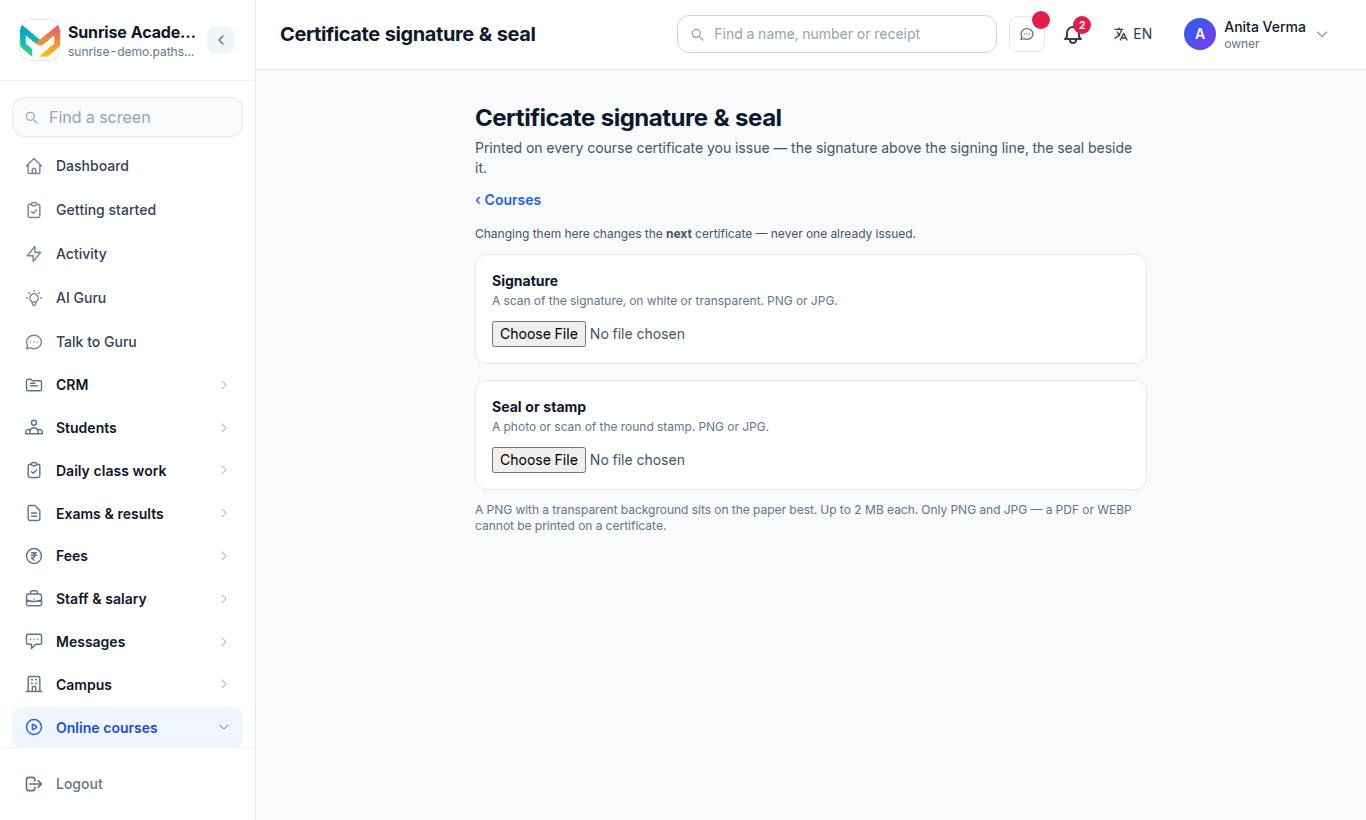
The page is Certificate signature & seal. "Changing them here changes the next — never one already issued."
- Signature — a scan of the signature, on white or transparent.
- Seal or stamp — a photo or scan of the round stamp.
- Upload each (PNG or JPG, up to 2 MB). A PNG with a transparent background sits on the paper best. A PDF or WEBP cannot be printed on a certificate.
- Use Remove to take one off.
#How learners get it
- Web: on the course page once every topic is finished. If they open it too early: "There is no certificate for this course yet. Finish every topic — watch each video right through — and it will appear on the course page."
- App: Profile › Certificates › Get certificate. Before then: "Finish a course to earn its certificate."
#School certificates are separate
Pathshala's Certificates page (bonafide, transfer and similar school certificates) belongs to MJX Academic, not MJX Learn.
#Who can use this?
| Who | Can |
|---|---|
| Owner, Admin | Course certificate settings, Signature & seal. |
| Learners | Download their own certificate. |
| Plan | Signature & seal is part of "Live classes, mock tests and certificates" — Basic and up. Any colour and your own wording: MJX Full Branding. |
#Questions people ask
When does a learner get a certificate?
When they finish every topic of a course that gives one — watching each video right through. It then appears on their course page and in the app's Profile under Certificates.
Can I switch certificates off for a course?
Yes. Untick "Give a certificate for finishing it" on the course. Learners still finish the course; they are just not offered a document. Anybody already given one keeps it.
Does changing my signature change old certificates?
No. A new signature or seal prints on the next certificate you issue — never on one already issued.
Can I remove "Pathshala by MJX" from the certificate?
Yes, with MJX Full Branding. It also lets you use any colour, your own title and your own sentence.
Do buyers see the certificate before buying?
Yes. The sale page shows "Finish it and get a certificate with your name on it" with a sample.